# WPF GanttView Overview
Telerik **RadGanttView** is a control used for managing and visualization project planning data in a MVVM friendly way.
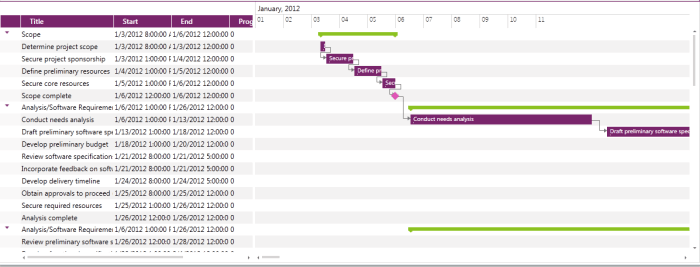
**Key features** list includes:
* **Support for various project data** - visualize different item types like Regular Tasks, Project Milestones, Summaries and the Relations between them, check [here](https://www.telerik.com/products/wpf/documentation/controls/radganttview/features/items/types) for more details.
* **Highlight critical items** - highlight different types of important items like late or critical tasks.[Read more](https://www.telerik.com/products/wpf/documentation/controls/radganttview/features/items/highlighting).
* **Built with performance in mind** - the control is taking advantage of Data and UI virtualization to achieve fast scrolling and navigation through thousands of items.
* **MVVM Support** - the control uses MVVM-friendly API to better facilitate the separation of the View layer. The control can be easily bound to a datasource via a single property.
* **Import MS Project Data** - import your MS project data into the **GanttView** control and visualize it in a user-friendly way.
* **Silverlight/WPF Code Compatibility** - the WPF GanttView shares a single codebase with its Silverlight counterpart. This means that you can achieve close to 100% code reuse for your GanttView logic if you have parallel Silverlight/WPF development.
You can check **RadGanttView** demos at
## Telerik UI for WPF Support and Learning Resources
* [Telerik UI for WPF GanttView Homepage](https://www.telerik.com/products/wpf/ganttview.aspx)
* [Get Started with the Telerik UI for WPF GanttView](https://www.telerik.com/products/wpf/documentation/controls/radganttview/getting-started)
* [Telerik UI for WPF API Reference](https://docs.telerik.com/devtools/wpf/api/)
* [Getting Started with Telerik UI for WPF Components](https://www.telerik.com/products/wpf/documentation/getting-started/first-steps-nuget)
* [Telerik UI for WPF Virtual Classroom (Training Courses for Registered Users)](https://learn.telerik.com/learn/course/external/view/elearning/16/telerik-ui-for-wpf)
* [Telerik UI for WPF GanttView Forums](https://www.telerik.com/forums/wpf)
* [Telerik UI for WPF Knowledge Base](https://docs.telerik.com/devtools/wpf/knowledge-base)