# WPF ExpressionEditor Overview
Thank you for choosing **RadExpressionEditor**!
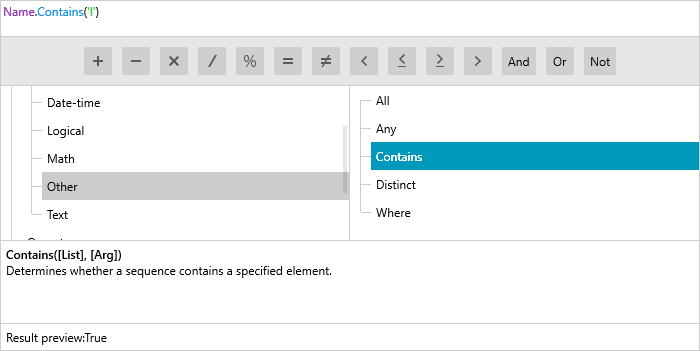
**RadExpressionEditor** allows your users to build powerful LINQ expressions using a simple Domain Specific Language, reminiscent of formulas in many popular spreadsheet applications.
## Key Features
* **Easy to Use Interface**: The user-friendly interface of the control makes it easy to generate the desired expression with just a few clicks and key strokes.
* **Syntax Highlighting**: The RadExpressionEditor also supports highlighting for the fields, functions and literals as can be observed in the image above.
* **Error Reporting**: Whenever an invalid expression is entered, this is immediately highlighted by a curly underline.
* **Rich Set of Built-In Functions**: The RadExpressionEditor provides a variety of functions to choose from such as mathematical and logical operations, functions for working with text and many more.
* **Reusable Expressions**: The resulting expressions can be used in any API that works with LINQ expressions.
> tip Get started with the control with its [Getting Started](https://www.telerik.com/products/wpf/documentation/controls/radexpressioneditor/getting-started) help article that shows how to use it in a basic scenario.
> Check out our online demos at .
## Telerik UI for WPF Support and Learning Resources
* [Telerik UI for WPF ExpressionEditor Homepage](https://www.telerik.com/products/wpf/expressioneditor.aspx)
* [Get Started with the Telerik UI for WPF ExpressionEditor](https://www.telerik.com/products/wpf/documentation/controls/radexpressioneditor/getting-started)
* [Telerik UI for WPF API Reference](https://docs.telerik.com/devtools/wpf/api/)
* [Getting Started with Telerik UI for WPF Components](https://www.telerik.com/products/wpf/documentation/getting-started/first-steps-nuget)
* [Telerik UI for WPF Virtual Classroom (Training Courses for Registered Users)](https://learn.telerik.com/learn/course/external/view/elearning/16/telerik-ui-for-wpf)
* [Telerik UI for WPF ExpressionEditor Forums](https://www.telerik.com/forums/wpf)
* [Telerik UI for WPF Knowledge Base](https://docs.telerik.com/devtools/wpf/knowledge-base)
## See Also
* [Visual Structure](https://www.telerik.com/products/wpf/documentation/controls/radexpressioneditor/visualstructure)
* [Expressions](https://www.telerik.com/products/wpf/documentation/controls/radexpressioneditor/expressions/overview)