# Styling the RadPane
The **RadPane** can be styled by creating an appropriate **Style** and setting it to the **Style** property of the control or by creating an implicit style.
## Targeting the RadPane Element
In order to style all **RadPane** elements in a RadDocking, you should create a style targeting **RadPane**.
**Example 1: Creating an implicit style targeting RadPane**
```XAML
```
> caption RadPane with red background in the Office2016 theme
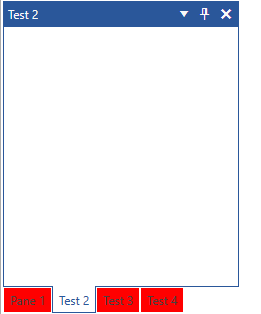
> important You will notice that in **Figure 1** all RadPanes are red except the selected one. Inside the ControlTemplate of the RadPane there are triggers/visual states which set the Background when a pane becomes selected and that value takes precedence over the value from the implicit style. In order to change this behavior, you can extract and modify the RadPane ControlTemplate for the theme(s) that you are using. For more information on how to do that read, the [Editing Control Templates](https://www.telerik.com/products/wpf/documentation/styling-and-appearance/styling-apperance-editing-control-templates) article.
## See Also
* [RadPane](https://www.telerik.com/products/wpf/documentation/controls/raddocking/features/panes/radpane)
* [Docked/Floating Panes](https://www.telerik.com/products/wpf/documentation/controls/raddocking/features/panes/docked-floating-panes)
* [Pinned/Unpinned Panes](https://www.telerik.com/products/wpf/documentation/controls/raddocking/features/panes/pinned-unpinned-panes)
* [Styling the RadDocumentPane](https://www.telerik.com/products/wpf/documentation/controls/raddocking/styles-and-templates/styling-the-raddocumentpane)
* [Styling the RadPaneGroup](https://www.telerik.com/products/wpf/documentation/controls/raddocking/styles-and-templates/styling-the-radpanegroup)