# Styling the Compass
The compasses that you see, when rearranging the containers in the **RadDocking** control, are represented by the **Compass** and **RootCompass** controls. The one shown inside the container under the mouse is the [Compass](https://www.telerik.com/products/wpf/documentation/controls/raddocking/features/compass#compass) control.
## Targeting the Compass Element
In order to style all **Compass** elements in a RadDocking, you should create a style targeting **Compass** and set it to the **CompassStyle** property of the RadDocking.
**Example 1: Setting the CompassStyle property**
```XAML
```
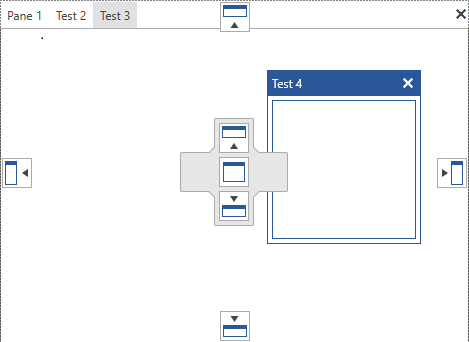
> caption Compass without left and right indicator in the Office2016 theme
> tip In order to learn how to further modify the control by extracting its ControlTemplate, read the [Editing Control Templates](https://www.telerik.com/products/wpf/documentation/styling-and-appearance/styling-apperance-editing-control-templates) article.
## See Also
* [Compass](https://www.telerik.com/products/wpf/documentation/controls/raddocking/features/compass)
* [Drag and Drop](https://www.telerik.com/products/wpf/documentation/controls/raddocking/features/drag-and-drop)
* [Styling the RootCompass](https://www.telerik.com/products/wpf/documentation/controls/raddocking/styles-and-templates/styling-the-root-compass)
* [Styling the Visual Cue](https://www.telerik.com/products/wpf/documentation/controls/raddocking/styles-and-templates/styling-the-visual-cue)