# How to Implement Conditional Docking
There are cases, in which you want to **disable** the user's ability to **dock** panes to any of the sides. In this case you need to implement conditional docking.
You could use the **PreviewShowCompass** event of the **RadDocking** control in combination with the **Is<\*>IndicatorVisible** series of properties of the **Compass** class. Where <\*> could be one of the following:
* **Left**
* **Top**
* **Right**
* **Bottom**
* **Center**
For the purpose of this tutorial, the following **RadDocking** declaration will be used:
```XAML
```
When you try to drag and dock the "Pane 2", then all [compass indicators](https://www.telerik.com/products/wpf/documentation/controls/raddocking/features/compass) are available.

In order to implement conditional docking, you need to perform the following instructions.
Attach to the **PreviewShowCompass** event of the **RadDocking** control.
```XAML
```
Switch to the code-behind. The **PreviewShowCompassEventArgs** exposes a **Compass** property. You need to use the **Is<\*>IndicatorVisible** series of properties of the **Compass** class in order to disable any of the compass indicators.
* **IsLeftIndicatorVisible** - If you want to disable the left compass indicator, then set the **IsLeftIndicatorVisible** property of the passed event arguments to **False**.
```C#
private void radDocking_PreviewShowCompass(object sender, Telerik.Windows.Controls.Docking.PreviewShowCompassEventArgs e)
{
e.Compass.IsLeftIndicatorVisible = false;
}
```
```VB.NET
Private Sub radDocking_PreviewShowCompass(sender As Object, e As Telerik.Windows.Controls.Docking.PreviewShowCompassEventArgs)
e.Compass.IsLeftIndicatorVisible = False
End Sub
```
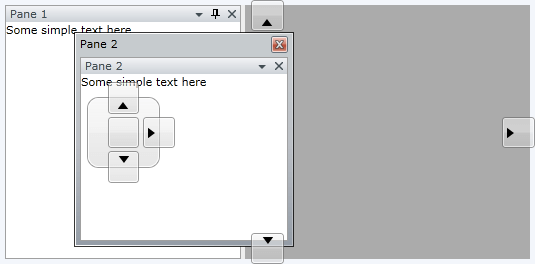
* **IsTopIndicatorVisible** - If you want to disable the top compass indicator, then set the **IsTopIndicatorVisible** property of the passed event arguments to **False**.
```C#
private void radDocking_PreviewShowCompass1(object sender, Telerik.Windows.Controls.Docking.PreviewShowCompassEventArgs e)
{
e.Compass.IsLeftIndicatorVisible = false;
e.Compass.IsTopIndicatorVisible = false;
}
```
```VB.NET
Private Sub radDocking_PreviewShowCompass(ByVal sender As Object, ByVal e As Telerik.Windows.Controls.Docking.PreviewShowCompassEventArgs)
e.Compass.IsLeftIndicatorVisible = False
e.Compass.IsTopIndicatorVisible = False
End Sub
```
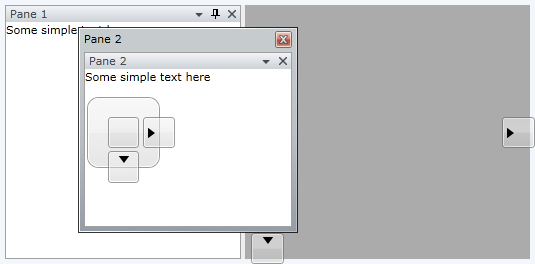
* **IsRightIndicatorVisible** - If you want to disable the right compass indicator, then set the **IsRightIndicatorVisible** property of the passed event arguments to **False**.
```C#
private void radDocking_PreviewShowCompass2(object sender, Telerik.Windows.Controls.Docking.PreviewShowCompassEventArgs e)
{
e.Compass.IsLeftIndicatorVisible = false;
e.Compass.IsTopIndicatorVisible = false;
e.Compass.IsRightIndicatorVisible = false;
}
```
```VB.NET
Private Sub radDocking_PreviewShowCompass(ByVal sender As Object, ByVal e As Telerik.Windows.Controls.Docking.PreviewShowCompassEventArgs)
e.Compass.IsLeftIndicatorVisible = False
e.Compass.IsTopIndicatorVisible = False
e.Compass.IsRightIndicatorVisible = False
End Sub
```
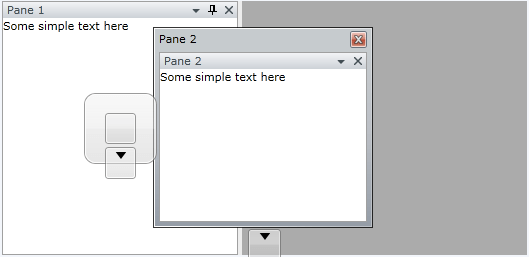
* **IsBottomIndicatorVisible** - If you want to disable the bottom compass indicator, then set the **IsBottomIndicatorVisible** property of the passed event arguments to **False**.
```C#
private void radDocking_PreviewShowCompass3(object sender, Telerik.Windows.Controls.Docking.PreviewShowCompassEventArgs e)
{
e.Compass.IsLeftIndicatorVisible = false;
e.Compass.IsTopIndicatorVisible = false;
e.Compass.IsRightIndicatorVisible = false;
e.Compass.IsBottomIndicatorVisible = false;
}
```
```VB.NET
Private Sub radDocking_PreviewShowCompass(ByVal sender As Object, ByVal e As Telerik.Windows.Controls.Docking.PreviewShowCompassEventArgs)
e.Compass.IsLeftIndicatorVisible = False
e.Compass.IsTopIndicatorVisible = False
e.Compass.IsRightIndicatorVisible = False
e.Compass.IsBottomIndicatorVisible = False
End Sub
```
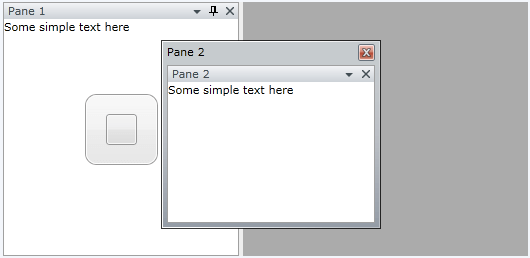
* **IsCenterIndicatorVisible** - If you want to disable the center compass indicator, then set the **IsCenterIndicatorVisible** property of the passed event arguments to **False**.
```C#
private void radDocking_PreviewShowCompass4(object sender, Telerik.Windows.Controls.Docking.PreviewShowCompassEventArgs e)
{
e.Compass.IsLeftIndicatorVisible = false;
e.Compass.IsTopIndicatorVisible = false;
e.Compass.IsRightIndicatorVisible = false;
e.Compass.IsBottomIndicatorVisible = false;
e.Compass.IsCenterIndicatorVisible = false;
}
```
```VB.NET
Private Sub radDocking_PreviewShowCompass(ByVal sender As Object, ByVal e As Telerik.Windows.Controls.Docking.PreviewShowCompassEventArgs)
e.Compass.IsLeftIndicatorVisible = False
e.Compass.IsTopIndicatorVisible = False
e.Compass.IsRightIndicatorVisible = False
e.Compass.IsBottomIndicatorVisible = False
e.Compass.IsCenterIndicatorVisible = False
End Sub
```
In the last case, all compass indicators are disabled.
> tip There is an alternative approach to disable the docking. You need to set the initial position of the [RadSplitContainer](https://www.telerik.com/products/wpf/documentation/controls/raddocking/styles-and-templates/styling-the-radsplitcontainer) to **FloatingOnly**.
## See Also
* [Compass](https://www.telerik.com/products/wpf/documentation/controls/raddocking/features/compass)
* [Drag and Drop](https://www.telerik.com/products/wpf/documentation/controls/raddocking/features/drag-and-drop)
* [How to Freeze the Layout](https://www.telerik.com/products/wpf/documentation/controls/raddocking/how-to/freeze-the-layout)