# How to Customize or Remove RadPane's Menu
The purpose of this tutorial is to show you how to customize **RadPane's** menu.
> tip For more information about the **RadPane** structure, read [here](https://www.telerik.com/products/wpf/documentation/controls/raddocking/features/panes/radpane). If you want to learn more about **RadPane's** menu, read [this one](https://www.telerik.com/products/wpf/documentation/controls/raddocking/features/panes/panes-menu).
## Customizing RadPane's Menu
To add custom commands to **RadPane's** menu, you should perform the following steps:
1. You can create a custom class CustomRadDockingCommands. Inside, you can create a singleton property of type **Telerik.Windows.Controls.RoutedUICommand**. **Example 1** demonstrates how you can do that.
**Example 1: Create Singleton command property**
```C#
public class CustomRadDockingCommands
{
private static RoutedUICommand closeAllPanesButThisCommand;
public static RoutedUICommand CloseAllPanesButThisCommand
{
get
{
if (closeAllPanesButThisCommand == null)
{
closeAllPanesButThisCommand = new RoutedUICommand("Close all panes but this!", "CloseAllPanesButThisCommand", typeof(RadDockingCommands));
}
return closeAllPanesButThisCommand;
}
}
}
```
2. Create a custom **DataTemplate** by using the Telerik's **RadContextMenu** and **RadMenuItem** controls. You can use either the built-in **RadDockingCommands** or create a custom one - both approaches are demonstrated in this topic. Set the created **DataTemplate** to **RadPane**'s **ContextMenuTemplate** property. **Example 2** show how to set **RadPane**'s **ContextMenuTemplate** property.
**Example 2: Custom DataTemplate for the ContextMenuTemplate property**
```XAML
```
3. You should implement your custom logic in the **OnCloseAllPanesButThis** and **OnCloseAllPanesButThisCanExecute** methods. They specify whether the command can be executed and what action is performed, when it is executed. **Example 3** demonstrates sample logic for the command methods.
**Example 3: Implement Execute and CanExecute methods**
```C#
public class CustomRadDockingCommands
{
private static RoutedUICommand closeAllPanesButThisCommand;
public static RoutedUICommand CloseAllPanesButThisCommand
{
get
{
if (closeAllPanesButThisCommand == null)
{
closeAllPanesButThisCommand = new RoutedUICommand("Close all panes but this!", "CloseAllPanesButThisCommand", typeof(RadDockingCommands));
}
return closeAllPanesButThisCommand;
}
}
public static void OnCloseAllPanesButThis(object sender, ExecutedRoutedEventArgs e)
{
RadPane pane = e.Parameter as RadPane;
if (pane != null)
{
RadPaneGroup paneGroup = pane.PaneGroup;
if (paneGroup != null)
{
System.Collections.Generic.IEnumerable panesToClose = paneGroup.EnumeratePanes().Where(x => !x.IsHidden && x.IsPinned);
foreach (RadPane paneToClose in panesToClose)
{
if (paneToClose != pane)
{
paneToClose.IsHidden = true;
}
}
}
}
}
public static void OnCloseAllPanesButThisCanExecute(object sender, CanExecuteRoutedEventArgs e)
{
e.CanExecute = false;
RadPaneGroup paneGroup = sender as RadPaneGroup;
if (paneGroup != null)
{
int childrenCount = paneGroup.EnumeratePanes().Count(x => !x.IsHidden && x.IsPinned);
if (childrenCount > 1)
{
e.CanExecute = true;
}
else
{
e.CanExecute = false;
}
}
}
}
```
4. Your menu command is ready and you have a custom **DataTemplate**, which is set to the **ContextMenuTemplate** property. The next step is to register your custom command by using the **Telerik.Windows.Controls.CommandManager** class in the **CustomRadDockingCommands** constructor. **Example 4** shows the final structure of the **CustomRadDockingCommands** class.
**Example 4: Register CloseAllPanesButThisCommand custom command**
```C#
public class CustomRadDockingCommands
{
private static RoutedUICommand closeAllPanesButThisCommand;
public static RoutedUICommand CloseAllPanesButThisCommand
{
get
{
if (closeAllPanesButThisCommand == null)
{
closeAllPanesButThisCommand = new RoutedUICommand("Close all panes but this!", "CloseAllPanesButThisCommand", typeof(RadDockingCommands));
}
return closeAllPanesButThisCommand;
}
}
static CustomRadDockingCommands()
{
CommandManager.RegisterClassCommandBinding(typeof(RadPaneGroup), new CommandBinding(CustomRadDockingCommands.CloseAllPanesButThisCommand, OnCloseAllPanesButThis, OnCloseAllPanesButThisCanExecute));
}
public static void OnCloseAllPanesButThis(object sender, ExecutedRoutedEventArgs e)
{
RadPane pane = e.Parameter as RadPane;
if (pane != null)
{
RadPaneGroup paneGroup = pane.PaneGroup;
if (paneGroup != null)
{
System.Collections.Generic.IEnumerable panesToClose = paneGroup.EnumeratePanes().Where(x => !x.IsHidden && x.IsPinned);
foreach (RadPane paneToClose in panesToClose)
{
if (paneToClose != pane)
{
paneToClose.IsHidden = true;
}
}
}
}
}
public static void OnCloseAllPanesButThisCanExecute(object sender, CanExecuteRoutedEventArgs e)
{
e.CanExecute = false;
RadPaneGroup paneGroup = sender as RadPaneGroup;
if (paneGroup != null)
{
int childrenCount = paneGroup.EnumeratePanes().Count(x => !x.IsHidden && x.IsPinned);
if (childrenCount > 1)
{
e.CanExecute = true;
}
else
{
e.CanExecute = false;
}
}
}
}
```
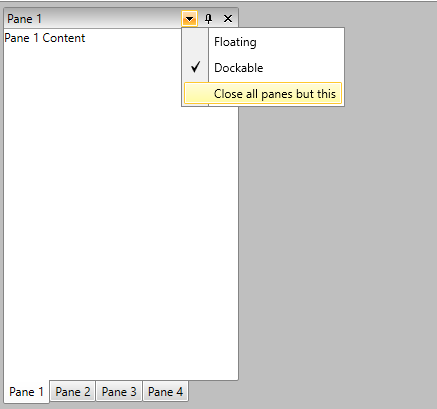
Run your demo. **RadPane**'s menu should look like the snapshot below.
## Removing RadPane's Menu
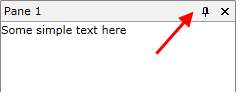
In order to remove **RadPane**'s Menu, you should set **RadPane**'s **ContextMenuTemplate** property to **null** (respectively **{x:Null}** in XAML).
**Example 5: Set ContextMenuTemplate property to null**
```XAML
```
**Example 6: Set ContextMenuTemplate property to null in code behind**
```C#
radPane.ContextMenuTemplate = null;
```
```VB.NET
radPane.ContextMenuTemplate = Nothing
```
## See Also
* [How to Add Buttons to the Pane Header](https://www.telerik.com/products/wpf/documentation/controls/raddocking/how-to/add-buttons-to-the-pane-headers)
* [How to Disable the Close Button](https://www.telerik.com/products/wpf/documentation/controls/raddocking/how-to/disable-the-close-button)