# ZOrder

**RadDiagram** gives you the ability to control the **Z-Order** of shapes and connections by using their **ZIndex** property. You can also use **RadDiagramCommands** in order to increase/decrease **ZIndex** of the selected **RadDiagramItems** simultaneously.

> Please note that the examples in this tutorial are showcasing Telerik Windows8 theme. In the [Setting a Theme](http://www.telerik.com/help/wpf/common-styling-apperance-setting-theme-wpf.html#Setting_Application-Wide_Built-In_Theme_in_the_Code-Behind) article you can find more information on how to set an application-wide theme.

## Using the ZIndex property

Consider the following code:

```XAML
<telerik:RadDiagram x:Name="diagram" Grid.Row="1">
    <telerik:RadDiagramShape x:Name="shape1" 
							 Width="150"
							 Height="150"
							 Background="DeepSkyBlue"
							 Content="Zindex = 3"
							 Geometry="{telerik:CommonShape ShapeType=EllipseShape}"
							 Position="80 120"
							 ZIndex="3" />
    <telerik:RadDiagramShape x:Name="shape2" 
							 Width="150"
							 Height="150"
							 Background="CadetBlue"
							 Content="Zindex = 2"
							 Geometry="{telerik:CommonShape ShapeType=EllipseShape}"
							 Position="180 120"
							 ZIndex="2" />
    <telerik:RadDiagramShape x:Name="shape3" 
							 Width="150"
							 Height="150"
							 Background="DodgerBlue"
							 Content="Zindex = 1"
							 Geometry="{telerik:CommonShape ShapeType=EllipseShape}"
							 Position="120 20"
							 ZIndex="1" />

    <telerik:RadDiagramConnection Source="{Binding ElementName=shape3}" 
								  SourceConnectorPosition="Right"
								  Target="{Binding ElementName=shape2}"
								  TargetConnectorPosition="Right"
								  ZIndex="4" />

    <telerik:RadDiagramConnection Source="{Binding ElementName=shape3}" 
								  SourceConnectorPosition="Left"
								  Target="{Binding ElementName=shape1}"
								  TargetConnectorPosition="Left"
								  ZIndex="0" />
</telerik:RadDiagram>
```

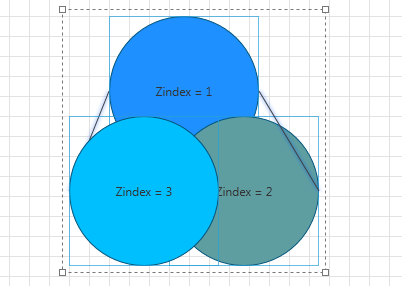
We have reversed the natural ZOrder of the 3 Shapes. On the other hand, the connection on the right is on top of the shapes and connection on the left is below them:
![Rad Diagrams-Features-ZIndex](https://www.telerik.com/products/wpf/documentation/assets/7e39be9f1a43d5fcd55c8bc75ecbed54/raddiagrams-features-zindex.png)

## Using the RadDiagram Commands

**RadDiagram** provides a set of predefined commands for manipulating the selected items' ZIndices. **"BringForward"** and **"SendBackward"** allow you to increase/decrease the Z-Indices of the selected RadDiagramItems. If you need to bring the selected item(s) on top of all other items or below them, you can use **"BringToFront"** and **"SentToback"**:

```XAML
<Grid>
    <Grid.RowDefinitions>
        <RowDefinition Height="Auto" />
        <RowDefinition Height="*" />
    </Grid.RowDefinitions>
    <StackPanel Orientation="Horizontal">
        <telerik:RadButton Width="200" 
						   Height="30"
						   Command="telerik:DiagramCommands.BringToFront"
						   CommandTarget="{Binding ElementName=diagram2}"
						   Content="Bring Up" />
        <telerik:RadButton Width="200" 
						   Height="30"
						   Command="telerik:DiagramCommands.SendToBack"
						   CommandTarget="{Binding ElementName=diagram2}"
						   Content="Bring Down" />
    </StackPanel>
    <telerik:RadDiagram x:Name="diagram2" Grid.Row="1">
        <telerik:RadDiagramShape x:Name="shape1_2" 
								 Width="150"
								 Height="150"
								 Background="DeepSkyBlue"
								 Content="Zindex = 3"
								 Geometry="{telerik:CommonShape ShapeType=EllipseShape}"
								 Position="80 120"
								 ZIndex="3" />
        <telerik:RadDiagramShape x:Name="shape2_2" 
								 Width="150"
								 Height="150"
								 Background="CadetBlue"
								 Content="Zindex = 2"
								 Geometry="{telerik:CommonShape ShapeType=EllipseShape}"
								 Position="180 120"
								 ZIndex="2" />
        <telerik:RadDiagramShape x:Name="shape3_2" 
								 Width="150"
								 Height="150"
								 Background="DodgerBlue"
								 Content="Zindex = 1"
								 Geometry="{telerik:CommonShape ShapeType=EllipseShape}"
								 Position="120 20"
								 ZIndex="1" />

        <telerik:RadDiagramConnection Source="{Binding ElementName=shape3_2}" 
									  SourceConnectorPosition="Right"
									  Target="{Binding ElementName=shape2_2}"
									  TargetConnectorPosition="Right"
									  ZIndex="4" />

        <telerik:RadDiagramConnection Source="{Binding ElementName=shape3_2}" 
									  SourceConnectorPosition="Left"
									  Target="{Binding ElementName=shape1_2}"
									  TargetConnectorPosition="Left"
									  ZIndex="0" />
    </telerik:RadDiagram>
</Grid>
```

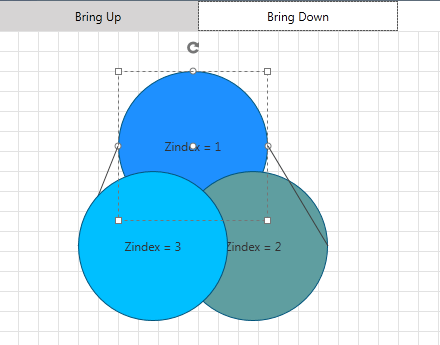
This way configured, the two buttons are ready to bring to front or sent to back the selected items of the **RadDiagram**:
![raddiagrams-features-zindex-bringup 1](https://www.telerik.com/products/wpf/documentation/assets/cf37f03c5e63a5ff17dbb17dacf84a72/raddiagrams-features-zindex-bringup1.png)

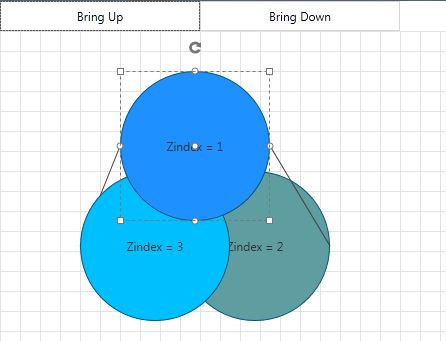
Here is the result of selecting the shape with ZIndex = 1 and clicking the left button:
![raddiagrams-features-zindex-bringup 2](https://www.telerik.com/products/wpf/documentation/assets/804869d67389db2e4c227677e41b9e75/raddiagrams-features-zindex-bringup2.png)

## See Also

* [Structure](https://www.telerik.com/products/wpf/documentation/controls/raddiagram/structure)
* [Getting Started](https://www.telerik.com/products/wpf/documentation/controls/raddiagram/getting-started)
* [Populating with Data](https://www.telerik.com/products/wpf/documentation/controls/raddiagram/populating-with-data/data-overview)
* [Shapes](https://www.telerik.com/products/wpf/documentation/controls/raddiagram/diagram-items/shape/raddiagrams-features-shapes)
* [Connections](https://www.telerik.com/products/wpf/documentation/controls/raddiagram/diagram-items/raddiagrams-features-connections)
* [Items Editing](https://www.telerik.com/products/wpf/documentation/controls/raddiagram/items-manipulation/raddiagrams-features-edit)
* [Rotation](https://www.telerik.com/products/wpf/documentation/controls/raddiagram/items-manipulation/raddiagrams-features-rotation)
* [Resizing](https://www.telerik.com/products/wpf/documentation/controls/raddiagram/items-manipulation/raddiagrams-features-resizing)
* [Selection](https://www.telerik.com/products/wpf/documentation/controls/raddiagram/items-manipulation/raddiagrams-features-selection)
