# Disable Horizontal or Vertical Shape Resizing
In **RadDiagram** each **RadDiagramItem** can be resized. This operation is internally implemented by a **ResizingService**.
> In order to learn more about the different Diagramming Services, you can examine the [Services](https://www.telerik.com/products/wpf/documentation/controls/raddiagram/features/services) article.
In this tutorial we will examine a solution that allows the user to dynamically configure **RadDiagramShapes** resizing and decide whether to allow horizontal and vertical resizing.
First we will create a sample **RadDiagram** definition that has two **RadDiagramShape** objects:
```XAML
```
Next, we will add two **RadToggleButtons** to provide the user with the option to turn on and off the vertical and horizontal resizing of a shape.
```XAML
```
Now that we've defined the content of our view, we can start describing the custom resizing implementation. And as we need to disable a resizing operation based on dynamically set values, we will have to customize the default resizing mechanism. This mechanism is controlled by the **ResizingService** class which exposes a virtual method that calculates how to change the current size of a shape. Therefore we will start by creating a custom resizing service that derives from the **RadDiagram ResizingService** and we will override the **CalculateNewDelta()** method.
```C#
public class MyResizing_Simple : ResizingService
{
public MyResizing_Simple(RadDiagram owner)
: base(owner as IGraphInternal)
{
}
protected override Point CalculateNewDelta(Point newPoint)
{
return base.CalculateNewDelta(newPoint);
}
}
```
```VB.NET
Public Class MyResizing
Inherits ResizingService
Public Sub New(ByVal owner As RadDiagram)
MyBase.New(TryCast(owner, IGraphInternal))
End Sub
Protected Overrides Function CalculateNewDelta(ByVal newPoint As Point) As Point
Return MyBase.CalculateNewDelta(newPoint)
End Function
End Class
```
Since we added two **RadToggleButtons** in our view, we need to define two **boolean** properties to track the checked state of these buttons and use them to control the result of the resizing operation.
```C#
public class MyResizing : ResizingService, INotifyPropertyChanged
{
private bool canResizeHeight;
private bool canResizeWidth;
public MyResizing(RadDiagram owner)
: base(owner as IGraphInternal)
{
//Initialize the boolean properties that will control the availability of the resizing
this.CanResizeWidth = true;
this.CanResizeHeight = true;
}
public event PropertyChangedEventHandler PropertyChanged;
public bool CanResizeWidth
{
get
{
return this.canResizeWidth;
}
set
{
if (this.canResizeWidth != value)
{
this.canResizeWidth = value;
this.OnPropertyChaged("CanResizeWidth");
}
}
}
public bool CanResizeHeight
{
get
{
return this.canResizeHeight;
}
set
{
if (this.canResizeHeight != value)
{
this.canResizeHeight = value;
this.OnPropertyChaged("CanResizeHeight");
}
}
}
protected override Point CalculateNewDelta(Point newPoint)
{
//calculate the size change using the defaul calulation mechanism
var newDelta = base.CalculateNewDelta(newPoint);
//use the boolean properties to determine whether to apply any changes in the size of the manipulated item
return new Point(this.CanResizeWidth ? newDelta.X : 0, this.CanResizeHeight ? newDelta.Y : 0);
}
private void OnPropertyChaged(string name)
{
if (this.PropertyChanged != null)
{
this.PropertyChanged(this, new PropertyChangedEventArgs(name));
}
}
}
```
```VB.NET
Public Class MyResizing
Inherits ResizingService
Implements INotifyPropertyChanged
Private resizeHeight As Boolean
Private resizeWidth As Boolean
Public Sub New(ByVal owner As RadDiagram)
MyBase.New(TryCast(owner, IGraphInternal))
'Initialize the boolean properties that will control the availability of the resizing'
Me.CanResizeWidth = True
Me.CanResizeHeight = True
End Sub
Public Event PropertyChanged As PropertyChangedEventHandler Implements INotifyPropertyChanged.PropertyChanged
Public Property CanResizeWidth() As Boolean
Get
Return Me.resizeWidth
End Get
Set(ByVal value As Boolean)
If Me.resizeWidth <> value Then
Me.resizeWidth = value
Me.OnPropertyChaged("CanResizeWidth")
End If
End Set
End Property
Public Property CanResizeHeight() As Boolean
Get
Return Me.resizeHeight
End Get
Set(ByVal value As Boolean)
If Me.resizeHeight <> value Then
Me.resizeHeight = value
Me.OnPropertyChaged("CanResizeHeight")
End If
End Set
End Property
Protected Overrides Function CalculateNewDelta(ByVal newPoint As Point) As Point
'calculate the size change using the defaul calulation mechanism'
Dim newDelta = MyBase.CalculateNewDelta(newPoint)
'use the boolean properties to determine whether to apply any changes in the size of the manipulated item'
Return New Point(If(Me.CanResizeWidth, newDelta.X, 0), If(Me.CanResizeHeight, newDelta.Y, 0))
End Function
Private Sub OnPropertyChaged(ByVal name As String)
RaiseEvent PropertyChanged(Me, New PropertyChangedEventArgs(name))
End Sub
End Class
```
> Please note that the **CalculateNewDelta()** method returns a result of type **Point**. However, this result doesn't describe coordinates of a point, but a delta value representing the change that should be applied on **RadDiagramItem(s)** size. This delta is calculated based on the resizing direction specified by the resizing thumb being used, the coordinates of the mouse when the resize was initiated, the coordinates of the mouse when the operation was finished and the rotation angle. The **X** porperty of the calculated result reflects the change in the **Width** of the manipulated item, while the **Y** property value reflects the change that has to be applied on the **Height** of the item. This is why when you override the **CalculateNewDelta()** method to return a **Point** with **X** and **Y** properties set to **0**, you tell **RadDiagram** that there is no change in the size of the manipulated **RadDiagramItem(s)**.
If you take a look at the custom **CalculateNewDelta()** method implementation, you can note that the logic is straight-forward. It takes into account the values of the **CanResizeWidth** and **CanResizeHeight** properties to decide whether there should be a change in the **Width** or **Height** of the manipulated item. If both boolean properties are set to **false**, then the **CalculateNewDelta()** method returns a result of **Point(0,0)** which indicates that there are no changes in the size of the manipulated shape. This way the initiated resizing is ignored and the actual size of the manipulated shape is not changed.
Finally, we need to configure the **RadDiagram** instance to use our custom resizing service instead of the default **ResizingService**. This is why we need to create a new instance of the **MyResizing** class in the code-behind file of our view. Then we need to make sure that the **CanResizeWidth** and **CanResizeHeight** properties are used as binding paths for the **IsChecked** properties of the two **RadToggleButtons** we defined to control the user ability to resize a shape:
```C#
private MyResizing newResizingService;
public void Example()
{
InitializeComponent();
this.InitializeNewServices();
}
private void InitializeNewServices()
{
//initialize the newResizingService
this.newResizingService = new MyResizing(this.diagram);
//create a binding with Path=CanResizeWidth
Binding binding = new Binding("CanResizeWidth");
//use the newResizingService as a source of the binding
binding.Source = this.newResizingService;
binding.Mode = BindingMode.TwoWay;
//apply the binding on the resizeWidth RadToggleButton
this.resizeWidth.SetBinding(RadToggleButton.IsCheckedProperty, binding);
//create a binding with Path=CanResizeHeight
binding = new Binding("CanResizeHeight");
//use the newResizingService as a source of the binding
binding.Source = this.newResizingService;
binding.Mode = BindingMode.TwoWay;
//apply the binding on the resizeHeight RadToggleButton
this.resizeHeight.SetBinding(RadToggleButton.IsCheckedProperty, binding);
}
```
```VB.NET
Private newResizingService As MyResizing
Public Sub New()
InitializeComponent()
Me.InitializeNewServices()
End Sub
Private Sub InitializeNewServices()
'initialize the newResizingService'
Me.newResizingService = New MyResizing(Me.diagram)
'create a binding with Path=CanResizeWidth'
Dim binding As New Binding("CanResizeWidth")
'use the newResizingService as a source of the binding'
binding.Source = Me.newResizingService
binding.Mode = BindingMode.TwoWay
'apply the binding on the resizeWidth RadToggleButton'
Me.resizeWidth.SetBinding(RadToggleButton.IsCheckedProperty, binding)
'create a binding with Path=CanResizeHeight'
binding = New Binding("CanResizeHeight")
'use the newResizingService as a source of the binding'
binding.Source = Me.newResizingService
binding.Mode = BindingMode.TwoWay
'apply the binding on the resizeHeight RadToggleButton'
Me.resizeHeight.SetBinding(RadToggleButton.IsCheckedProperty, binding)
End Sub
```
And now we can use the **newResizingService** instance and register it through the **ServiceLocator**:
```C#
public void Example2()
{
InitializeComponent();
this.InitializeNewServices();
this.diagram.ServiceLocator.Register(this.newResizingService);
}
```
```VB.NET
Public Sub New()
InitializeComponent()
Me.InitializeNewServices()
Me.diagram.ServiceLocator.Register(Of IResizingService)(Me.newResizingService)
End Sub
```
If you run the solution now the resizing buttons will be checked thus allowing all resizing operations.
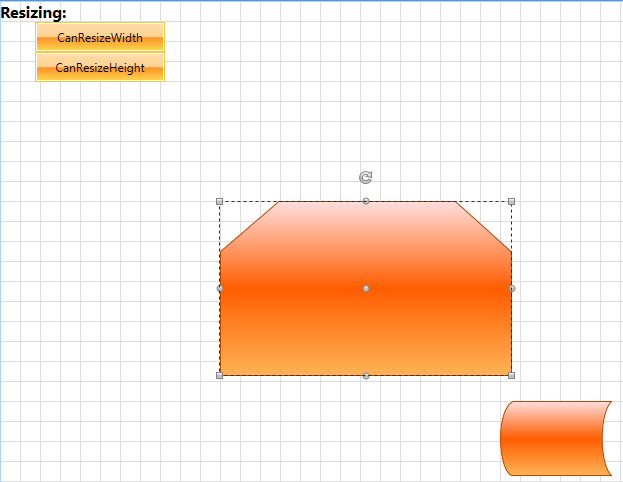
However, as soon as you uncheck any of the buttons, the related resizing operation will be denied. For instance, if you click the **CanResizeWidth** button, you will not be able to change the **Width** of the **RadDiagramShapes**. And as soon as you also uncheck the **CanResizeHeight** button, the **Height** will also be locked.
> tip Find a runnable project of the previous example in the [WPF Samples GitHub repository](https://github.com/telerik/xaml-sdk/tree/master/Diagram/CustomServices).
## See Also
* [Shapes](https://www.telerik.com/products/wpf/documentation/controls/raddiagram/diagram-items/shape/raddiagrams-features-shapes)
* [Resizing](https://www.telerik.com/products/wpf/documentation/controls/raddiagram/items-manipulation/raddiagrams-features-resizing)
* [Services](https://www.telerik.com/products/wpf/documentation/controls/raddiagram/features/services)
* [Customize the Rotation Step](https://www.telerik.com/products/wpf/documentation/controls/raddiagram/howto/customize-rotation)