# Watermark
You can set a watermark content to your **RadDateTimePicker** control. This watermark is a text field which will be visible when the **RadDateTimePicker** is not focussed and empty, i.e. no value has been selected.
The Watermark is represented by a regular **RadWatermarkTextBox** control. You can use the following properties to alter its content:
* **DateTimeWatermarkContent** - will set the **WatermarkContent** of the actual **RadWatermarkTextBox** control.
* **DateTimeWatermarkTemplate** - will set the **WatermarkTemplate** of the actual **RadWatermarkTextBox** control.
> tip To read more about the **RadWatermarkTextBox** take a look [here](https://www.telerik.com/products/wpf/documentation/controls/radwatermarktextbox/overview).
The **DateTimeWatermarkContent** is the simplest way to change the watermark's content. For example:
```XAML
```

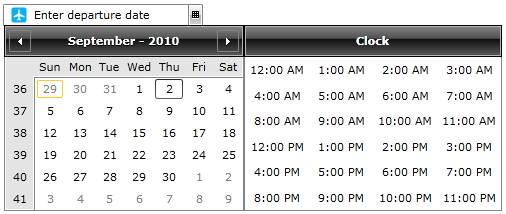
If you want to further customize the watermark you need to set the **DateTimeWatermarkTemplate**. This property is of type **DataTemplate** and lets you take full control of the watermark representation. For example:
```XAML
```
Here is the result:
## See Also
* [Overview](https://www.telerik.com/products/wpf/documentation/controls/raddatetimepicker/overview)
* [Visual Structure](https://www.telerik.com/products/wpf/documentation/controls/raddatetimepicker/visual-structure)
* [Input Modes](https://www.telerik.com/products/wpf/documentation/controls/raddatetimepicker/features/input-modes)
* [Date Selection Modes](https://www.telerik.com/products/wpf/documentation/controls/raddatetimepicker/features/date-selection-modes)
* [Preview ToolTip](https://www.telerik.com/products/wpf/documentation/controls/raddatetimepicker/features/preview-tooltip)
* [How to implement custom parsing](https://www.telerik.com/products/wpf/documentation/controls/raddatetimepicker/how-to/implement-custom-parsing)