# Selection
The **RadDateTimePicker** lets you select only single values - a single date, month or year from the Calendar and/or a single time from the Clock.
> You can customize the selection mode in the calendar view via the **DateSelectionMode** property. The default behavior is that you can choose from dates. [Read more here](https://www.telerik.com/products/wpf/documentation/controls/raddatetimepicker/features/date-selection-modes)
## Selecting an Item Declaratively and Programmatically
The following properties hold the information about the selection in the **RadDateTimePicker** control:
* **SelectedValue** - gives you a **DateTime** representation of the selected date and time or **null** if no value has been selected.
* **SelectedDate** - it is the **DateTime** that corresponds to the user selected date or **null**, if no value has been selected.
* **SelectedTime** - it is of type **TimeSpan?** and corresponds to the selected time representation in the clock view of the control or **null** if no time has been selected.
*
```XAML
```
```C#
this.radDateTimePicker.SelectedValue = new DateTime(2010, 1, 5, 10, 0, 0);
```
```VB.NET
Me.radDateTimePicker.SelectedValue = New DateTime(2010, 1, 5, 10, 0, 0)
```
## Restricting the date item's selection
In the **RadDateTimePicker's** calendar you can restrict the selectable items by using the following properties:
* **SelectableDateStart** - this is the first selectable date in the **RadDateTimePicker** calendar that a user will be able to select.
* **SelectableDateEnd** - this is the last selectable date in the **RadDateTimePicker** calendar that a user will be able to select.
```XAML
```
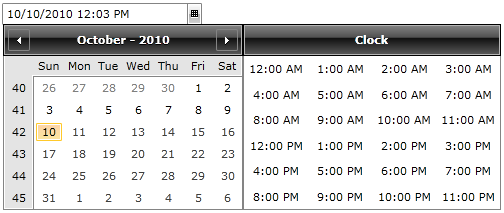
The date items that are after the **SelectableDateEnd** will still be visible but the user will not be able to select them.
> You can also decide not to display date items that cannot be selected (located after the **SelectableDateEnd** value). You can do this via the **DisplayDateStart** and **DisplayDateEnd** properties. [Read more here](https://www.telerik.com/products/wpf/documentation/controls/raddatetimepicker/features/date-items)
## Restricting the time item's selection
In the **RadDateTimePicker's** clock view you can restrict the selectable time items by using the **StartTime** and **EndTime** properties. You can even fill the Clock with a custom collection of **TimeSpan** objects. [Read more here](https://www.telerik.com/products/wpf/documentation/controls/raddatetimepicker/features/clock-items)
## Restricting the date and time item's selection from the input box
Telerik introduced the **IsInputRestrictedToSelectableDates** boolean property in Q1 2016 of UI for WPF. By using it you could easily restrict the user from selecting a date based on the entered text inside the input area of the control. The selectable range is defined by the values set for the **SelectableDateStart** and **SelectableDateEnd** properties.
```XAML
```
## See Also
* [Overview](https://www.telerik.com/products/wpf/documentation/controls/raddatetimepicker/overview)
* [Events](https://www.telerik.com/products/wpf/documentation/controls/raddatetimepicker/events)
* [Formatting](https://www.telerik.com/products/wpf/documentation/controls/raddatetimepicker/features/formatting)
* [Selection](https://www.telerik.com/products/wpf/documentation/controls/raddatetimepicker/features/selection)