# Formatting
The **RadDateTimePicker** gives you a few possibilities to change the way your data is formatted. This topic will go through the following sections:
* [Changing the display format](https://www.telerik.com/products/wpf/documentation/controls/raddatetimepicker/features/formatting#changing-the-display-format)
* [Changing the culture](https://www.telerik.com/products/wpf/documentation/controls/raddatetimepicker/features/formatting#changing-the-culture)
* [Defining a custom format](https://www.telerik.com/products/wpf/documentation/controls/raddatetimepicker/features/formatting#defining-a-custom-format)
* [Fractional-second precision and UTC](https://www.telerik.com/products/wpf/documentation/controls/raddatetimepicker/features/formatting#fractional-second-precision-and-utc)
## Changing the display format
**RadDateTimePicker** has the ability to format its value in two different formats specified by the **DisplayFormat** property.
Here is a brief description of each value in the **DisplayFormat** enumerator property:
* **Short** - this is the default value which will show you only the date and time formatted according to the current culture.
* **Long** - this is the mode which shows a detailed information about the current date and time.
For example:
```XAML
```

## Changing the culture
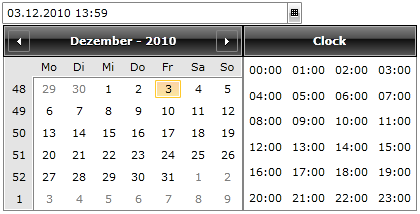
You can change the **RadDateTimePicker** control's culture via the **Culture** property. You can set its value in XAML or code behind. If you choose to set it in XAML you will have to provide the correct culture code. Otherwise in code behind you will have to create a **CultureInfo** object and assign it to the **RadDateTimePicker's Culture** property.
Here is an example:
```XAML
```
```C#
this.radDateTimePicker.Culture = new System.Globalization.CultureInfo("de");
```
```VB.NET
Me.radDateTimePicker.Culture = New System.Globalization.CultureInfo("de")
```
Here is the result:
## Defining a custom format
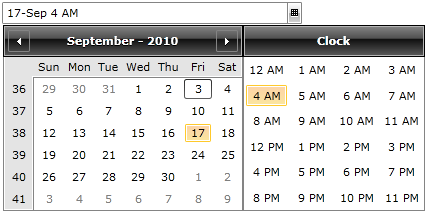
You can easily customize the date format in the **RadDateTimePicker** through its **Culture** property. You do this by defining a custom **DateFormatInfo** object and later assigning it to the **CultureInfo's DateTimeFormat** property.
Here is an example of defining a custom format for the **RadDateTimePicker's** items:
```C#
this.radDateTimePicker.Culture = new System.Globalization.CultureInfo("en-US");
this.radDateTimePicker.Culture.DateTimeFormat.ShortDatePattern = "dd-MMM";
this.radDateTimePicker.Culture.DateTimeFormat.ShortTimePattern = "h tt";
```
```VB.NET
Me.radDateTimePicker.Culture = New System.Globalization.CultureInfo("en-US")
Me.radDateTimePicker.Culture.DateTimeFormat.ShortDatePattern = "dd-MMM"
Me.radDateTimePicker.Culture.DateTimeFormat.ShortTimePattern = "h tt"
```
> In this example the "tt" in the **ShortTimePattern** represents the AM and PM values and also you have omitted the year from the **ShortDatePattern's** definition.
> For more information about the custom date and time format specifiers and the result string produced by each format specifier, check out the [Custom Date and Time Format Strings topic](http://msdn.microsoft.com/en-us/library/8kb3ddd4.aspx).
Here is the result:
## Fractional-second precision and UTC
The `Culture` property controls how `RadDateTimePicker` formats and parses its value. For example, set the culture's `ShortTimePattern` to `HH:mm:ss.fff` to use a 24-hour clock and display milliseconds.
`RadDateTimePicker` does not convert values between local time and UTC. Convert the `DateTime` value in your application logic before assigning it to `SelectedValue` or after reading it from the control.
The built-in text parser supports fractional seconds through milliseconds (three digits). `RadDateTimePicker` does not provide a built-in editor for microseconds. To display and select microseconds in a `TimeSpan`, see [Show Microseconds in RadTimeSpanPicker](https://www.telerik.com/products/wpf/documentation/knowledge-base/kb-timespanpicker-show-microseconds).
`RadTimeSpanPicker` edits a `TimeSpan`, not a complete `DateTime`. Combine its value with the required date and perform any UTC conversion in your application logic.
## See Also
* [Overview](https://www.telerik.com/products/wpf/documentation/controls/raddatetimepicker/overview)
* [Events](https://www.telerik.com/products/wpf/documentation/controls/raddatetimepicker/events)
* [Selection](https://www.telerik.com/products/wpf/documentation/controls/raddatetimepicker/features/selection)