# Date Items
When you use the **RadDateTimePicker** control you can customize the date items included in the **Calendar** view. You can define start and end dates for the entries in the calendar. You do this using the following properties:
* **DisplayDateStart** - it is of type **DateTime** and represents the starting date of the date items in your **Calendar**.
* **DisplayDateEnd** - it is again of type **DateTime** and represents the ending date of the items in your **Calendar**.
If you specify these properties you will be able to select a date only in the range of the chosen start and end dates.
Here is an example of setting these properties in XAML:
```XAML
```
Here is the result:
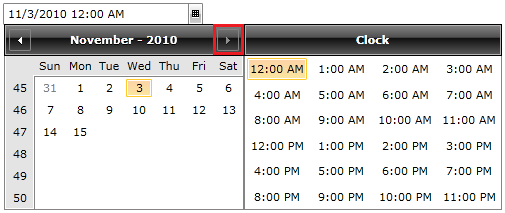
The Next Month button is not active because of the **DisplayDateEnd** property's value set in the example.
> tip You can further restrict the input by indicating a selectable start and end dates. These dates will allow you to select only within a predefined range, but you would still have the ability to browse within the range of the display start and end dates. [Read more here](https://www.telerik.com/products/wpf/documentation/controls/raddatetimepicker/features/selection)
## Using a default display date
You can also set the default date visible when the calendar appears. The property you have to use is called **DisplayDate** and is of type **DateTime**.
> Notice that the **DisplayDate** is different from the **SelectedDate** property. The **DisplayDate** points out just the default month and year visible when the calendar first pops up, nothing is selected.
For example:
```XAML
```
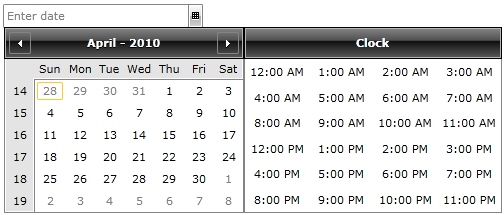
The result of this example will be that when you click on the **RadDateTimePicker's** drop-down button for the first time in the calendar you will not see the current month and year but instead the month and year defined in the **DisplayDate** property.
> tip If you set the **DisplayDate** property to a value which is not in the range of the **DisplayDateStart** and **DisplayDateEnd** properties you will end up with a parse error exception.
## See Also
* [Overview](https://www.telerik.com/products/wpf/documentation/controls/raddatetimepicker/overview)
* [Visual Structure](https://www.telerik.com/products/wpf/documentation/controls/raddatetimepicker/visual-structure)
* [Clock Items](https://www.telerik.com/products/wpf/documentation/controls/raddatetimepicker/features/clock-items)
* [Selection](https://www.telerik.com/products/wpf/documentation/controls/raddatetimepicker/features/selection)
* [Formatting](https://www.telerik.com/products/wpf/documentation/controls/raddatetimepicker/features/formatting)
* [How to set the first day of the week](https://www.telerik.com/products/wpf/documentation/controls/raddatetimepicker/how-to/set-first-day-calendar)