# DateRangePicker Overview
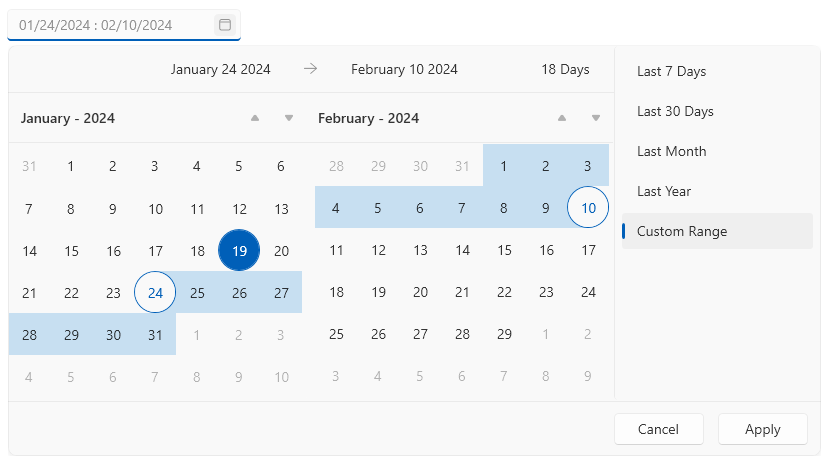
The DateRangePicker component allows you to easily enrich your UI with a tool for selecting range of dates. This is helpful for scenarios where you need to extract a specific set of data related to a time range. For example, applications for booking hotels, showing graphs with sales data in specific ranges and more.
## Key Features
* **Culture settings**—RadDateRangePicker provides settings to adjust the current culture and few corresponding options, like the first day of the week.
* **Read-only support**—The component can be displayed in a read-only state that disables the user selection of dates.
* **Allowed selection range**—You can define an allowed selection range which restricts the user selection.
* **Blackout dates**—This features can be used to disable a set of dates which cannot be selected.
* **Customizable input element**—The DateRangePicker control allows you to customize the formatting, the empty content and the placeholders of the input area.
* **Customizable calendars**—The control has a set of two calendars that show the current and next month or year, which can be customized via number of properties of the control.
* **Customizable list of predefined date ranges**—The list with the predefined date ranges allows the end user to easily select a range.
> tip Get started with the control with its [Getting Started](https://www.telerik.com/products/wpf/documentation/controls/raddaterangepicker/getting-started) help article that shows how to use it in a basic scenario.
> Check out the DateRangePicker demos at:
## Telerik UI for WPF Support and Learning Resources
* [Telerik UI for WPF DateRangePicker Homepage](https://www.telerik.com/products/wpf/daterangepicker.aspx)
* [Get Started with the Telerik UI for WPF DateRangePicker](https://www.telerik.com/products/wpf/documentation/controls/raddaterangepicker/getting-started)
* [Telerik UI for WPF API Reference](https://docs.telerik.com/devtools/wpf/api/)
* [Getting Started with Telerik UI for WPF Components](https://www.telerik.com/products/wpf/documentation/getting-started/first-steps-nuget)
* [Telerik UI for WPF Virtual Classroom (Training Courses for Registered Users)](https://learn.telerik.com/learn/course/external/view/elearning/16/telerik-ui-for-wpf)
* [Telerik UI for WPF DateRangePicker Forums](https://www.telerik.com/forums/wpf)
* [Telerik UI for WPF Knowledge Base](https://docs.telerik.com/devtools/wpf/knowledge-base)
## See Also
* [Visual Structure](https://www.telerik.com/products/wpf/documentation/controls/raddaterangepicker/visual-structure)
* [Getting Started](https://www.telerik.com/products/wpf/documentation/controls/raddaterangepicker/getting-started)