# Text Input Formatting
The DateRangePicker control provides a variety of settings that can be used to customize the date text input.
## Using Format String
To format the string value that shows the start and end dates, you can use the `FormatString` property of `RadDateRangePicker`.
**Setting the FormatString property**
```XAML
```

## Changing the Placeholder Symbol
The placeholder symbol is the underscore displayed when the selection is empty and the text input is focused.
> caption Default placeholder symbol

To change the symbol, set the `Placeholder` property of `RadDateRangePicker`.
**Setting the Placeholder property**
```XAML
```
> caption Custom placeholder symbol

## Changing the Separator Between the Dates
The default separator between the date texts is the `:` symbol. To change this, set the `Separator` property of `RadDateRangePicker`.
**Setting the Separator property**
```XAML
```
> caption Custom separator

## Setting Date Pattern
The date pattern allows you to set the formatting of the date parts of the text. To apply a custom pattern, set the `DatePattern` property of `RadDateRangePicker`.
**Setting the Separator property**
```XAML
```
> caption Custom date patterns
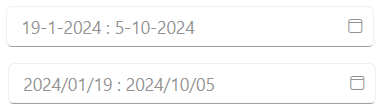
The `DatePattern` doesn't support formats for abbreviated days (ddd, dddd) and months (MMM, MMMM).
If the `DatePattern` cannot correctly parse the date, the `Culture` settings are used.
## See Also
* [Customizing Appearance](https://www.telerik.com/products/wpf/documentation/controls/raddaterangepicker/customizing-appearance)
* [Getting Started](https://www.telerik.com/products/wpf/documentation/controls/raddaterangepicker/getting-started)
* [Selection](https://www.telerik.com/products/wpf/documentation/controls/raddaterangepicker/programmatic-selection)