# Display Modes
> tip If you are new to the **RadDataPager** control, you can consider reading the [Getting Started](https://www.telerik.com/products/wpf/documentation/controls/raddatapager/getting-started) topic before continuing.
The **RadDataPager** allows you to decide which of its visual elements to be visible. This is done via the **PagerDisplayModes** enumeration and the **DisplayMode** property.
The enumeration has the following values:
* **First** - the go to first page button is displayed.
* **FirstLastNumeric** - the go to first and last page buttons and the numeric buttons are displayed
* **FirstLastPreviousNext** - the go to first and last page buttons and go to previous and next page buttons are displayed
* **FirstLastPreviousNextNumeric** - same as above, but in addition the numeric buttons are also displayed
* **Last** - the go to last page button is displayed
* **Next** - the go to next page button is displayed
* **Numeric** - only the numeric buttons are displayed
* **Previous** - the go to previous page button is displayed
* **PreviousNext** - the go to previous and next page buttons are displayed
* **PreviousNextNumeric** - the go to previous and next page buttons are displayed, and in addition the numeric buttons are also displayed
* **Text** - only the textbox and the label are displayed
* **All (default)** - all buttons are displayed
Here is an example of a **RadDataPager** that displays the previous, next and numeric buttons.
```XAML
```
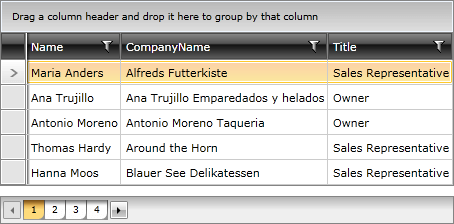
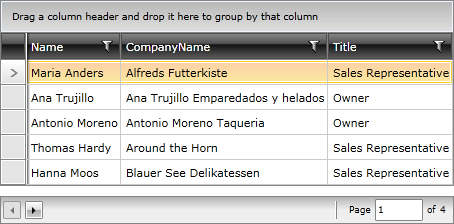
If the combination of visual elements doesn't exist in the enumeration, you can combine one or more enumeration values. This is done by separating the values with a coma. Here is an example:
```XAML
```
## See Also
* [Page Size](https://www.telerik.com/products/wpf/documentation/controls/raddatapager/features/page-size)
* [Auto Ellipsis](https://www.telerik.com/products/wpf/documentation/controls/raddatapager/features/auto-ellipsis)