# Edit Modes
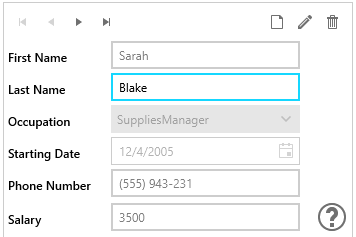
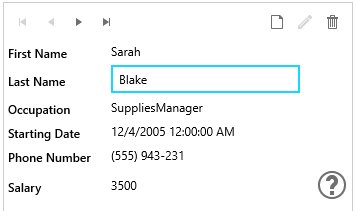
RadDataForm exposes an **EditMode** property of type **DataFormEditMode**, which provides different options for **editing behavior**. Its possible values are **Default** and **Single**.
## Default
The default option **utilizes lighter UI, but also provides fewer options**:
1. All **DataFormDataField** editors are accessible from the UI and the correctness of an edit operation is ensured only by the data-binding mechanism.
2. There are **no distinct visual states of the DataFormDataField** that indicate whether it is being currently edited, or not.
3. When a validation error occurs, **users are not encouraged to fix it, or cancel their change** by blocking the UI.
**Example 1: RadDataForm with Default EditMode**
```XAML
```
> caption RadDataForm with default EditMode
## Single
Single EditMode introduces the concept of **editing properties one at a time**. An editor is created only for the currently edited property. The other values are displayed in TextBlocks.
It relies on DataFormDataField's **DataMemberBinding** property. Setting this mode is not supported with dynamic data.
**Example 2: RadDataForm with EditMode set to Single**
```XAML
```
> caption RadDataForm with single EditMode
## See Also
* [Events](https://www.telerik.com/products/wpf/documentation/controls/raddataform/events)