# Menu Placement
The **RadContextMenu** exposes a set of properties, which allow you to specify the location, on which it will appear.
## Placement
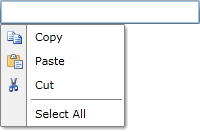
The placement property allows you to specify the position of the **RadContextMenu** relatively to the target element or the value of the **PlacementRect**. It has the following values.
* **Absolute** - positions the **RadContextMenu** absolutely.
* **Bottom** - displays the **RadContextMenu** below the target control or the rect.
* **Center** - displays the **RadContextMenu** in the center of the target control or the rect.
* **Left** - displays the **RadContextMenu** on the left of the target control or the rect.
* **Right** - displays the **RadContextMenu** on the right of the target control or the rect.
* **Top** - displays the **RadContextMenu** above the target control or the rect.
Here is an example:
**Set the Placement**
```XAML
```
> caption RadContextMenu with bottom placement
## Adjust the Menu Offset
Use the horizontal and vertical offsets to fine-tune the distance between the target element and the context menu.
### Set the Horizontal Offset
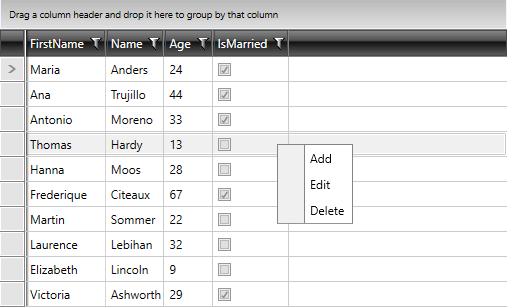
The `HorizontalOffset` property controls the horizontal distance between the target origin and the popup alignment point.
**Set the Horizontal Offset**
```XAML
```
> caption RadContextMenu with its HorizontalOffset property set
### Set the Vertical Offset
The `VerticalOffset` property controls the vertical distance between the target origin and the popup alignment point.
**Set the Vertical Offset**
```XAML
```
## PlacementRectangle
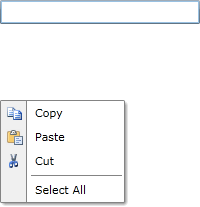
The **PlacementRectangle** is of type **Rect** and specifies the position of the **RadContextMenu**. It can be combined with the **Placement** property.
> tip Properties of type **Rect** cannot be declared inline because this is not supported. Set the property as an attribute by passing the x, y, width, and height parameters. The type converter handles them.
**Set the Placement Rectangle**
```XAML
```
> caption RadContextMenu with a placement rectangle
## PlacementTarget
The **PlacementTarget** property is used when the **RadContextMenu** should be displayed on a position related to a different UI element (not the one attached to).
> note If you use the same **RadContextMenu** for multiple elements and open it from code, set the **PlacementTarget**.
**Set the Placement Target**
```C#
public MainWindow()
{
this.InitializeComponent();
this.radContextMenu.PlacementTarget = this.InputBox;
this.radContextMenu.IsOpen = true;
}
```
> caption RadContextMenu with a placement target

The following table lists the placement values and their target points.
| Placement | Placement Target | Target Area | Context Menu Target Point | Context Menu Alignment Point |
| ------------- | ------------------------------------------- | --------------------------------------------------------------------------------------------------------------- | ------------------------------------------ | --------------------------------------------- |
| Absolute | Not applicable. PlacementTarget is ignored. | The screen, or PlacementRectangle if it is set. The PlacementRectangle is relative to the screen. | The top-left corner of the target area. | The top-left corner of the RadContextMenu. |
| AbsolutePoint | Not applicable. PlacementTarget is ignored. | The screen, or PlacementRectangle if it is set. The PlacementRectangle is relative to the screen. | The top-left corner of the target area. | The top-left corner of the RadContextMenu. |
| Bottom | PlacementTarget or parent. | The target object, or PlacementRectangle if it is set. The PlacementRectangle is relative to the target object. | The bottom-left corner of the target area. | The top-left corner of the RadContextMenu. |
| Center | PlacementTarget or parent. | The target object, or PlacementRectangle if it is set. The PlacementRectangle is relative to the target object. | The center of the target area. | The center of the RadContextMenu. |
| Left | PlacementTarget or parent. | The target object, or PlacementRectangle if it is set. The PlacementRectangle is relative to the target object. | The top-left corner of the target area. | The top-right corner of the RadContextMenu. |
| Mouse | Not applicable. PlacementTarget is ignored. | The bounds of the mouse pointer. PlacementRectangle is ignored. | The bottom-left corner of the target area. | The top-left corner of the RadContextMenu. |
| MousePoint | Not applicable. PlacementTarget is ignored. | The bounds of the mouse pointer. PlacementRectangle is ignored. | The top-left corner of the target area. | The top-left corner of the RadContextMenu. |
| Relative | PlacementTarget or parent. | The target object, or PlacementRectangle if it is set. The PlacementRectangle is relative to the target object. | The top-left corner of the target area. | The top-left corner of the RadContextMenu. |
| RelativePoint | PlacementTarget or parent. | The target object, or PlacementRectangle if it is set. The PlacementRectangle is relative to the target object. | The top-left corner of the target area. | The top-left corner of the RadContextMenu. |
| Right | PlacementTarget or parent. | The target object, or PlacementRectangle if it is set. The PlacementRectangle is relative to the target object. | The top-right corner of the target area. | The top-left corner of the RadContextMenu. |
| Top | PlacementTarget or parent. | The target object, or PlacementRectangle if it is set. The PlacementRectangle is relative to the target object. | The top-left corner of the target area. | The bottom-left corner of the RadContextMenu. |
## DropDownPlacement
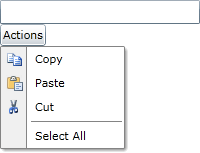
If there are any sub-menus in the **RadContextMenu** their dropdown position can be specified through the **DropDownPlacement** property of the **RadMenuItem**. It has the following values:
* **Auto** - positions the dropdown of the sub-menu automatically.
* **Bottom** - displays the nested **RadMenuItems** below the parent RadMenuItem.
* **Left** - displays the nested **RadMenuItems** on the left of the parent RadMenuItem.
* **Right** - displays the nested **RadMenuItems** on the right of the parent RadMenuItem.
* **Top** - displays the nested **RadMenuItems** above the parent RadMenuItem.
Here is an example:
**Set the DropDownPlacement**
```XAML
```
> caption RadContextMenu with a menu item DropDownPlacement
## See Also
* [Setting the Opening Event](https://www.telerik.com/products/wpf/documentation/controls/radcontextmenu/opening-on-specific-event)
* [Keyboard Support](https://www.telerik.com/products/wpf/documentation/controls/radcontextmenu/key-modifiers)
* [Opening and Closing Delays](https://www.telerik.com/products/wpf/documentation/controls/radcontextmenu/opening-and-closing-delays)