# Binding to XML
The purpose of this tutorial is to show you how to bind `RadComboBox` to data defined in a XML file. The operations you need to perform are to convert the XML to a collection of business objects and then bind that collection using the `ItemsSource` property of the ComboBox.
> caption The final result
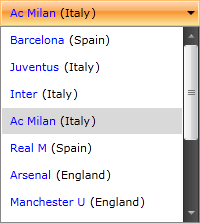
1. Define the data source as XML content.
**Defining the XML data source**
```XML
```
2. Add a new `RadComboBox` declaration in your XAML.
```XAML
```
3. Create a new class named `XmlNodeItem`. This class is pretty simple and it represents a separate node from the XML document. Its properties are `Team` and `Country`. Both of the properties are of type `string`.
```C#
public class RadComboBoxXmlDataSource : XmlNodeItemList
{
private string source;
public string Source
{
get
{
return this.source;
}
set
{
this.source = value;
AddRange(this.RetrieveData(Application.GetResourceStream(new Uri(value, UriKind.Relative)).Stream));
}
}
private XmlNodeItemList RetrieveData(Stream xmlStream)
{
XmlSerializer serializer = new XmlSerializer(typeof(XmlNodeItemList));
StreamReader reader = new StreamReader(xmlStream);
XmlNodeItemList list = (XmlNodeItemList)serializer.Deserialize(reader);
return list;
}
}
```
```VB.NET
Public Class RadComboBoxXmlDataSource
Inherits XmlNodeItemList
Private m_source As String
Public Property Source() As String
Get
Return Me.m_source
End Get
Set(ByVal value As String)
Me.m_source = value
AddRange(RetrieveData(Application.GetResourceStream(New Uri(value, UriKind.Relative)).Stream))
End Set
End Property
Private Function RetrieveData(ByVal xmlStream As Stream) As XmlNodeItemList
Dim serializer As New XmlSerializer(GetType(XmlNodeItemList))
Dim reader As New StreamReader(xmlStream)
Dim list As XmlNodeItemList = DirectCast(serializer.Deserialize(reader), XmlNodeItemList)
Return list
End Function
End Class
```
4. Create a new class named `XmlNodeItemList`, which derives from `ObservableCollection` of `XmlNodeItem`. This is a collection that will be created from the XML file.
```C#
public class RadComboBoxXmlDataSource : XmlNodeItemList
{
private string source;
public string Source
{
get
{
return this.source;
}
set
{
this.source = value;
AddRange(this.RetrieveData(Application.GetResourceStream(new Uri(value, UriKind.Relative)).Stream));
}
}
private XmlNodeItemList RetrieveData(Stream xmlStream)
{
XmlSerializer serializer = new XmlSerializer(typeof(XmlNodeItemList));
StreamReader reader = new StreamReader(xmlStream);
XmlNodeItemList list = (XmlNodeItemList)serializer.Deserialize(reader);
return list;
}
}
```
```VB.NET
Public Class RadComboBoxXmlDataSource
Inherits XmlNodeItemList
Private m_source As String
Public Property Source() As String
Get
Return Me.m_source
End Get
Set(ByVal value As String)
Me.m_source = value
AddRange(RetrieveData(Application.GetResourceStream(New Uri(value, UriKind.Relative)).Stream))
End Set
End Property
Private Function RetrieveData(ByVal xmlStream As Stream) As XmlNodeItemList
Dim serializer As New XmlSerializer(GetType(XmlNodeItemList))
Dim reader As New StreamReader(xmlStream)
Dim list As XmlNodeItemList = DirectCast(serializer.Deserialize(reader), XmlNodeItemList)
Return list
End Function
End Class
```
5. Create a new class named `RadComboBoxXmlDataSource`, which derives from `XmlNodeItemList`. The class takes a path to the XML file and deserializes the data in the private method `RetrieveData()`.
```C#
public class RadComboBoxXmlDataSource : XmlNodeItemList
{
private string source;
public string Source
{
get
{
return this.source;
}
set
{
this.source = value;
AddRange(this.RetrieveData(Application.GetResourceStream(new Uri(value, UriKind.Relative)).Stream));
}
}
private XmlNodeItemList RetrieveData(Stream xmlStream)
{
XmlSerializer serializer = new XmlSerializer(typeof(XmlNodeItemList));
StreamReader reader = new StreamReader(xmlStream);
XmlNodeItemList list = (XmlNodeItemList)serializer.Deserialize(reader);
return list;
}
}
```
```VB.NET
Public Class RadComboBoxXmlDataSource
Inherits XmlNodeItemList
Private m_source As String
Public Property Source() As String
Get
Return Me.m_source
End Get
Set(ByVal value As String)
Me.m_source = value
AddRange(RetrieveData(Application.GetResourceStream(New Uri(value, UriKind.Relative)).Stream))
End Set
End Property
Private Function RetrieveData(ByVal xmlStream As Stream) As XmlNodeItemList
Dim serializer As New XmlSerializer(GetType(XmlNodeItemList))
Dim reader As New StreamReader(xmlStream)
Dim list As XmlNodeItemList = DirectCast(serializer.Deserialize(reader), XmlNodeItemList)
Return list
End Function
End Class
```
6. The next step is to declare the `RadComboBoxXmlDataSource` as a resource in your application.
```XAML
```
7. Update the `RadComboBox` declaration by setting the `ItemsSource` property.
```XAML
```
8. Create a custom `DateTemplate` and set it to the `RadComboBox`'s `ItemTemplate` property.
```XAML
```
9. Update the ComboBox declaration by setting the `ItemTemplate` property.
```XAML
```
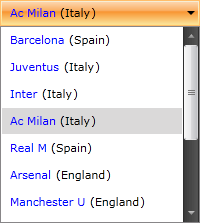
> caption The final result
## See Also
* [Filtering](https://www.telerik.com/products/wpf/documentation/controls/radcombobox/features/filtering)
* [Edit Modes](https://www.telerik.com/products/wpf/documentation/controls/radcombobox/features/edit-modes)