# Selection
The purpose of this tutorial is to show you the basic properties exposed by the **RadComboBox** for working with **selection**. This topic includes the following sections:
* [Using the SelectedItem](https://www.telerik.com/products/wpf/documentation/controls/radcombobox/features/selection#using-the-selecteditem)
* [Using SelectedValue and SelectedValuePath](https://www.telerik.com/products/wpf/documentation/controls/radcombobox/features/selection#using-selectedvalue-and-selectedvaluepath)
* [Using the SelectedIndex](https://www.telerik.com/products/wpf/documentation/controls/radcombobox/features/selection#using-the-selectedindex)
* [Using the Text property](https://www.telerik.com/products/wpf/documentation/controls/radcombobox/features/selection#using-the-text-property)
## Using the SelectedItem
The purpose of the **SelectedItem** property is to get or set the currently selected item of the **RadComboBox**. There are two common cases when accessing the **SelectedItem** property run-time.
* When your **RadComboBox** is with static data (declared in XAML), the **SelectedItem** property is of type **RadComboBoxItem**.
```C#
RadComboBoxItem selectedItem = radComboBox.SelectedItem as RadComboBoxItem;
```
```VB.NET
Dim selectedItem As RadComboBoxItem = TryCast(radComboBox.SelectedItem, RadComboBoxItem)
```
* When your **RadComboBox** is [data bound to a collection of custom objects](https://www.telerik.com/products/wpf/documentation/controls/radcombobox/populating-with-data/binding-to-object), the **SelectedItem** is of the type of the custom object.
```C#
Agency agency = radComboBox.SelectedItem as Agency;
```
```VB.NET
Dim agency As Agency = TryCast(radComboBox.SelectedItem, Agency)
```
## Using SelectedValue and SelectedValuePath
The **SelectedValue** property is used when you have linked your **RadComboBox** to a data source, and you want to return a value other than the one which is displayed. The **SelectedValuePath** property provides a way to specify a **SelectedValue** for the **SelectedItem** in a **RadComboBox**. There are two essential things that you should remember here:
* The **SelectedItem** property represents an object in the **Items** collection and the combo box displays the value of a single property of the selected item.
* The **SelectedValuePath** property specifies the path to the property that is used to determine the value of the **SelectedValue** property.
The following example demonstrates the usage of the **SelectedItem**, **SelectedValue** and **SelectedValuePath** properties.
Imagine that you have a business object named **Agency** with two members (properties): **Name** and **Phone**. And a **RadComboBox** object which is [data bound](https://www.telerik.com/products/wpf/documentation/controls/radcombobox/populating-with-data/binding-to-object) to a list of **Agency** objects
```C#
public class Agency
{
public string Name
{
get;
set;
}
public string Phone
{
get;
set;
}
}
```
```VB.NET
Public Class Agency
Private _Name As String
Public Property Name() As String
Get
Return _Name
End Get
Set(ByVal value As String)
_Name = value
End Set
End Property
Private _Phone As String
Public Property Phone() As String
Get
Return _Phone
End Get
Set(ByVal value As String)
_Phone = value
End Set
End Property
End Class
```
```XAML
```
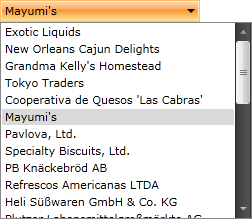
When you select an agency name from the combo box, the **SelectedItem** property returns the **Agency** data item that corresponds to the selected **Name**. However, because the **SelectedValuePath** of this **RadComboBox** is set to agency phone, the **SelectedValue** is set to the **Phone** property of the **Agency** business object.
## Using the SelectedIndex
Use the **SelectedIndex** property to get or set the index of the selected item. For example, by using the **SelectedIndex** property, you could specify which the default selected item is.
```XAML
```
## Using the Text Property
Use the **RadComboBox**'s **Text** property, whenever you want to get or set the text of the currently selected item. This is the currently displayed text in the input box.
```C#
string text = radComboBox.Text;
```
```VB.NET
Dim text As String = radComboBox.Text
```
## See Also
* [Filtering](https://www.telerik.com/products/wpf/documentation/controls/radcombobox/features/filtering)
* [Edit Modes](https://www.telerik.com/products/wpf/documentation/controls/radcombobox/features/edit-modes)
* [AutoComplete](https://www.telerik.com/products/wpf/documentation/controls/radcombobox/features/autocomplete)
* [Clear Selection Button](https://www.telerik.com/products/wpf/documentation/controls/radcombobox/features/clearselectionbutton)