# Message Attachments
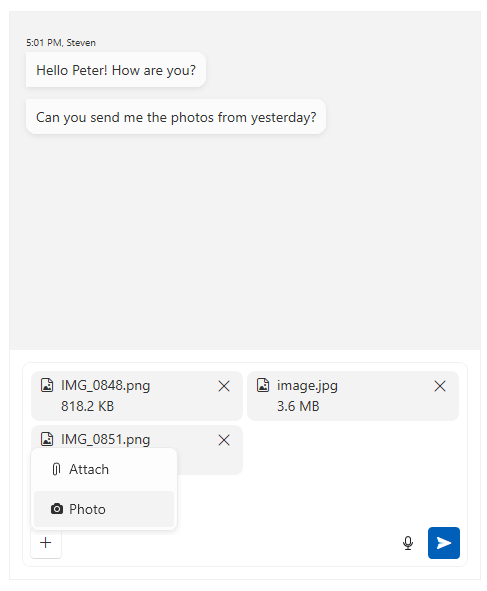
The attachments feature allows you to add files in the chat messages.
To enable the attachments, set the `IsMoreButtonVisible` property of `RadChat` to `true`.
```XAML
```
## Handling Attachment Actions
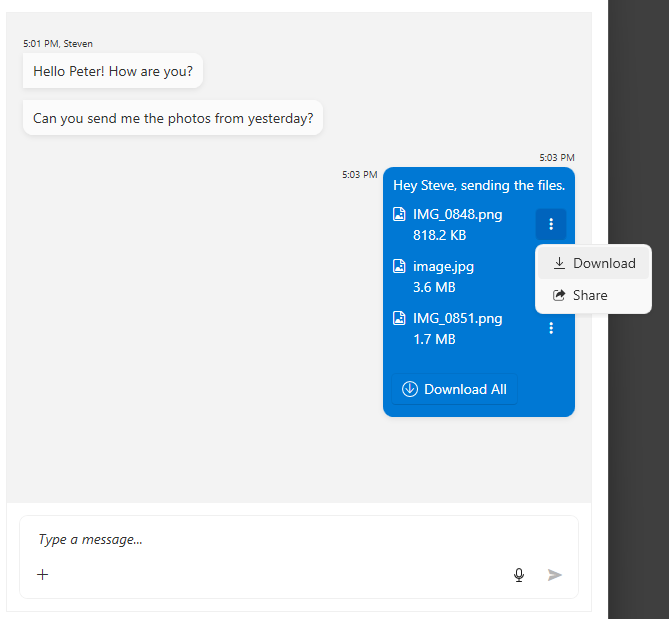
The action that happens when you download or share attachments can be handled via the `AttachmentActionRequested` event of `RadChat`. The event is invoked when the user click onto the **Download** or **Share** button in the attachment.
```C#
private void RadChat_AttachmentActionRequested(object sender, AttachmentActionEventArgs e)
{
IReadOnlyList attachments = e.AttachedFiles;
if (e.Action == AttachmentAction.Download)
{
foreach (var attachment in attachments)
{
var fileName = attachment.FileName;
Stream fileStream = attachment.GetFileStream.Invoke();
// implement file download
}
}
else if (e.Action == AttachmentAction.Share)
{
foreach (var attachment in attachments)
{
var fileName = attachment.FileName;
Stream fileStream = attachment.GetFileStream.Invoke();
// implement file share
}
}
}
```
## Maximum Visible Attachments
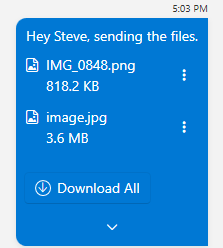
The number of attachments that will be displayed by default without showing an expand button can be adjusted via the `MaxVisibleAttachments` property of `RadChat`.
```XAML
```
## Managing Message Attachments Programmatically
The attachments of a message can be accessed via its `AttachedFiles` collection property.
**Setting message attachments programmatically**
```C#
var textMessage = new TextMessage(this.chat.CurrentAuthor, "Sure, attaching the photos.");
var attachedFiles = new List();
attachedFiles.Add(new PromptInputAttachedFile(new FileInfo("file-path-here")));
textMessage.AttachedFiles = attachedFiles.AsReadOnly();
```
**Getting message attachments**
```C#
IReadOnlyList attachments = textMessage.AttachedFiles;
```
The content of a attached file can be accessed via the `GetFileStream` function of the corresponding `PromptInputAttachedFile` object.
```C#
Stream fileStream = textMessage.AttachedFiles.ElementAt(0).GetFileStream.Invoke();
```
## Customizing Input Box Attachment Appearance
The visual elements showing the attachments in the input text box can be adjusted via the `AttachmentTemplate` property of the `RadPromptInput` element.
```XAML
```
```C#
private void RadChat_Loaded(object sender, RoutedEventArgs e)
{
var chat = (RadChat)sender;
var promptInput = chat.FindChildByType();
promptInput.AttachmentTemplate = (DataTemplate)this.Resources["CustomAttachmentTemplate"];
}
```
The data context passed to the `AttachmentTemplate` is an object of type `PromptInputAttachedFile`.
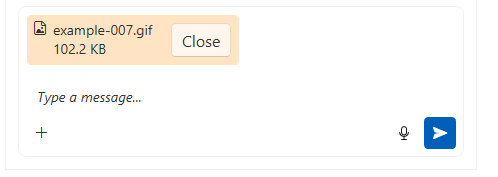
For conditional appearance customization, use the `AttachmentTemplateSelector` ([DataTemplateSelector](https://learn.microsoft.com/en-us/dotnet/api/system.windows.controls.datatemplateselector?view=netframework-4.8.1)) property.