# Custom Annotations

You can place arbitary visual elements on the chart plot area by using the **CartesianCustomAnnotation** and **PolarCustomAnnotation**.

## Cartesian Custom Annotation

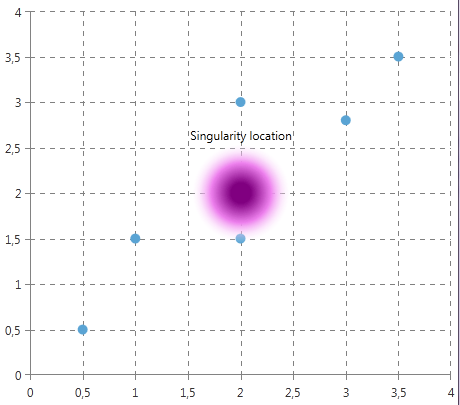
The Cartesian Custom Annotation renders its **Content** starting at the specified (HorizontalValue, VerticalValue) position. You can change the visualization by using the **ContentTemplate** property.

Here is what **CartesianCustomAnnotation** looks like:

```XAML
<telerik:CartesianCustomAnnotation HorizontalValue="2" VerticalValue="2"
                                   HorizontalAlignment="Center" VerticalAlignment="Center"
                                   VerticalOffset="-8">
    <telerik:CartesianCustomAnnotation.Content>
        <StackPanel Orientation="Vertical">
            <TextBlock Text="Singularity location"/>
            <Rectangle Width="100" Height="100">
                <Rectangle.Fill>
                    <RadialGradientBrush Center="0.5,0.5" RadiusX="0.5" RadiusY="0.5" GradientOrigin="0.5,0.5">
                        <GradientStop Color="Purple" Offset="0.2"></GradientStop>
                        <GradientStop Color="Violet" Offset="0.6"></GradientStop>
                        <GradientStop Color="Transparent" Offset="1"></GradientStop>
                    </RadialGradientBrush>
                </Rectangle.Fill>
            </Rectangle>
        </StackPanel>
    </telerik:CartesianCustomAnnotation.Content>
</telerik:CartesianCustomAnnotation>
```

![Rad Chart View-annotations-cartesian-custom](https://www.telerik.com/products/wpf/documentation/assets/300d7319f8eacbce2f1ae56a99bf3386/radchartview-annotations-cartesian-custom.png)

## Polar Custom Annotation

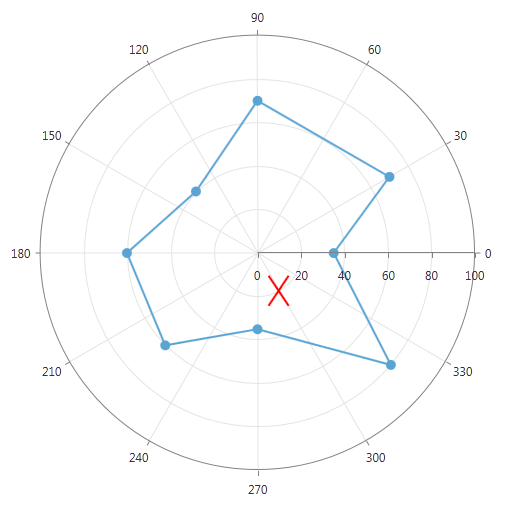
The content of the PolarCustomAnnotation is rendered at the **(RadialValue, PolarValue)** position.

```XAML
<telerik:PolarCustomAnnotation PolarValue="20" RadialValue="300" 
                               HorizontalAlignment="Center" VerticalAlignment="Center">
    <telerik:PolarCustomAnnotation.Content>
        <Path Stroke="Red" StrokeThickness="2">
            <Path.Data>
                <PathGeometry>
                    <PathGeometry.Figures>
                        <PathFigure StartPoint="0,0">
                            <LineSegment Point="20,30"/>
                        </PathFigure>
                        <PathFigure StartPoint="0,30">
                            <LineSegment Point="20,0"/>
                        </PathFigure>
                    </PathGeometry.Figures>
                </PathGeometry>
            </Path.Data>
        </Path>
    </telerik:PolarCustomAnnotation.Content>
</telerik:PolarCustomAnnotation>
```

![Rad Chart View-annotations-polar-custom](https://www.telerik.com/products/wpf/documentation/assets/522811c6c7bbc1f9027300159e7b92a1/radchartview-annotations-polar-custom.png)

## Properties

Common:

* **Content** This property sets the content of the annotation.

* **ContentTemplate** This property defines the DataTemplate used to display the content of the annotation.

* **HorizontalOffset** This property specifies an offset in pixels, applied after the annotation is positioned on the axis depending on its Horizontal/Vertical or Polar/Radial values.

* **VerticalOffset** This property specifies an offset in pixels, applied after the annotation is positioned on the axis depending on its Horizontal/Vertical or Polar/Radial values.

Cartesian:

* **HorizontalValue** The place on the Horizontal Axis, where the annotation is positioned.

  > When the axis is numerical (Linear or Logarithmic) a numeric value is expected, and when it is a CategoricalAxis - a category.

* **VerticalValue** The place on the Horizontal Axis, where the annotation is positioned.

  > When the axis is numerical (Linear or Logarithmic) a numeric value is expected, and when it is a CategoricalAxis - a category.

Polar:

* **PolarValue** The place on the Polar Axis, where the annotation is positioned.

* **RadialValue** The place on the Radial Axis, where the annotation is positioned.

  > When the radial axis is NumericRadialAxis a numeric value is expected and when it is a CategoricalRadialAxis - a category.