# Data Binding to WCF Service
The purpose of this tutorial is to show you how to populate a **RadChart** with data from a **WCF Service**.
> This tutorial will use the **Northwind** database, which can be downloaded from [here](http://www.microsoft.com/downloads/details.aspx?FamilyID=06616212-0356-46A0-8DA2-EEBC53A68034\&displaylang=en).
Before proceeding further with this tutorial you need to create a new application and add a **RadChart** declaration in your XAML:
```XAML
```
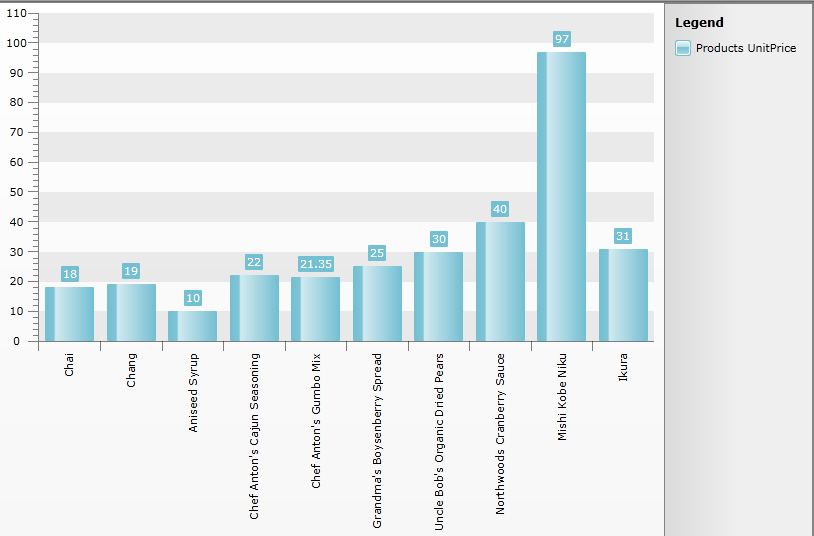
The chart control will be populated with the top 10 products from the Northwind database. On the **Y axis** the **UnitPrice** property will be displayed.
* Add a new **SeriesMapping** to your chart declaration and set the **LegendLabel** property to "Products UnitPrice".
* Add a new **ItemMapping** and set the following properties:
* **FieldName** to **UnitPrice**
* **DataPointMember** to **YValue**
```XAML
```
Creating the WCF Service:
* Add a new item "LINQ to SQL Classes" inside the web server project. Use the .dbml’s designer and drag the \*Products \*table onto the design surface:
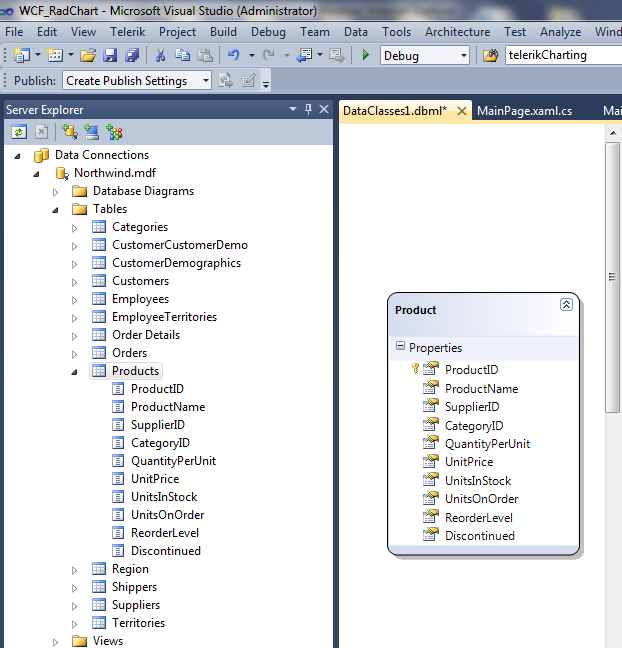
* Then add a new item "WPF-enabled WCF Service" to the server project. In the *.svc.cs* file add the following Linq query to get the first 10 Products from the table:
```C#
[ServiceContract(Namespace = "")]
[AspNetCompatibilityRequirements(RequirementsMode = AspNetCompatibilityRequirementsMode.Allowed)]
public class Service2
{
[OperationContract]
public List LoadTop10Products()
{
DataClasses1DataContext db = new DataClasses1DataContext();
var query = from c in db.Products select c;
return query.Take(10).ToList();
}
}
```
```VB.NET
Public Class Service2
Public Function LoadTop10Products() As List(Of Products)
Dim db As New DataClasses1DataContext()
Dim query = From c In db.Products
Select c
Return query.Take(10).ToList()
End Function
End Class
```
Now build the project before continuing.
## Plain Method Calls
* Add a reference to your WCF Service.
> tip For more information about how to add a reference to a WCF Service and how to create a new instance of a WCF Service client, take a look at the [Consuming WCF Service](http://www.telerik.com/help/silverlight/consuming-data-wcf-service.html) topic.
* Switch to the code-behind and create a new instance of your WCF Service client.
```C#
MyService.Service2Client client = new MyService.Service2Client();
```
```VB.NET
Dim client As New MyService.Service2Client()
```
Add the following code in your **xaml.cs** which will make the initial load of the objects.
```C#
public void SetupService()
{
InitializeComponent();
MyService.Service2Client client = new MyService.Service2Client();
client.LoadTop10ProductsCompleted += new EventHandler(client_LoadTop10ProductsCompleted);
client.LoadTop10ProductsAsync();
}
void client_LoadTop10ProductsCompleted(object sender, LoadTop10ProductsCompletedEventArgs e)
{
var products = e.Result;
this.radChart.ItemsSource = products;
this.radChart.DefaultView.ChartArea.AxisX.LabelRotationAngle = -90;
}
```
```VB.NET
Public Sub SetupClient()
Dim client As New MyService.Service2Client()
AddHandler client.LoadTop10ProductsCompleted, AddressOf client_LoadTop10ProductsCompleted
client.LoadTop10ProductsAsync()
End Sub
Public Sub client_LoadTop10ProductsCompleted(ByVal sender As Object, ByVal e As LoadTop10ProductsCompletedEventArgs)
Dim products = e.Result
Me.radChart.ItemsSource = products
Me.radChart.DefaultView.ChartArea.AxisX.LabelRotationAngle = -90
End Sub
```
```C#
radChart.ItemsSource = serviceClient.LoadTop10Products();
```
```VB.NET
radChart.ItemsSource = serviceClient.LoadTop10Products()
```
Run your demo, the result can be seen on the next image:
## Using MVVM Approach
This section will show you how to populate your **RadChart** control in a MVVM manner.
* Create a new class named **NorthwindDataSource**.
```C#
public class NorthwindDataSource
{
}
```
```VB.NET
Public Class NorthwindDataSource
End Class
```
* Add a reference to your WCF Service.
* In the **NorthwindDataSource** class add a reference to an **ObservableCollection** of **Products**.
* In the **NorthwindDataSource** class add a reference to your WCF Service client.
```C#
public class NorthwindDataSource
{
private SampleWcfServiceClient serviceClient;
public NorthwindDataSource()
{
this.serviceClient = new SampleWcfServiceClient();
this.Products = new ObservableCollection();
}
public ObservableCollection Products
{
get;
set;
}
}
```
```VB.NET
Public Class NorthwindDataSource
Private serviceClient As SampleWcfServiceClient
Public Sub New()
Me.serviceClient = New SampleWcfServiceClient()
Me.Products = New ObservableCollection(Of Products)()
End Sub
Private _Products As ObservableCollection(Of Products)
Public Property Products() As ObservableCollection(Of Products)
Get
Return _Products
End Get
Set(ByVal value As ObservableCollection(Of Products))
_Products = value
End Set
End Property
End Class
```
> tip For more information about how to add a reference to a WCF Service and how to create a new instance of a WCF Service client, take a look at the [Consuming WCF Service](http://www.telerik.com/help/silverlight/consuming-data-wcf-service.html) topic.
* Add the following code in the constructor of the **NorthwindDataSource**. It will make the initial load of all **Products** from the database:
```C#
this.serviceClient.LoadTop10ProductsCompleted += new EventHandler(serviceClient_LoadTop10ProductsCompleted);
this.serviceClient.LoadTop10ProductsAsync();
```
```C#
foreach ( Products p in serviceClient.LoadTop10Products() )
{
this.Products.Add( p );
}
```
```VB.NET
AddHandler Me.serviceClient.LoadTop10ProductsCompleted, AddressOf serviceClient_LoadTop10ProductsCompleted
Me.serviceClient.LoadTop10ProductsAsync()
```
```VB.NET
For Each p As Products In serviceClient.LoadTop10Products()
Me.Products.Add(p)
Next
```
```C#
private void serviceClient_LoadTop10ProductsCompleted(object sender, LoadTop10ProductsCompletedEventArgs e)
{
foreach (Products p in e.Result)
{
this.Products.Add(p);
}
}
```
```VB.NET
Private Sub serviceClient_LoadTop10ProductsCompleted(ByVal sender As Object, ByVal e As LoadTop10ProductsCompletedEventArgs)
For Each p As Products In e.Result
Me.Products.Add(p)
Next
End Sub
```
* Declare the **NorthwindDataSource** object as a resource in your application.
```XAML
```
* Update your chart declaration - set the **ItemsSource** property.
```XAML
```
Here it is shown how the final result should look like:

## See Also
* [Populating with Data Overview](https://www.telerik.com/products/wpf/documentation/controls/radchart/populating-with-data/overview)
* [Data Binding Support Overview](https://www.telerik.com/products/wpf/documentation/controls/radchart/populating-with-data/data-binding-support-overview)
* [Data Binding to ADO.NET Data Service](https://www.telerik.com/products/wpf/documentation/controls/radchart/populating-with-data/binding-to-adonet-service)
* [Creating a Chart Declaratively](https://www.telerik.com/products/wpf/documentation/controls/radchart/populating-with-data/creating-chart-declaratively)
* [Creating a Chart in Code-behind](https://www.telerik.com/products/wpf/documentation/controls/radchart/populating-with-data/creating-chart-in-code-behind)