# Radio Button
The **RadRadioButton** control inherits from the native RadioButton control and implements the **ICommandSource** interface. Because of the inheritance it has all of the features of the standard RadioButton control. The **ICommandSource** implementation allows you to attach commands to the button, that will be executed when the RadRadioButton is clicked.
> tip You can see how to use an ICommand with a button in the [Commands](https://www.telerik.com/products/wpf/documentation/controls/radbuttons/commands) topic.
> caption Radio button

## Defining RadButton
You can instantiate your **RadRadioButton** in both XAML and code.
**Example 1: Defining a button in XAML**
```XAML
```
**Example 2: Defining a button in code**
```C#
private void RadRadioButton_Checked(object sender, RoutedEventArgs e)
{
//implement your logic here
}
```
```VB.NET
Private Sub RadRadioButton_Checked(sender As Object, e As RoutedEventArgs)
'implement your logic here '
End Sub
```
## Button Checked Events
The button provides a set of events that are fired when you click on it.
* **Checked**: This event is fired when the button is checked.
* **Unchecked**: This event is fired when the button is unchecked.
* **Activate**: This event is fired when the button is checked or unchecked.
> tip As any other button the **RadRadioButton** exposes a **Click** event as well.
The check state of the button can be manually controlled via its **IsChecked** property.
Here is an example of handling the **Checked** event of a button.
**Example 3: Subscribing to the Checked event**
```XAML
```
**Example 4: Defining a Checked event handler**
```C#
private void RadRadioButton_Checked(object sender, RoutedEventArgs e)
{
//implement your logic here
}
```
```VB.NET
Private Sub RadRadioButton_Checked(sender As Object, e As RoutedEventArgs)
'implement your logic here '
End Sub
```
## Grouping RadRadioButtons
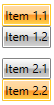
By grouping the **RadRadioButtons** the user will be allowed to check only one button in the group. In order to group several RadRadioButtons you can place them in the same layout panel (see Example 5).
**Example 5: Grouping radio buttons**
```XAML
```
The above code creates two groups of **RadRadioButtons**.
> caption Grouped radio buttons
## Customizing the RadRadioButton
* **IsBackgroundVisible** - this property is of type bool and it controls the visibility of the background and the border of the RadRadioButton control when in normal state.
> caption Radio button with hidden background

* **CornerRadius**: This property controls the corner radius of the button.
> caption Radio button with its CornerRadius set to 15

## See Also
* [Button](https://www.telerik.com/products/wpf/documentation/controls/radbuttons/features/button)
* [Toggle Button](https://www.telerik.com/products/wpf/documentation/controls/radbuttons/features/toggle-button)
* [Commands](https://www.telerik.com/products/wpf/documentation/controls/radbuttons/commands)
* [Events](https://www.telerik.com/products/wpf/documentation/controls/radbuttons/events)
* [RadRadioButton API](http://www.telerik.com/help/wpf/t_telerik_windows_controls_radradiobutton.html).