# Custom Busy Content
**RadBusyIndicator** provides the option to customize what's shown in the **RadBusyIndicator's** content while the indicator is active through its **BusyContent** and **BusyContentTemplate** properties. We will cover them in the following sections:
* [Setting BusyContent property](https://www.telerik.com/products/wpf/documentation/controls/radbusyindicator/features/custom-busy-content#setting-busycontent-property)
* [Setting BusyContentTemplate property](https://www.telerik.com/products/wpf/documentation/controls/radbusyindicator/features/custom-busy-content#setting-busycontenttemplate-property)
## Setting BusyContent property
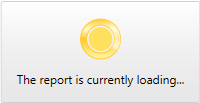
**BusyContent** property sets the loading message while the indicator is active as shown in the following example:
**Setting BusyContent**
```XAML
the content here
```
Here is the result:
## Setting BusyContentTemplate property
**RadBusyIndicator** exposes a **BusyContentTemplate** property which allows you to customize the DataTemplate shown while the indicator is in Busy state.
In this section we will show you how to create and apply a simple **BusyContentTemplate** to your **RadBusyIndicator** control. For the purpose of this example we will create a **DispatcherTimer** timer and while this timer is on, the **RadBusyIndicator** will also be active. To start the timer the user will have to click on a button. The example also includes a counter representing the progress value which will count down from 100 to 0 percent and will be visible through the **RadBusyIndicator's** busy content.
To do this, first you have to define your **RadBusyIndicator** control:
**Defining RadBusyIndicator**
```XAML
```
> Notice that the **RadBusyIndicator's Background** property is set to **Transparent**. This will be the background applied to the indicator's content and the **Grid** hosting the **RadBusyIndicator's** progress bar and content elements.
In the **RadBusyIndicator's** definition you have indicated the **BusyContentTemplate**, that's why you have to define this **DataTemplate** as well. Here is an example:
**Defining DataTemplate**
```XAML
```
In the code behind you have to:
* Create and initialize the **DispatcherTimer** object.
* Handle the click event for the button:
* Enable the **RadBusyIndicator** by setting its **IsBusy** property to **True**.
* Start the timer that will count down some period of time.
* Handle the tick event for the timer:
* Modify the counter (progress) property.
* Disable the **RadBusyIndicator** by setting its **IsBusy** property to **False** in a specific condition.
> tip You can also create a [determined RadBusyIndicator](https://www.telerik.com/products/wpf/documentation/controls/radbusyindicator/features/report-progress-value) control which provides a straightforward way to report a changing progress value.
> In order to use the **DispatcherTimer** and the **INotifyPropertyChanged** interface you will need to add the following usings/imports:
>
> * **System.ComponentModel**
> * **System.Windows.Threading**
**BusyContentTemplateSample class implementation**
```C#
public partial class BusyContentTemplateSample : UserControl, INotifyPropertyChanged
{
private int progressValue;
private DispatcherTimer progressTimer;
public event PropertyChangedEventHandler PropertyChanged;
public BusyContentTemplateSample()
{
InitializeComponent();
this.DataContext = this;
this.progressTimer = new DispatcherTimer();
this.progressTimer.Interval = TimeSpan.FromSeconds( 1 );
this.progressTimer.Tick += new EventHandler( this.progressTimer_Tick );
}
public int ProgressValue
{
get
{
return this.progressValue;
}
set
{
if ( this.progressValue == value )
return;
this.progressValue = value;
if ( this.PropertyChanged != null )
this.PropertyChanged( this, new PropertyChangedEventArgs( "ProgressValue" ) );
}
}
private void showIndicatorButton_Click( object sender, RoutedEventArgs e )
{
this.progressTimer.Start();
this.ProgressValue = 100;
this.radBusyIndicator.IsBusy = true;
}
private void progressTimer_Tick( object sender, EventArgs e )
{
this.ProgressValue--;
if ( this.ProgressValue == 0 )
{
this.progressTimer.Stop();
this.radBusyIndicator.IsBusy = false;
}
}
}
```
```VB.NET
Partial Public Class BusyContentTemplateSample
Inherits UserControl
Implements INotifyPropertyChanged
Private m_progressValue As Integer
Private progressTimer As DispatcherTimer
Public Event PropertyChanged As PropertyChangedEventHandler
Public Sub New()
InitializeComponent()
Me.DataContext = Me
Me.progressTimer = New DispatcherTimer()
Me.progressTimer.Interval = TimeSpan.FromSeconds(1)
Me.progressTimer.Tick += New EventHandler(Me.progressTimer_Tick)
End Sub
Public Property ProgressValue() As Integer
Get
Return Me.m_progressValue
End Get
Set
If Me.m_progressValue = Value Then
Return
End If
Me.m_progressValue = Value
RaiseEvent PropertyChanged(Me, New PropertyChangedEventArgs("ProgressValue"))
End Set
End Property
Private Sub showIndicatorButton_Click(sender As Object, e As RoutedEventArgs)
Me.progressTimer.Start()
Me.ProgressValue = 100
Me.radBusyIndicator.IsBusy = True
End Sub
Private Sub progressTimer_Tick(sender As Object, e As EventArgs)
Me.ProgressValue -= 1
If Me.ProgressValue = 0 Then
Me.progressTimer.[Stop]()
Me.radBusyIndicator.IsBusy = False
End If
End Sub
End Class
```
**BusyContentTemplateSample class implementation**
Here is the final result:

## See Also
* [Customizing BusyIndicator Elements](https://www.telerik.com/products/wpf/documentation/controls/radbusyindicator/customizing-busyindicator-elements)
* [Progress Determination](https://www.telerik.com/products/wpf/documentation/controls/radbusyindicator/features/progress-determination)
* [Report Progress Value](https://www.telerik.com/products/wpf/documentation/controls/radbusyindicator/features/report-progress-value)
* [Integrate RadBusyIndicator with a Service Call in RadWindow](https://www.telerik.com/products/wpf/documentation/knowledge-base/kb-busyindicator-integrate-with-services-and-radwindow)