# How to apply different templates for front and back cover page
Currently **RadBook** does not expose separate properties for setting templates for the front and back cover pages(first and last pages in RadBook's items collection). In this case, you can use the already available **DataTemplateSelectors** - **LeftPageTemplateSelector** and **RightPageTemplateSelector**. Depending on the index of each page, we will decide what template to apply on the page.
First, lets begin by creating 4 different templates:
* front cover page template
* left inner page template
* right inner page template
* back cover page template
For the sake of the example, each template will have the following structure:
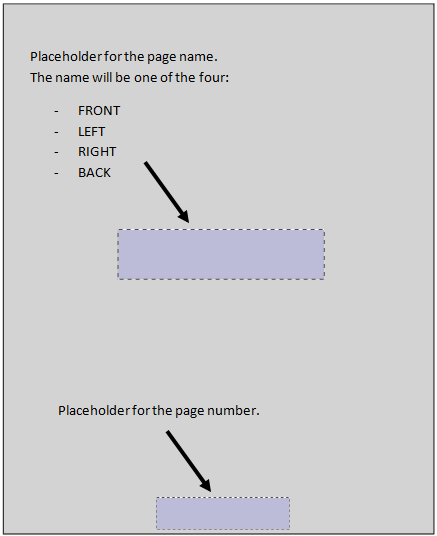
This how the four templates look like in XAML code:
**Example 1: Setting up the page templates**
```XAML
```
The next step is to create two **DataTemplateSelectors**, that will take care of picking the right template out. The first **DataTemplateSelector** will provide template for the front cover page and every consecutive right page, while the second **DataTemplateSelector** will provide template for the back cover page and every consecutive left page.
**Example 2: Defining the template selectors**
```C#
///
/// DataTemplateSelector responsible for picking template for the back cover page and every consecutive left page.
///
public class LeftPageTemplateSelector : DataTemplateSelector
{
///
/// Gets or sets the back cover template.
///
/// The back cover template.
public DataTemplate BackCoverTemplate { get; set; }
///
/// Gets or sets template for every left page in the book, except only in the case of a last page.
///
/// The left page template.
public DataTemplate LeftPageTemplate { get; set; }
public override DataTemplate SelectTemplate(object item, DependencyObject container)
{
RadBookItem page = container as RadBookItem;
// we need an instance of the book so that we can determine the whether the current page is the last page.
RadBook book = System.Windows.Controls.ItemsControl.ItemsControlFromItemContainer(container) as RadBook;
// Using the index property, we can determine whether the page is last page or it is one of the inner left pages.
if (page.Index == book.Items.Count - 1)
{
return this.BackCoverTemplate;
}
else
{
return this.LeftPageTemplate;
}
}
}
///
/// DataTemplateSelector responsible for picking template for the fron cover page and every consecutive right page.
///
public class RightPageTemplateSelector : DataTemplateSelector
{
///
/// Gets or sets the front cover template.
///
/// The front cover template.
public DataTemplate FrontCoverTemplate { get; set; }
///
/// Gets or sets template for every right page in the book, except only in the case of a first page.
///
/// The right page template.
public DataTemplate RightPageTemplate { get; set; }
public override DataTemplate SelectTemplate(object item, DependencyObject container)
{
RadBookItem page = container as RadBookItem;
// Using the index property, we can determine whether the page is first page or it is one of the inner right pages.
if (page.Index == 0)
{
return this.FrontCoverTemplate;
}
else
{
return this.RightPageTemplate;
}
}
}
```
```VB.NET
''' '''
''' DataTemplateSelector responsible for picking template for the back cover page and every consecutive left page. '''
''' '''
Public Class LeftPageTemplateSelector
Inherits DataTemplateSelector
''' '''
''' Gets or sets the back cover template. '''
''' '''
''' The back cover template. '''
Public Property BackCoverTemplate() As DataTemplate
Get
Return m_BackCoverTemplate
End Get
Set(ByVal value As DataTemplate)
m_BackCoverTemplate = Value
End Set
End Property
Private m_BackCoverTemplate As DataTemplate
''' '''
''' Gets or sets template for every left page in the book, except only in the case of a last page. '''
''' '''
''' The left page template. '''
Public Property LeftPageTemplate() As DataTemplate
Get
Return m_LeftPageTemplate
End Get
Set(ByVal value As DataTemplate)
m_LeftPageTemplate = Value
End Set
End Property
Private m_LeftPageTemplate As DataTemplate
Public Overrides Function SelectTemplate(ByVal item As Object, ByVal container As DependencyObject) As DataTemplate
Dim page As RadBookItem = TryCast(container, RadBookItem)
' we need an instance of the book so that we can determine the whether the current page is the last page. '
Dim book As RadBook = TryCast(System.Windows.Controls.ItemsControl.ItemsControlFromItemContainer(container), RadBook)
' Using the index property, we can determine whether the page is last page or it is one of the inner left pages. '
If page.Index = book.Items.Count - 1 Then
Return Me.BackCoverTemplate
Else
Return Me.LeftPageTemplate
End If
End Function
End Class
''' '''
''' DataTemplateSelector responsible for picking template for the fron cover page and every consecutive right page. '''
''' '''
Public Class RightPageTemplateSelector
Inherits DataTemplateSelector
''' '''
''' Gets or sets the front cover template. '''
''' '''
''' The front cover template. '''
Public Property FrontCoverTemplate() As DataTemplate
Get
Return m_FrontCoverTemplate
End Get
Set(ByVal value As DataTemplate)
m_FrontCoverTemplate = Value
End Set
End Property
Private m_FrontCoverTemplate As DataTemplate
''' '''
''' Gets or sets template for every right page in the book, except only in the case of a first page. '''
''' '''
''' The right page template. '''
Public Property RightPageTemplate() As DataTemplate
Get
Return m_RightPageTemplate
End Get
Set(ByVal value As DataTemplate)
m_RightPageTemplate = Value
End Set
End Property
Private m_RightPageTemplate As DataTemplate
Public Overrides Function SelectTemplate(ByVal item As Object, ByVal container As DependencyObject) As DataTemplate
Dim page As RadBookItem = TryCast(container, RadBookItem)
' Using the index property, we can determine whether the page is first page or it is one of the inner right pages. '
If page.Index = 0 Then
Return Me.FrontCoverTemplate
Else
Return Me.RightPageTemplate
End If
End Function
End Class
```
Next, we can instantiate the two template selectors in XAML...
**Example 3: Adding the template selectors in XAML**
```XAML
```
... and pass them to the book:
**Example 4: Passing the template selectors to the RadBook control**
```XAML
```
Finally, all we have to do is populate the book with items. In this example, the book will be bound to an array of numbers.
**Example 5: Setting the ItemsSource of the RadBook control**
```C#
this.radBook1.ItemsSource = Enumerable.Range(0, 10);
```
```VB.NET
Partial Public Class MainPage
Inherits UserControl
Public Sub New()
InitializeComponent()
book1.ItemsSource = Enumerable.Range(0, 10)
End Sub
End Class
```
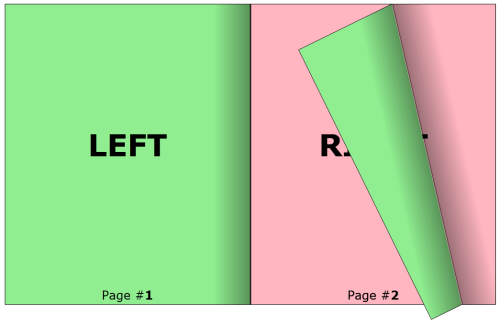
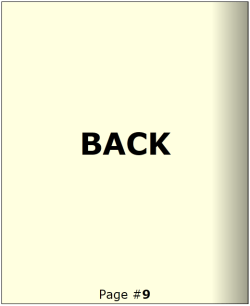
This is how the final result looks like: