# Suggestions

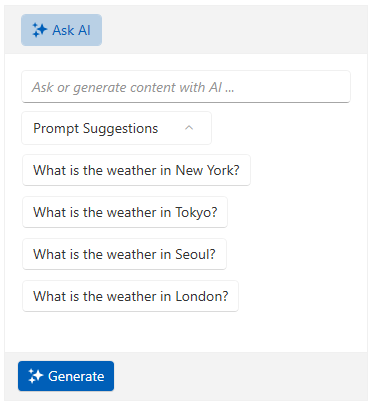
The `RadAIPrompt` control allows you to define suggestions for the user prior to initiating a request. To do so, set the `AreSuggestionsVisible` property to **True** of RadAIPrompt and add entries of the type of **string** to its `Suggestions` collection. The Suggestions property expects a collection that implements the `IEnumerable` interface.

**Showing Suggestions in the RadAIPrompt**

```XAML
<telerik:RadAIPrompt x:Name="aiPrompt1" AreSuggestionsVisible="True">
    <telerik:RadAIPromptInputItem />
    <telerik:RadAIPrompt.Suggestions>
        <x:Array Type="sys:String"
             xmlns:x="http://schemas.microsoft.com/winfx/2006/xaml"
             xmlns:sys="clr-namespace:System;assembly=mscorlib">
            <sys:String>What is the weather in New York?</sys:String>
            <sys:String>What is the weather in Tokyo?</sys:String>
            <sys:String>What is the weather in Seoul?</sys:String>
            <sys:String>What is the weather in London?</sys:String>
        </x:Array>
    </telerik:RadAIPrompt.Suggestions>
</telerik:RadAIPrompt>

```

> caption RadAIPrompt with suggestions
![WPF RadAIPrompt with suggestions](https://www.telerik.com/products/wpf/documentation/assets/315d0909445075b38b6cc7265be7ef25/radaiprompt-suggestions-0.png)

## Customizing the Appearance of the Suggestions

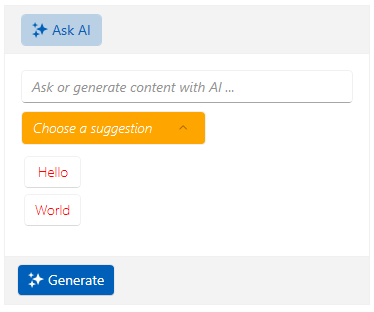
RadAIPrompt control exposes properties that will allow you to customize the appearance of each suggestion. They are as follows:

* `SuggestionItemTemplate`—Allows you to set a custom DataTemplate that will be applied to each suggestion.
* `SuggestionHeaderContent`—Provides the functionality to specify a header for the element that displays the suggestions.
* `SuggestionHeaderContentTemplate`—Allows you to specify a custom DataTemplate for the header of the element that visualizes the suggestions.
* `SuggestionsExpanderStyle`—This property lets you set a custom Style for the RadExpander element that displays the suggestions.

The following example showcases the RadAIPrompt when the above properties are used:

**Defining a sample model and a view model**

```C#
public class SuggestionItem
{
    public string SuggestionItemName { get; set; }
}

public class SuggestionsViewModel
{
    public SuggestionsViewModel()
    {
        this.SuggestionItems = new ObservableCollection<SuggestionItem>()
            {
                new SuggestionItem(){ SuggestionItemName = "Hello" },
                new SuggestionItem(){ SuggestionItemName = "World" },
            };
    }

    public ObservableCollection<SuggestionItem> SuggestionItems { get; set; }
}
```

**Defining the RadAIPrompt and its properties**

```XAML
<Grid>
    <Grid.DataContext>
        <local:SuggestionsViewModel/>
    </Grid.DataContext>
    <telerik:RadAIPrompt x:Name="aiPrompt" 
                             Suggestions="{Binding SuggestionItems}" 
                             SuggestionsHeaderContent="Choose a suggestion" 
                             AreSuggestionsVisible="True">
        <telerik:RadAIPromptInputItem />
        <telerik:RadAIPrompt.SuggestionItemTemplate>
            <DataTemplate>
                <telerik:RadButton Content="{Binding SuggestionItemName}"
                                       Command="{Binding SuggestionClickedCommand, RelativeSource={RelativeSource Mode=FindAncestor, AncestorType=telerik:RadAIPrompt}}"
                                       CommandParameter="{Binding SuggestionItemName}"
                                       FontWeight="Thin"
                                       Background="White"
                                       Foreground="Red"/>
            </DataTemplate>
        </telerik:RadAIPrompt.SuggestionItemTemplate>
        <telerik:RadAIPrompt.SuggestionsHeaderContentTemplate>
            <DataTemplate>
                <TextBlock Text="{Binding}" FontWeight="Thin" FontStyle="Italic" Foreground="White"/>
            </DataTemplate>
        </telerik:RadAIPrompt.SuggestionsHeaderContentTemplate>
        <telerik:RadAIPrompt.SuggestionsExpanderStyle>
            
            <Style TargetType="telerik:RadExpander">
                <Setter Property="Background" Value="Orange"/>
            </Style>
        </telerik:RadAIPrompt.SuggestionsExpanderStyle>
    </telerik:RadAIPrompt>
</Grid>
```

> caption RadAIPrompt suggestions with custom appearance
![WPF RadAIPrompt suggestions with custom appearance](https://www.telerik.com/products/wpf/documentation/assets/4aa14ec38cc8947f27d9a3d995da3ebf/radaiprompt-suggestions-1.png)

## See Also

* [Views](https://www.telerik.com/products/wpf/documentation/controls/radaiprompt/views)
* [Events](https://www.telerik.com/products/wpf/documentation/controls/radaiprompt/events)
* [RadAIPromptButton](https://www.telerik.com/products/wpf/documentation/controls/radaiprompt/aiprompt-button)
* [Commands](https://www.telerik.com/products/wpf/documentation/controls/radaiprompt/commands)
* [Paging](https://www.telerik.com/products/wpf/documentation/controls/radaiprompt/paging)
