# Commands
`RadAIPrompt` provides several commands that you can utilize when working with the component. Furthermore, it allows you to define custom commands that will be displayed in a separate view to further personalize the control.
The following list shows the commands that are exposed by the RadAIPrompt control:
* `PromptRequestCommand`—This command is executed when the input button is clicked.
* `SuggestionClickedCommand`—This command is executed when a suggestion from the Suggestions collection is clicked.
* `OutputItemCopyCommand`—This command is executed when the copy button of the generated response item is clicked.
* `OutputItemRetryCommand`—This command is executed when the retry button of the generated response item is clicked.
* `OutputItemRatingChangedCommand`—This command is executed when the rating of the generated response is changed through the UI.
The following example shows how to utilize one of the above-listed commands.
**Defining an ICommand property in the view model**
```C#
public class MyViewModel
{
public MyViewModel()
{
this.PromptRequestCommand = new DelegateCommand(OnPromptRequestCommandExecuted);
}
public ICommand PromptRequestCommand { get; set; }
private void OnPromptRequestCommandExecuted(object obj)
{
//Execute your logic here when the PromptRequestCommand of RadAIPrompt is executed
}
}
```
**Binding the view model ICommand to the PromptRequestCommand of RadAIPrompt**
```XAML
```
## Configuring Custom Commands
The RadAIPrompt exposes the `Commands` collection. It allows you to provide a collection of objects deriving from the`AIPromptCommandBase` class that will be displayed in the [commands view](https://www.telerik.com/products/wpf/documentation/controls/radaiprompt/views#commands-view) of the component.
The AIPromptCommandBase class provides the following properties:
* `Icon`—Allows you to display an icon for the command in the commands view. By default, a `Uri` that points to an svg image is expected. The svg is displayed via the [RadSvgImage](https://www.telerik.com/products/wpf/documentation/controls/radsvgimage/overview) element.
* `Text`—Allows you to specify a string that will display information about the command.
To add a logic that will be executed when the user interacts with the commands view's items, the RadAIPrompt provides two objects that extend the AIPromptCommandBase class. They are the `AIPromptCommand` and `AIPromptCommandGroup` objects.
### AIPromptCommand
This class exposes the `Command` property that will allow you to set an `ICommand` implementation to it. It will be raised when the User interacts with it.
**Creating an AIPromptCommand instance**
```C#
public class MyViewModel
{
public MyViewModel()
{
AIPromptCommand simplifyCommand = new AIPromptCommand()
{
Command = new DelegateCommand(OnSimplifyCommandExecuted),
Text = "Simplify",
};
this.MyCommands = new ObservableCollection()
{
simplifyCommand
};
}
public ObservableCollection MyCommands { get; set; }
private void OnSimplifyCommandExecuted(object obj)
{
MessageBox.Show("SimplifyCommand Executed");
}
}
```
**Binding the custom commands collection to RadAIPrompt**
```XAML
```
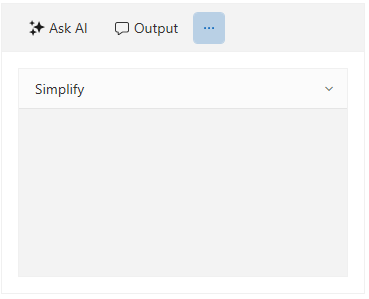
> caption RadAIPrompt with a custom commands collection
### AIPromptCommandGroup
The `AIPromptCommandGroup` object provides the `Commands` collection property. It will allow you to group `AIPromptCommand` instances.
**Creating an AIPromptCommandGroup instance**
```C#
public class MyViewModel
{
public MyViewModel()
{
AIPromptCommand simplifyCommand = new AIPromptCommand()
{
Command = new DelegateCommand(OnSimplifyCommandExecuted),
Text = "Simplify"
};
AIPromptCommand extendCommand = new AIPromptCommand()
{
Command = new DelegateCommand(OnExtendCommandExecuted),
Text = "Extend"
};
AIPromptCommandGroup aIPromptCommandGroup = new AIPromptCommandGroup()
{
Text = "Commands group"
};
List commands = new List()
{
simplifyCommand,
extendCommand
};
aIPromptCommandGroup.Commands = commands;
this.MyCommands = new ObservableCollection()
{
aIPromptCommandGroup
};
}
public ObservableCollection MyCommands { get; set; }
private void OnSimplifyCommandExecuted(object obj)
{
MessageBox.Show("SimplifyCommand Executed");
}
private void OnExtendCommandExecuted(object obj)
{
MessageBox.Show("ExtendCommand Executed");
}
}
```
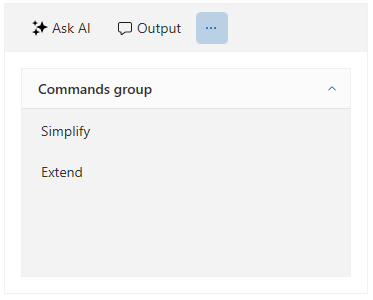
> caption RadAIPrompt with grouped commands
## See Also
* [Views](https://www.telerik.com/products/wpf/documentation/controls/radaiprompt/views)
* [Events](https://www.telerik.com/products/wpf/documentation/controls/radaiprompt/events)
* [RadAIPromptButton](https://www.telerik.com/products/wpf/documentation/controls/radaiprompt/aiprompt-button)
* [Suggestions](https://www.telerik.com/products/wpf/documentation/controls/radaiprompt/suggestions)
* [Paging](https://www.telerik.com/products/wpf/documentation/controls/radaiprompt/paging)