# Set Drag Visual
DragDropManager enables you to define your own custom drag cue. This can be easily done by handling the [DragInitialize](https://www.telerik.com/products/wpf/documentation/controls/dragdropmanager/events) event and defining the DragVisual.
We will demonstrate this functionality implemented within a simple ListBox. For the purpose we need to execute the following steps:
1. Create a ListBox with ItemTemplate and implicit Style for the ListBox Items:
```XAML
```
2. Bind ListBox to simple data and subscribe to DragInitialize event:
```C#
public MainPage()
{
InitializeComponent();
this.DataContext = new ObservableCollection(from c in Enumerable.Range(0, 10) select "Item" + c);
DragDropManager.AddDragInitializeHandler(SampleListBox, OnDragInitialize);
}
```
```VB.NET
Public Sub New()
InitializeComponent()
Me.DataContext = New ObservableCollection(Of String)(From c In Enumerable.Range(0, 10)"Item" & c)
DragDropManager.AddDragInitializeHandler(Me, New DragInitializeEventHandler(AddressOf OnDragInitialized))
End Sub
```
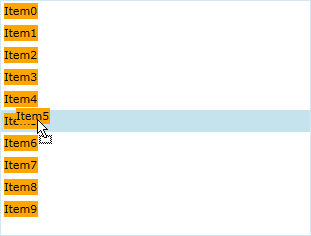
3. Set suitable drag visual that will be displayed while dragging is performed:
```C#
private void OnDragInitialize(object sender, DragInitializeEventArgs args)
{
args.Data = ((FrameworkElement)args.OriginalSource).DataContext;
args.DragVisual = new ContentControl { ContentTemplate = this.LayoutRoot.Resources["ItemTemplate"] as DataTemplate, Content = args.Data };
args.AllowedEffects = DragDropEffects.All;
args.Handled = true;
}
```
```VB.NET
Private Sub OnDragInitialize(ByVal sender As Object, ByVal args As DragInitializeEventArgs)
args.Data = DirectCast(args.OriginalSource, FrameworkElement).DataContext
args.DragVisual = New ContentControl With {.ContentTemplate = TryCast(Me.LayoutRoot.Resources("ItemTemplate"), DataTemplate), .Content = args.Data}
args.AllowedEffects = DragDropEffects.All
args.Handled = True
End Sub
```
On running the application, the following will be visualized: