`. |
| ``, `` | ``, `` | Displays bold text. |
| ``, `` | ``, `` | Displays italic text. |
| `` | `` | Underlines text. |
| `
` | N/A | Inserts a line break. |
| `` | `
` | Creates a paragraph. |
| `` | `` | Applies limited inline styling through `font-family`, `font-size`, `color`, and `background-color`. Use this tag when possible. |
| `` | `
` | Creates an ordered list. |
| `` | Creates an unordered list. |
| `` | `` | Creates a list item inside an ordered or unordered list. |
| `` | `` | Displays strikethrough text. |
| `` | `` | Creates a hyperlink. |
| `![]() ` | N/A | Displays an image. |
## Common Formatting Examples
The examples below cover the most common formatting tasks.
### Bold, Italic, and Underline
The following example combines bold, italic, and underlined text:
```HTML
some text some text
```
### Paragraphs
Use `
` to separate text into paragraphs:
```HTML
First paragraph
Second paragraph
```
### Font Color
Set the text color by using a named color such as `red` or a hexadecimal value such as `#0000FF`:
```HTML
font color (color name)
font color (hex color)
```
### Font Size
You can use relative sizes such as `larger` and `smaller`, named absolute sizes such as `small` or `x-large`, or point values. The default font size in Windows Forms on most systems is `8.25pt`, which is the value returned by `SystemFonts.DefaultFont`.
```HTML
font size(absolute)
font size in pt(s) (absolute)
font size(relative)
```
### Highlighted Text
Use `background-color` to highlight text:
```HTML
Highlighted Text
```
### Font Family
Set the font family through the `style` attribute of a `` tag:
```HTML
Font Family
```
### Strikethrough Text
Use `` to display strikethrough text:
```HTML
Some text
```
## Links and Images
Use hyperlinks when you want formatted text to navigate to another location, and use images when text alone is not enough.
### Links
The following example shows the Telerik hyperlink markup that opens an external link:
```HTML
Telerik Corporation
```
### Images
Use `![]() ` to display an image in the formatted text:
```HTML
 ```
The image path can point to an embedded resource or to a file on disk. To specify a resource, use the `res:` prefix:
```HTML
 ```
To specify a file on disk, provide the full path, for example `src="C:\some path\image.png"`, or use `~` to refer to the current directory, for example `src="~\some path\image.gif"`. All image formats supported by the .NET `Image` class are supported by the `
![]() ` tag.
## RadMarkupEditor specifics
`RadMarkupEditor` and `TextPrimitive` share much of the same formatting model, but they do not support exactly the same tags. `TextPrimitive` also supports several non-standard tags.
> note See the [RadMarkupDialog](https://docs.telerik.com/devtools/winforms/telerik-presentation-framework/markup-dialog/radmarkupdialog) article for the list of supported tags. The `font`, `color`, and `size` tags are rendered by `TextPrimitive`, but they are not supported by `RadMarkupDialog`.
You can use `` to change the font size, `
` to insert a new line, and the matching opening and closing tags to apply bold, underline, or italic formatting. Set the font family through ``.
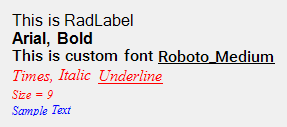
The following code snippet produces the formatted result shown in the screenshot:
**RadLabel markup with mixed font styles, colors, sizes, and custom font content**
```C#
this.radLabel1.Text = "This is RadLabel
Arial, Bold
Times, Italic Underline
Size = 9
Sample Text";
```
```VB.NET
Me.RadLabel1.Text = "This is RadLabel
Arial, Bold
Times, Italic Underline
Size = 9
Sample Text"
```
> caption Figure 1: A RadLabel that displays multiple HTML-like text styles
## Display Multiple Hyperlinks in RadLabel
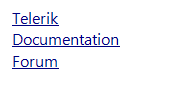
`RadLabel` can display multiple hyperlinks in a single formatted text block. The following example shows how to define several links:
```C#
this.radLabel1.Text = "Telerik" + Environment.NewLine +
"Documentation " + Environment.NewLine +
"Forum ";
```
```VB.NET
Me.RadLabel1.Text = "Telerik" & Environment.NewLine & _
"Documentation " & Environment.NewLine & _
"Forum "
```
The hyperlink colors are controlled by these static properties:
* `TinyHTMLParsers.LinkColor`: Default hyperlink color.
* `TinyHTMLParsers.LinkClickedColor`: Visited hyperlink color.
> caption Figure 2: A RadLabel that displays multiple hyperlinks
## Controlling Hyperlink Navigation
Links in TPF HTML-formatted text require both `HyperlinkHelper.ValidateLinkPattern` and `HyperlinkHelper.ValidateLinkScheme` before automatic navigation. Only absolute `http`, `https`, and `mailto` URIs are accepted by default. In markup, use an explicit scheme such as `href=https://www.telerik.com`; the bare `www.` addresses in the formatting example above are not absolute URIs and are not automatically opened.
`Telerik.WinControls.TextPrimitiveUtils.FormattedTextBlock.HyperlinkClicked` provides a local hook before navigation. Its `Telerik.WinControls.Hyperlinks.HyperlinkClickedEventArgs` exposes `URL`, `IsTrustedUrl`, and `Handled`. If the local event does not handle the request, `HyperlinkHelper.HyperlinkClicked` runs next. Only an unhandled request whose final trust state is `true` is launched.
The following code runs after `radLabel1` has been initialized and its formatted text has been assigned. It approves only an exact application-controlled custom-protocol destination. Ensure that the registered protocol handler is trusted.
**Approving a Destination in One Formatted Text Block**
```C#
var htmlText = this.radLabel1.LabelElement.LabelText.Impl
as Telerik.WinControls.Primitives.TextPrimitiveHtmlImpl;
if (htmlText != null)
{
htmlText.TextBlock.HyperlinkClicked += (sender, e) =>
{
if (string.Equals(e.URL, "contoso-help://help/start",
System.StringComparison.Ordinal))
{
e.IsTrustedUrl = true;
}
};
}
```
Set `Handled` to `true` instead when application code handles or rejects the request. The subscription applies to that text block instance; if text changes recreate the block, register the handler on the new block or use the shared event described below.
> important Applications that rely on formatted-text links opening FTP URLs, UNC/file paths, OneNote links, or custom protocols must explicitly handle or approve those destinations.
## Shared Hyperlink Validation
`Telerik.WinControls.HyperlinkHelper` provides the shared hyperlink API used by TPF formatted text and participating Telerik UI for WinForms controls. Its validation methods serve different purposes:
| Method | Validation |
| ----------------------------- | -------------------------------------------------------------------------------------------------------------------------------------------- |
| `ValidateLinkPattern(string)` | Recognizes link formats, including HTTP/HTTPS, FTP, `mailto`, UNC paths, OneNote links, addresses starting with `www.`, and email addresses. |
| `ValidateLinkScheme(string)` | Requires an absolute URI whose scheme is `http`, `https`, or `mailto`. |
Default external navigation requires both checks to return `true`. Passing `ValidateLinkPattern` alone does not mean that a link will open. An FTP URL, for example, can pass the pattern check but fail the scheme check.
**Checking a Destination Against the Default Policy**
```C#
string destination = "https://example.com/help";
bool passesDefaultValidation =
Telerik.WinControls.HyperlinkHelper.ValidateLinkPattern(destination) &&
Telerik.WinControls.HyperlinkHelper.ValidateLinkScheme(destination);
```
## Handling Links Across Controls
Subscribe to the static `HyperlinkHelper.HyperlinkClicked` event to handle requests across participating controls. Its `Telerik.WinControls.Hyperlinks.HyperlinkClickedEventArgs` provides `URL`, `IsTrustedUrl`, and `Handled`. The destination property is named `URL`, not `Url`.
Local handlers run first. A locally handled request does not reach the shared event. An unhandled request can reach it even when `IsTrustedUrl` is `false`, allowing an application to approve an otherwise blocked destination. Set `IsTrustedUrl` to `true` only after checking the destination against your application's policy. Setting it to `false` alone does not prevent a later handler from changing it back to `true`.
**Approving an Application Destination Globally**
```C#
using System;
using System.Windows.Forms;
using Telerik.WinControls;
using Telerik.WinControls.Hyperlinks;
public class MainForm : Form
{
public MainForm()
{
HyperlinkHelper.HyperlinkClicked += this.OnHyperlinkClicked;
}
private void OnHyperlinkClicked(object sender, HyperlinkClickedEventArgs e)
{
if (string.Equals(e.URL, "contoso-help://help/start", StringComparison.Ordinal))
{
e.IsTrustedUrl = true;
}
}
protected override void Dispose(bool disposing)
{
if (disposing)
{
HyperlinkHelper.HyperlinkClicked -= this.OnHyperlinkClicked;
}
base.Dispose(disposing);
}
}
```
Leaving `Handled` as `false` allows the originating control to navigate after checking the final trust state. If your application performs navigation itself, set `Handled` to `true` to prevent a second launch. To reject a request definitively, set `Handled` to `true` without launching anything. Never approve every destination unconditionally or use `ValidateLinkPattern` alone as your approval policy.
The shared event receives unhandled requests from GridView hyperlink columns, RadMap's HTML renderer, RadPdfViewer URI annotations, RichTextEditor, and Spreadsheet. GridView uses `HyperlinkOpeningEventArgs.Cancel` for local cancellation; setting it to `true` stops the request before the shared event.
## Detect the Clicked Hyperlink
If a `RadLabel` contains multiple hyperlinks, you can detect which one the user clicked. The example below inspects the `TextPrimitiveHtmlImpl.TextBlock.Lines` collection and finds the `FormattedText` instance under the mouse pointer.
```C#
private void RadLabel1_MouseDown(object sender, MouseEventArgs e)
{
TextPrimitiveHtmlImpl text = this.radLabel1.LabelElement.LabelText.Impl as TextPrimitiveHtmlImpl;
FormattedTextBlock textBlock = text.TextBlock;
FormattedText clickedLink = IsMouseOverBlock(textBlock, e);
if (clickedLink != null)
{
MessageBox.Show(clickedLink.Text + " pressed");
}
}
private FormattedText IsMouseOverBlock(FormattedTextBlock textBlock, MouseEventArgs e)
{
Point elementAtPoint = this.radLabel1.LabelElement.PointFromControl(e.Location);
int linesCount = textBlock.Lines.Count;
for (int i = 0; i <= linesCount - 1; i++)
{
TextLine textLine = textBlock.Lines[i];
int textLineCount = textLine.List.Count;
for (int j = 0; j <= textLineCount - 1; j++)
{
FormattedText formattedText = textLine.List[j];
if (formattedText.DrawingRectangle.Contains(elementAtPoint))
{
//found link under mouse
return formattedText;
}
}
}
return null;
}
```
```VB.NET
Private Sub RadLabel1_MouseDown(sender As Object, e As MouseEventArgs)
Dim text As TextPrimitiveHtmlImpl = TryCast(Me.RadLabel1.LabelElement.LabelText.Impl, TextPrimitiveHtmlImpl)
Dim textBlock As FormattedTextBlock = text.TextBlock
Dim clickedLink As FormattedText = IsMouseOverBlock(textBlock, e)
If clickedLink IsNot Nothing Then
MessageBox.Show(clickedLink.Text + " pressed")
End If
End Sub
Private Function IsMouseOverBlock(textBlock As FormattedTextBlock, e As MouseEventArgs) As FormattedText
Dim elementAtPoint As Point = Me.RadLabel1.LabelElement.PointFromControl(e.Location)
Dim linesCount As Integer = textBlock.Lines.Count
For i As Integer = 0 To linesCount - 1
Dim textLine As TextLine = textBlock.Lines(i)
Dim textLineCount As Integer = textLine.List.Count
For j As Integer = 0 To textLineCount - 1
Dim formattedText As FormattedText = textLine.List(j)
If formattedText.DrawingRectangle.Contains(elementAtPoint) Then
'found link under mouse
Return formattedText
End If
Next
Next
Return Nothing
End Function
```
## See Also
* [Animations](https://www.telerik.com/products/winforms/documentation/telerik-presentation-framework/animations)
* [Dependency Properties](https://www.telerik.com/products/winforms/documentation/telerik-presentation-framework/dependency-properties)
* [Handling User Input](https://www.telerik.com/products/winforms/documentation/telerik-presentation-framework/handling-user-input)
* [Inherit Themes from RadControls Derivatives](https://www.telerik.com/products/winforms/documentation/telerik-presentation-framework/inherit-themes-from-radcontrols-derivatives)
* [Microsoft Active Accessibility Support](https://www.telerik.com/products/winforms/documentation/telerik-presentation-framework/microsoft-active-accessibility-support)
* [Override Theme Settings at Run Time](https://www.telerik.com/products/winforms/documentation/telerik-presentation-framework/override-theme-settings-at-run-time)
* [RadMarkupDialog](https://www.telerik.com/products/winforms/documentation/telerik-presentation-framework/markup-dialog/radmarkupdialog)