# How to reorder rows in bound RadGridView
## Environment
| Product Version |
2018.2.621 |
| Product |
RadGridView for WinForms |
## Description
**RadGridView** supports [rows reordering](https://www.telerik.com/products/winforms/documentation/controls/gridview/end-user-capabilities/reordering-rows) and it can be done by the user at run time. However, rows reordering is only available for grids in unbound mode. This article demonstrates a sample approach how to achieve rows reordering by drag and drop functionality in a bound grid.
## Solution
Consider the grid is bound to a collection of custom objects. Note that **RadGridView** handles the whole drag and drop operation by its [RadGridViewDragDropService](https://www.telerik.com/products/winforms/documentation/controls/gridview/features/drag-and-drop/radgridviewdragdropservice). We will utilize the service in order to achieve the desired rows reordering by using drag and drop behavior.
> caption Figure 1: Rows reordering in bound grid
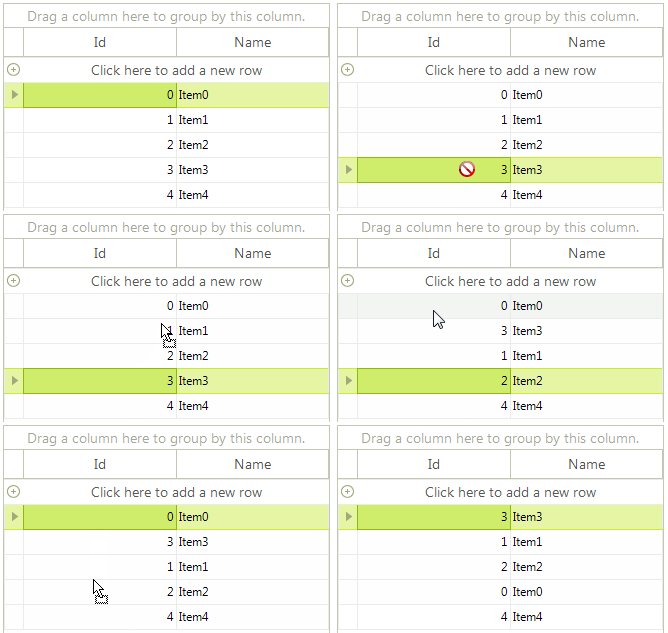
There are two main points for accomplishing the following behavior:
1. Register a custom [GridDataRowBehavior](https://www.telerik.com/products/winforms/documentation/controls/gridview/visual-elements/rows/row-behaviors) which starts the [RadGridViewDragDropService](https://www.telerik.com/products/winforms/documentation/controls/gridview/features/drag-and-drop/radgridviewdragdropservice) when you click with the left mouse button.
2. Handle the RadDragDropService.**PreviewDragStart** event in order to indicate that **RadGridView** can start the drag operation. In the RadDragDropService.**PreviewDragOver** event you can control on what targets the row being dragged can be dropped on. In the **PreviewDragDrop** event you can perform the actual reordering of the data bound records. Note that it is important to remove the dragged record from the **DataSource** collection and insert it at the new index. You don't manipulate the RadGridView.**Rows** collection but the **DataSource** collection and its records.
You can find below a complete sample code snippet demonstrating how to bind **RadGridView** to a collection of custom objects and
```C#
public GridViewRowsReorderBoundMode()
{
InitializeComponent();
BindingList- items = new BindingList
- ();
for (int i = 0; i < 5; i++)
{
items.Add(new Item(i, "Item" + i));
}
this.radGridView1.DataSource = items;
this.radGridView1.AutoSizeColumnsMode = Telerik.WinControls.UI.GridViewAutoSizeColumnsMode.Fill;
//register the custom row behavior
BaseGridBehavior gridBehavior = this.radGridView1.GridBehavior as BaseGridBehavior;
gridBehavior.UnregisterBehavior(typeof(GridViewDataRowInfo));
gridBehavior.RegisterBehavior(typeof(GridViewDataRowInfo), new CustomGridDataRowBehavior());
//handle drag and drop events for the grid through the DragDrop service
RadDragDropService svc =
this.radGridView1.GridViewElement.GetService();
svc.PreviewDragStart += svc_PreviewDragStart;
svc.PreviewDragDrop += svc_PreviewDragDrop;
svc.PreviewDragOver += svc_PreviewDragOver;
}
//required to initiate drag and drop when grid is in bound mode
private void svc_PreviewDragStart(object sender, PreviewDragStartEventArgs e)
{
e.CanStart = true;
}
private void svc_PreviewDragOver(object sender, RadDragOverEventArgs e)
{
if (e.DragInstance is GridDataRowElement)
{
e.CanDrop = e.HitTarget is GridDataRowElement ||
e.HitTarget is GridTableElement ||
e.HitTarget is GridSummaryRowElement;
}
}
//initiate the move of selected row
private void svc_PreviewDragDrop(object sender, RadDropEventArgs e)
{
GridDataRowElement rowElement = e.DragInstance as GridDataRowElement;
if (rowElement == null)
{
return;
}
e.Handled = true;
RadItem dropTarget = e.HitTarget as RadItem;
RadGridView targetGrid = dropTarget.ElementTree.Control as RadGridView;
if (targetGrid == null)
{
return;
}
var dragGrid = rowElement.ElementTree.Control as RadGridView;
if (targetGrid == dragGrid)
{
e.Handled = true;
GridDataRowElement dropTargetRow = dropTarget as GridDataRowElement;
int index = dropTargetRow != null ? this.GetTargetRowIndex(dropTargetRow, e.DropLocation) : targetGrid.RowCount;
GridViewRowInfo rowToDrag = dragGrid.SelectedRows[0];
this.MoveRows(dragGrid, rowToDrag, index);
}
}
private int GetTargetRowIndex(GridDataRowElement row, Point dropLocation)
{
int halfHeight = row.Size.Height / 2;
int index = row.RowInfo.Index;
if (dropLocation.Y > halfHeight)
{
index++;
}
return index;
}
private void MoveRows(RadGridView dragGrid,
GridViewRowInfo dragRow, int index)
{
dragGrid.BeginUpdate();
GridViewRowInfo row = dragRow;
if (row is GridViewSummaryRowInfo)
{
return;
}
if (dragGrid.DataSource != null && typeof(System.Collections.IList).IsAssignableFrom(dragGrid.DataSource.GetType()))
{
//bound to a list of objects scenario
var sourceCollection = (System.Collections.IList)dragGrid.DataSource;
if (row.Index < index)
{
index--;
}
sourceCollection.Remove(row.DataBoundItem);
sourceCollection.Insert(index, row.DataBoundItem);
}
else
{
throw new ApplicationException("Unhandled Scenario");
}
dragGrid.EndUpdate(true);
}
public class CustomGridDataRowBehavior : GridDataRowBehavior
{
protected override bool OnMouseDownLeft(MouseEventArgs e)
{
GridDataRowElement row = this.GetRowAtPoint(e.Location) as GridDataRowElement;
if (row != null)
{
RadGridViewDragDropService svc = this.GridViewElement.GetService();
svc.AllowAutoScrollColumnsWhileDragging = false;
svc.AllowAutoScrollRowsWhileDragging = false;
svc.Start(row);
}
return base.OnMouseDownLeft(e);
}
}
public class Item
{
public Item(int id, string name)
{
this.Id = id;
this.Name = name;
}
public int Id { get; set; }
public string Name { get; set; }
}
```
```VB.NET
Sub New()
InitializeComponent()
Dim items As BindingList(Of Item) = New BindingList(Of Item)()
For i As Integer = 0 To 5 - 1
items.Add(New Item(i, "Item" & i))
Next
Me.RadGridView1.DataSource = items
Me.RadGridView1.AutoSizeColumnsMode = Telerik.WinControls.UI.GridViewAutoSizeColumnsMode.Fill
Dim gridBehavior As BaseGridBehavior = TryCast(Me.RadGridView1.GridBehavior, BaseGridBehavior)
gridBehavior.UnregisterBehavior(GetType(GridViewDataRowInfo))
gridBehavior.RegisterBehavior(GetType(GridViewDataRowInfo), New CustomGridDataRowBehavior())
Dim svc As RadDragDropService = Me.RadGridView1.GridViewElement.GetService(Of RadDragDropService)()
AddHandler svc.PreviewDragStart, AddressOf svc_PreviewDragStart
AddHandler svc.PreviewDragDrop, AddressOf svc_PreviewDragDrop
AddHandler svc.PreviewDragOver, AddressOf svc_PreviewDragOver
End Sub
Private Sub svc_PreviewDragStart(ByVal sender As Object, ByVal e As PreviewDragStartEventArgs)
e.CanStart = True
End Sub
Private Sub svc_PreviewDragOver(ByVal sender As Object, ByVal e As RadDragOverEventArgs)
If TypeOf e.DragInstance Is GridDataRowElement Then
e.CanDrop = TypeOf e.HitTarget Is GridDataRowElement OrElse TypeOf e.HitTarget Is GridTableElement OrElse TypeOf e.HitTarget Is GridSummaryRowElement
End If
End Sub
Private Sub svc_PreviewDragDrop(ByVal sender As Object, ByVal e As RadDropEventArgs)
Dim rowElement As GridDataRowElement = TryCast(e.DragInstance, GridDataRowElement)
If rowElement Is Nothing Then
Return
End If
e.Handled = True
Dim dropTarget As RadItem = TryCast(e.HitTarget, RadItem)
Dim targetGrid As RadGridView = TryCast(dropTarget.ElementTree.Control, RadGridView)
If targetGrid Is Nothing Then
Return
End If
Dim dragGrid = TryCast(rowElement.ElementTree.Control, RadGridView)
If targetGrid.Equals(dragGrid) Then
e.Handled = True
Dim dropTargetRow As GridDataRowElement = TryCast(dropTarget, GridDataRowElement)
Dim index As Integer = If(dropTargetRow IsNot Nothing, Me.GetTargetRowIndex(dropTargetRow, e.DropLocation), targetGrid.RowCount)
Dim rowToDrag As GridViewRowInfo = dragGrid.SelectedRows(0)
Me.MoveRows(dragGrid, rowToDrag, index)
End If
End Sub
Private Function GetTargetRowIndex(ByVal row As GridDataRowElement, ByVal dropLocation As Point) As Integer
Dim halfHeight As Integer = row.Size.Height / 2
Dim index As Integer = row.RowInfo.Index
If dropLocation.Y > halfHeight Then
index += 1
End If
Return index
End Function
Private Sub MoveRows(ByVal dragGrid As RadGridView, ByVal dragRow As GridViewRowInfo, ByVal index As Integer)
dragGrid.BeginUpdate()
Dim row As GridViewRowInfo = dragRow
If TypeOf row Is GridViewSummaryRowInfo Then
Return
End If
If dragGrid.DataSource IsNot Nothing AndAlso GetType(System.Collections.IList).IsAssignableFrom(dragGrid.DataSource.[GetType]()) Then
Dim sourceCollection = CType(dragGrid.DataSource, System.Collections.IList)
If row.Index < index Then
index -= 1
End If
sourceCollection.Remove(row.DataBoundItem)
sourceCollection.Insert(index, row.DataBoundItem)
Else
Throw New ApplicationException("Unhandled Scenario")
End If
dragGrid.EndUpdate(True)
End Sub
Public Class CustomGridDataRowBehavior
Inherits GridDataRowBehavior
Protected Overrides Function OnMouseDownLeft(ByVal e As MouseEventArgs) As Boolean
Dim row As GridDataRowElement = TryCast(Me.GetRowAtPoint(e.Location), GridDataRowElement)
If row IsNot Nothing Then
Dim svc As RadGridViewDragDropService = Me.GridViewElement.GetService(Of RadGridViewDragDropService)()
svc.AllowAutoScrollColumnsWhileDragging = False
svc.AllowAutoScrollRowsWhileDragging = False
svc.Start(row)
End If
Return MyBase.OnMouseDownLeft(e)
End Function
End Class
Public Class Item
Public Sub New(ByVal id As Integer, ByVal name As String)
Me.Id = id
Me.Name = name
End Sub
Public Property Id As Integer
Public Property Name As String
End Class
```
> tip A complete solution providing a C# and VB.NET project is available [here](https://github.com/telerik/winforms-sdk/tree/master/GridView/BoundGridReorderRows).
## See Also
* [RadGridViewDragDropService](https://www.telerik.com/products/winforms/documentation/controls/gridview/features/drag-and-drop/radgridviewdragdropservice)
* [Rows Reordering in Self-reference Hierarchy](https://www.telerik.com/products/winforms/documentation/controls/gridview/features/drag-and-drop/rows-reordering-in-self-reference-hierarchy)