# Indicating Focus in RadDropDownList
## Environment
Product Version
2019.3.911
Product
RadDropDownList for WinForms
## Description
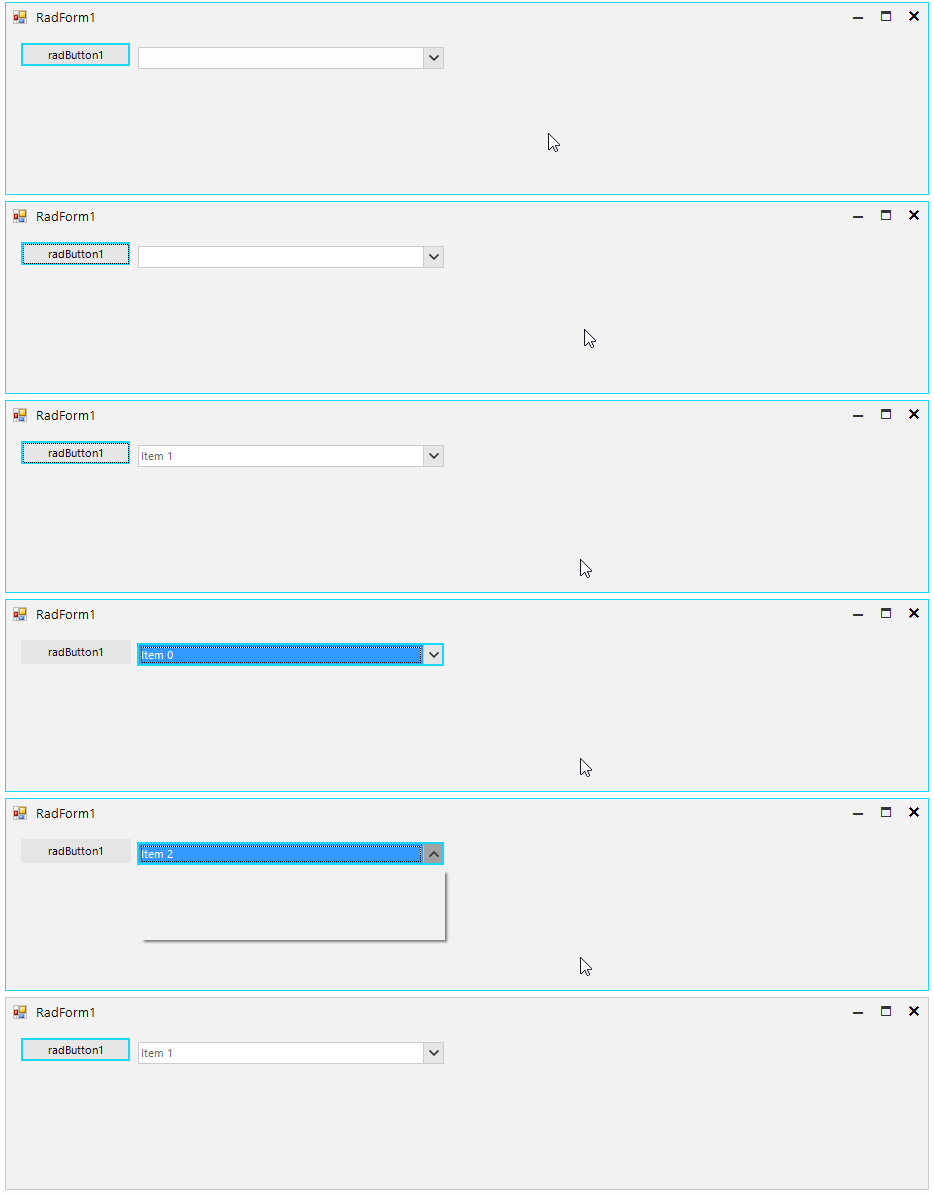
**RadDropDownList** [defines two styles](https://www.telerik.com/products/winforms/documentation/controls/dropdown-listcontrol-and-checkeddropdownlist/dropdownlist/dropdownstyle) affecting the editor and determining whether the end user can type in it or not. A common requirement is to set the **DropDownStyle** to *DropDownList* which will disable the input in the editor. In this kind of setup, the control shows that it has the focus by painting a border around the textbox in most of the themes. The example here will demonstrate how the focus cues can be enabled, and additionally, how the fore-color and back color of the editor can be changed when it receives and looses the focus.
## Solution
The **AllowShowFocusCues** property of the control needs to be set to true. The control also needs to be subscribed to its **GotFocus** and **LostFocus** where the its *Back* and *Fore* colors will be changed using the [Override Theme Settings at Run-time API](https://www.telerik.com/products/winforms/documentation/telerik-presentation-framework/override-theme-settings-at-run-time).
> caption Figure 1: Indicating Focus
#### Form\`s class
```C#
public partial class RadForm1 : Telerik.WinControls.UI.RadForm
{
private BindingList data;
public RadForm1()
{
InitializeComponent();
this.radDropDownList1.AllowShowFocusCues = true;
this.radDropDownList1.DropDownStyle = Telerik.WinControls.RadDropDownStyle.DropDownList;
this.data = new BindingList();
this.data.Add(new DataObject() { Name = "Item 0" });
this.data.Add(new DataObject() { Name = "Item 1" });
this.data.Add(new DataObject() { Name = "Item 2" });
this.radDropDownList1.DataSource = this.data;
this.radDropDownList1.DisplayMember = "Name";
this.radDropDownList1.GotFocus += RadDropDownList1_GotFocus;
this.radDropDownList1.LostFocus += RadDropDownList1_LostFocus;
}
private void RadDropDownList1_LostFocus(object sender, EventArgs e)
{
this.radDropDownList1.DropDownListElement.EditableElement.ResetThemeValueOverrides();
}
private void RadDropDownList1_GotFocus(object sender, EventArgs e)
{
this.radDropDownList1.DropDownListElement.EditableElement.SetThemeValueOverride(RadItem.BackColorProperty, Color.FromArgb(51, 153, 255), "RadDropDownListEditableAreaElement");
this.radDropDownList1.DropDownListElement.EditableElement.SetThemeValueOverride(RadItem.ForeColorProperty, Color.White, "RadDropDownListEditableAreaElement");
}
}
```
```VB.NET
Public Class RadForm1
Private data As BindingList(Of DataObject)
Public Sub New()
InitializeComponent()
Me.radDropDownList1.AllowShowFocusCues = True
Me.radDropDownList1.DropDownStyle = Telerik.WinControls.RadDropDownStyle.DropDownList
Me.data = New BindingList(Of DataObject)()
Me.data.Add(New DataObject() With {
.Name = "Item 0"
})
Me.data.Add(New DataObject() With {
.Name = "Item 1"
})
Me.data.Add(New DataObject() With {
.Name = "Item 2"
})
Me.radDropDownList1.DataSource = Me.data
Me.radDropDownList1.DisplayMember = "Name"
AddHandler Me.radDropDownList1.GotFocus, AddressOf RadDropDownList1_GotFocus
AddHandler Me.radDropDownList1.LostFocus, AddressOf RadDropDownList1_LostFocus
End Sub
Private Sub RadDropDownList1_LostFocus(ByVal sender As Object, ByVal e As EventArgs)
Me.radDropDownList1.DropDownListElement.EditableElement.ResetThemeValueOverrides()
End Sub
Private Sub RadDropDownList1_GotFocus(ByVal sender As Object, ByVal e As EventArgs)
Me.radDropDownList1.DropDownListElement.EditableElement.SetThemeValueOverride(RadItem.BackColorProperty, Color.FromArgb(51, 153, 255), "RadDropDownListEditableAreaElement")
Me.radDropDownList1.DropDownListElement.EditableElement.SetThemeValueOverride(RadItem.ForeColorProperty, Color.White, "RadDropDownListEditableAreaElement")
End Sub
End Class
```
## See Also
* [Drop Down Style](https://www.telerik.com/products/winforms/documentation/controls/dropdown-listcontrol-and-checkeddropdownlist/dropdownlist/dropdownstyle)