# Distinguishing the Source Control of RadContextMenu
## Environment
Product Version
2018.1 220
Product
RadContextMenu for WinForms
## Description
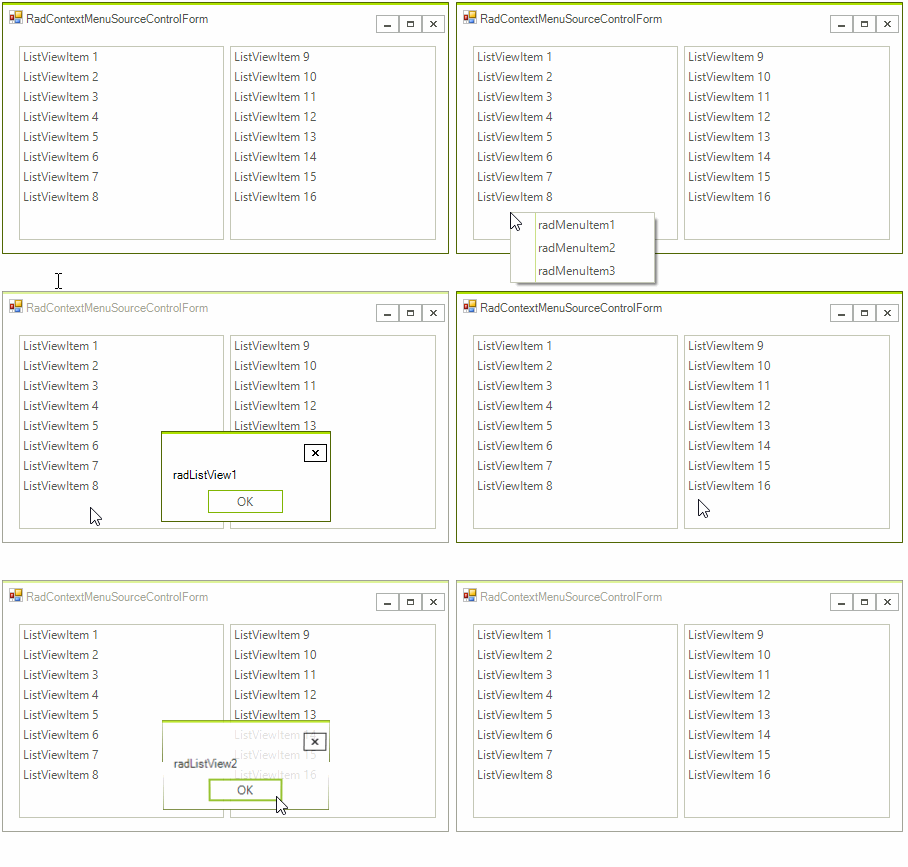
The **RadContextMenuManager** component allows a single **RadContextMenu** instance to be associated with various controls. This KB article demonstrates a way to distinguish the source control of the menu. It may be useful in a scenario requiring the menu items need to be dynamically changed or different actions be invoked upon clicking the menu items. The example assumes that two different **RadListView** controls are using the same **RadContextMenu**. Additional information about the **RadContextMenuManager** component is available here: .
## Solution
The source control will be extracted from the element\`s visual tree and stored in a variable so that it can be validated upon clicking the menu items.
> caption Figure 1: Single Context Menu
#### Context Menu Events
```C#
public partial class RadContextMenuSourceControlForm : Telerik.WinControls.UI.RadForm
{
public RadContextMenuSourceControlForm()
{
InitializeComponent();
this.radContextMenu1.DropDownOpening += RadContextMenu1_DropDownOpening;
this.radMenuItem1.Click += RadMenuItem1_Click;
}
private void RadMenuItem1_Click(object sender, EventArgs e)
{
if (this.currentControl == this.radListView1)
{
//...
}
else if (this.currentControl == this.radListView2)
{
//...
}
RadMessageBox.Show(this.currentControl.Name);
}
RadControl currentControl = null;
private void RadContextMenu1_DropDownOpening(object sender, CancelEventArgs e)
{
RadElement element = sender as RadElement;
if (element == null)
{
return;
}
this.currentControl = element.ElementTree.Control as RadControl;
if (this.currentControl != null)
{
Console.WriteLine(this.currentControl.Name);
}
}
}
```
```VB.NET
Public Class RadContextMenuSourceControlForm
Public Sub New()
InitializeComponent()
AddHandler Me.radContextMenu1.DropDownOpening, AddressOf RadContextMenu1_DropDownOpening
AddHandler Me.radMenuItem1.Click, AddressOf RadMenuItem1_Click
End Sub
Private Sub RadMenuItem1_Click(ByVal sender As Object, ByVal e As EventArgs)
If Me.currentControl Is Me.radListView1 Then
'../
ElseIf Me.currentControl Is Me.radListView2 Then
'...
End If
RadMessageBox.Show(Me.currentControl.Name)
End Sub
Private currentControl As RadControl = Nothing
Private Sub RadContextMenu1_DropDownOpening(ByVal sender As Object, ByVal e As CancelEventArgs)
Dim element As RadElement = TryCast(sender, RadElement)
If element Is Nothing Then
Return
End If
Me.currentControl = TryCast(element.ElementTree.Control, RadControl)
If Me.currentControl IsNot Nothing Then
Console.WriteLine(Me.currentControl.Name)
End If
End Sub
End Class
```
## See Also
* [RadContextMenuManager](https://www.telerik.com/products/winforms/documentation/controls/menus/contextmenu/assign-radcontextmenu-to-telerik-and-non-telerik-controls)