# Restricting Drag Direction in RadDiagram
## Environment
| Product Version |
2018.1 220 |
| Product |
RadDiagram for WinForms |
## Description
The shapes displayed in **RadDiagram** can be dragged in all directions. This article will suggest a custom implementation how dragging can be restricted to a horizontal or vertical direction. The default behavior with both directions being active at the same time is also preserved.
## Solution
The animation below demonstrates the end result with the restricted direction.
> caption Figure 1: Restrict Dragging
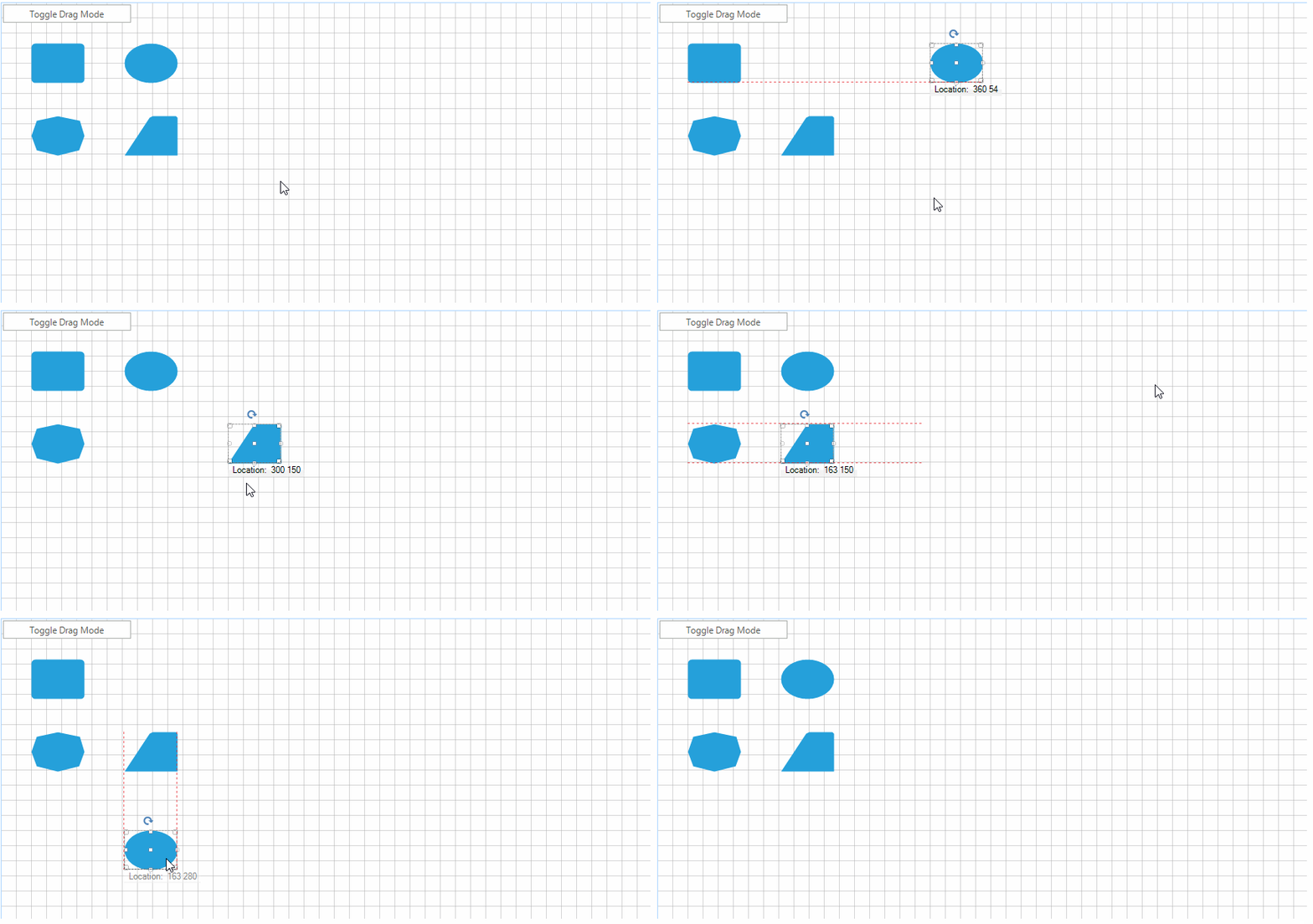
The custom functionality will be achieved with the help of a special drag service class.
1\. Create a **DragMode** enumeration responsible for controlling the allowed drag direction.
#### Drag Mode Enumeration
```C#
public enum DragMode
{
Both,
Horizontal,
Vertical,
}
```
```VB.NET
Public Enum DragMode
Both
Horizontal
Vertical
End Enum
```
2\. Inherit the **DraggingService** class.
* Add two fields to be used for saving the drag start point and the currently selected drag mode.
* Override the **InitializeDrag** method and set the initial drag start point.
* Override the **Drag** method and depending on the current **DragMode** create a new drag point.
#### CustomDraggingService Implementation
```C#
public class CustomDraggingService : DraggingService
{
private Telerik.Windows.Diagrams.Core.Point startDragPoint;
private DragMode dragMode = DragMode.Both;
public CustomDraggingService(IGraphInternal graph)
: base(graph)
{ }
public DragMode DragMode
{
get
{
return this.dragMode;
}
set
{
this.dragMode = value;
}
}
public override void InitializeDrag(Telerik.Windows.Diagrams.Core.Point point)
{
this.startDragPoint = point;
base.InitializeDrag(point);
}
public override void Drag(Telerik.Windows.Diagrams.Core.Point newPoint)
{
Telerik.Windows.Diagrams.Core.Point dragPoint = newPoint;
if (this.DragMode == DragMode.Horizontal)
{
dragPoint = new Telerik.Windows.Diagrams.Core.Point(newPoint.X, this.startDragPoint.Y);
}
else if (this.DragMode == DragMode.Vertical)
{
dragPoint = new Telerik.Windows.Diagrams.Core.Point(this.startDragPoint.X, newPoint.Y);
}
base.Drag(dragPoint);
}
}
```
```VB.NET
Public Class CustomDraggingService
Inherits DraggingService
Private startDragPoint As Telerik.Windows.Diagrams.Core.Point
Private _dragMode As DragMode = DragMode.Both
Public Sub New(ByVal graph As IGraphInternal)
MyBase.New(graph)
End Sub
Public Property DragMode As DragMode
Get
Return Me._dragMode
End Get
Set(ByVal value As DragMode)
Me._dragMode = value
End Set
End Property
Public Overrides Sub InitializeDrag(ByVal point As Telerik.Windows.Diagrams.Core.Point)
Me.startDragPoint = point
MyBase.InitializeDrag(point)
End Sub
Public Overrides Sub Drag(ByVal newPoint As Telerik.Windows.Diagrams.Core.Point)
Dim dragPoint As Telerik.Windows.Diagrams.Core.Point = newPoint
If Me.DragMode = DragMode.Horizontal Then
dragPoint = New Telerik.Windows.Diagrams.Core.Point(newPoint.X, Me.startDragPoint.Y)
ElseIf Me.DragMode = DragMode.Vertical Then
dragPoint = New Telerik.Windows.Diagrams.Core.Point(Me.startDragPoint.X, newPoint.Y)
End If
MyBase.Drag(dragPoint)
End Sub
End Class
```
3\. Instantiate the custom dragging service class.
#### Use the Custom Solution
```C#
public partial class CustomDraggingServiceForm : Telerik.WinControls.UI.RadForm
{
private CustomDraggingService dragService;
public CustomDraggingServiceForm()
{
InitializeComponent();
this.dragService = new CustomDraggingService(this.radDiagram1.DiagramElement)
{
DragMode = DragMode.Horizontal
};
this.radDiagram1.DiagramElement.ServiceLocator.Register(this.dragService);
}
private void radButton1_Click(object sender, System.EventArgs e)
{
this.dragService.DragMode = this.dragService.DragMode == DragMode.Horizontal ? DragMode.Vertical : DragMode.Horizontal;
}
}
```
```VB.NET
Public Class CustomDraggingServiceForm
Dim dragService As CustomDraggingService
Sub New()
InitializeComponent()
Me.dragService = New CustomDraggingService(Me.RadDiagram1.DiagramElement) With {.DragMode = DragMode.Horizontal}
Me.RadDiagram1.DiagramElement.ServiceLocator.Register(Of IDraggingService)(Me.dragService)
End Sub
Private Sub RadButton1_Click(sender As Object, e As EventArgs) Handles RadButton1.Click
Me.dragService.DragMode = If(Me.dragService.DragMode = DragMode.Horizontal, DragMode.Vertical, DragMode.Horizontal)
End Sub
End Class
```
> tip A complete solution providing a C# and VB.NET project is available [here](https://github.com/telerik/winforms-sdk/tree/master/Diagram/CustomDraggingService).
## See Also
* [Drag and Drop from Another Control](https://www.telerik.com/products/winforms/documentation/controls/diagram/drag-and-drop/drag-and-drop-from-another-control)
* [OLE Drag and Drop](https://www.telerik.com/products/winforms/documentation/controls/diagram/drag-and-drop/drag-and-drop-from-another-control)