# Notification Templates

**RadToastNotificationManager** offers the following built-in toast notification templates:

> important The screenshots below are captured under OS Windows 10. The toast notification templates may differ according to the operating system (and OS style theme) that shows them.

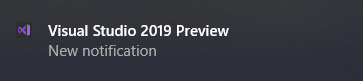
### ToastGeneric

Generic template used in Windows 10.

```XML
<toast>
  <visual>
    <binding template="ToastGeneric">

    </binding>
  </visual>
</toast>
```

![WinForms ToastGeneric](https://www.telerik.com/products/winforms/documentation/assets/72a70577e36740f1968173dc63f20a35/toast-notification-templates001.png)

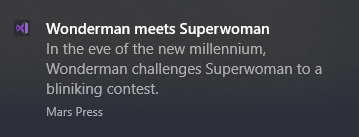
### ToastNews

News template.

```XML
<toast launch="readMoreArg">
  <visual>
    <binding template="ToastGeneric">
      <text>Wonderman meets Superwoman</text>
      <text>In the eve of the new millennium, Wonderman challenges Superwoman to a bliniking contest.</text>
      <text placement="attribution">Mars Press</text>
    </binding>
  </visual>
</toast>
```

![WinForms ToastNews](https://www.telerik.com/products/winforms/documentation/assets/30c1dfa4df61c071db81d6b93524277b/toast-notification-templates003.png)

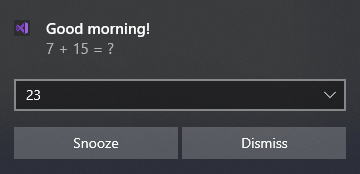
### ToastAlarm

Alarm template.

```XML
<toast launch="alarmLaucnhArg" scenario="alarm">
  <visual>
    <binding template="ToastGeneric">
      <text>Good morning!</text>
      <text>7 + 15 = ?</text>
    </binding>
  </visual>
  <actions>
    <input id="answer" type="selection" defaultInput="wrongDefault">
      <selection id="wrong" content="19" />
      <selection id="wrongDefault" content="23" />
      <selection id="wrong" content="21" />
      <selection id="right" content="22" />
      <selection id="wrong" content="24" />
    </input>
    <action activationType="system" arguments="snooze" content="" />
    <action activationType="background" arguments="dismiss" content="Dismiss" />
  </actions>
</toast>
```

![WinForms ToastAlarm](https://www.telerik.com/products/winforms/documentation/assets/9bb9d795f2e3022c5aa38afa17d5fdb7/toast-notification-templates004.png)

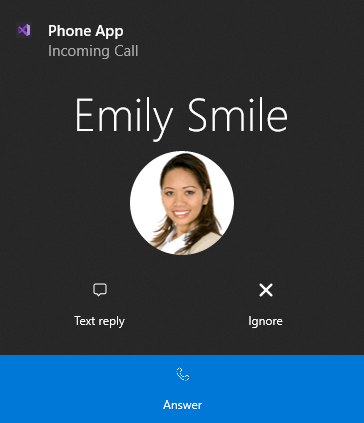
### ToastCall

Phone Call template.

```XML
<toast launch="callLaunchArg" scenario="incomingCall">
  <visual>
    <binding template="ToastGeneric">
      <text>Phone App</text>
      <text>Incoming Call</text>
      <group>
        <subgroup hint-weight="1" hint-textStacking="center">
          <text hint-align="center" hint-style="Header">Emily Smile</text>
          <image src="C:\Users\furnadzh\AppData\Local\Temp\Telerik\Toast\TA_EmilySmile.png" hint-crop="circle" hint-align="center" />
        </subgroup>
      </group>
    </binding>
  </visual>
  <actions>
    <action content="Text reply" imageUri="C:\Users\dyordano\AppData\Local\Temp\Telerik\Toast\TA_call_message.png" activationType="foreground" arguments="callReply" />
    <action content="Ignore" imageUri="C:\Users\dyordano\AppData\Local\Temp\Telerik\Toast\TA_call_cancel.png" activationType="background" arguments="callIgnore" />
    <action content="Answer" imageUri="C:\Users\dyordano\AppData\Local\Temp\Telerik\Toast\TA_call_telephone.png" arguments="callAnswer" />
  </actions>
</toast>
```

![WinForms ToastCall](https://www.telerik.com/products/winforms/documentation/assets/203080820214a89cd75aa341fec3df0a/toast-notification-templates005.png)

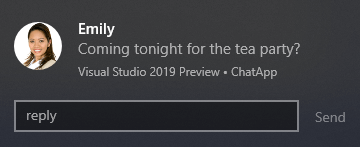
### ToastChat

Chat template.

```XML
<toast launch="chatLaunchArg">
  <visual>
    <binding template="ToastGeneric">
      <text>Emily</text>
      <text>Coming tonight for the tea party?</text>
      <text hint-maxLines="1" placement="attribution">ChatApp</text>
      <image placement="appLogoOverride" hint-crop="circle" src="C:\Users\dyordano\AppData\Local\Temp\Telerik\Toast\TA_EmilySmile.png" />
    </binding>
  </visual>
  <actions>
    <input id="idTextBox1" type="text" placeHolderContent="reply" />
    <action content="Send" hint-inputId="idTextBox1" activationType="background" arguments="argSendPress" />
  </actions>
</toast>
```

![WinForms ToastChat](https://www.telerik.com/products/winforms/documentation/assets/d85a6d16bfc4cd834aa965b4c1202af2/toast-notification-templates006.png)

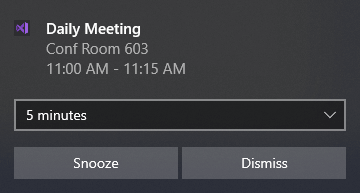
### ToastReminder

Meeting template.

```XML
<toast launch="reminderLaunchArg" scenario="reminder">
  <visual>
    <binding template="ToastGeneric">
      <text>Daily Meeting</text>
      <text>Conf Room 603</text>
      <text>11:00 AM - 11:15 AM</text>
    </binding>
  </visual>
  <actions>
    <input id="idSnoozeTime" type="selection" defaultInput="5">
      <selection id="1" content="1 minute" />
      <selection id="5" content="5 minutes" />
      <selection id="15" content="15 minutes" />
      <selection id="60" content="1 hour" />
      <selection id="120" content="2 hours" />
    </input>
    <action activationType="system" arguments="snooze" hint-inputId="idSnoozeTime" content="" />
    <action activationType="system" arguments="dismiss" content="" />
  </actions>
</toast>
```

![WinForms ToastReminder](https://www.telerik.com/products/winforms/documentation/assets/14cedad48e1c4ae62d545facc82abb18/toast-notification-templates007.png)

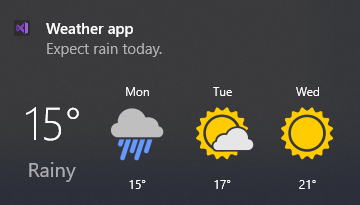
### ToastWeather

Wheather template.

```XML
<toast>
  <visual>
    <binding template="ToastGeneric">
      <text>Weather app</text>
      <text>Expect rain today.</text>
      <group>
        <subgroup hint-weight="1" hint-textStacking="center">
          <text hint-align="center" hint-style="header">15°</text>
          <text hint-align="center" hint-style="SubtitleSubtle">Rainy</text>
        </subgroup>
        <subgroup hint-weight="1">
          <text hint-align="center">Mon</text>
          <image src="C:\Users\dyordano\AppData\Local\Temp\Telerik\Toast\TA_Weather_Rainy.png" hint-removeMargin="true" />
          <text hint-align="center">15°</text>
        </subgroup>
        <subgroup hint-weight="1">
          <text hint-align="center">Tue</text>
          <image src="C:\Users\dyordano\AppData\Local\Temp\Telerik\Toast\TA_Weather_MostlyCloudy.png" hint-removeMargin="true" />
          <text hint-align="center">17°</text>
        </subgroup>
        <subgroup hint-weight="1">
          <text hint-align="center">Wed</text>
          <image src="C:\Users\dyordano\AppData\Local\Temp\Telerik\Toast\TA_Weather_Sunny.png" hint-removeMargin="true" />
          <text hint-align="center">21°</text>
        </subgroup>
      </group>
    </binding>
  </visual>
</toast>
```

![WinForms ToastWeather](https://www.telerik.com/products/winforms/documentation/assets/3577a44cc2ad97ccbac285e73e7dd036/toast-notification-templates008.png)

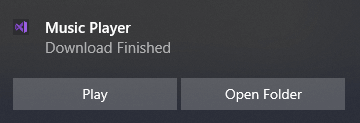
### ToastDownload

Download template.

```XML
<toast>
  <visual>
    <binding template="ToastGeneric">
      <text>Music Player</text>
      <text>Download Finished</text>
    </binding>
  </visual>
  <actions>
    <action content="Play" activationType="protocol" arguments="C:\Windows\Media\Alarm01.wav" />
    <action content="Open Folder" activationType="protocol" arguments="file:///C:/Windows/Media" />
  </actions>
</toast>
```

![WinForms ToastDownload](https://www.telerik.com/products/winforms/documentation/assets/8a24e8541cc930edc88cf593113406c5/toast-notification-templates009.png)

### ToastLegacy

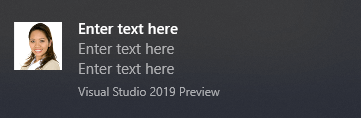
Legacy template, used in Windows 8. It is not recommended to use it in Windows 10.

```XML
<toast>
  <visual>
    <binding template="ToastImageAndText04">
      <text id="1">Enter text here</text>
      <text id="1">Enter text here</text>
      <text id="1">Enter text here</text>
      <image id="1" src="C:\Users\dyordano\AppData\Local\Temp\Telerik\Toast\TA_EmilySmile.png" alt="Alternative text"/>
    </binding>
  </visual>
</toast>
```

![WinForms ToastLegacy](https://www.telerik.com/products/winforms/documentation/assets/681f54932a7798d8a527c65120baa444/toast-notification-templates002.png)

### Customizing Default Templates

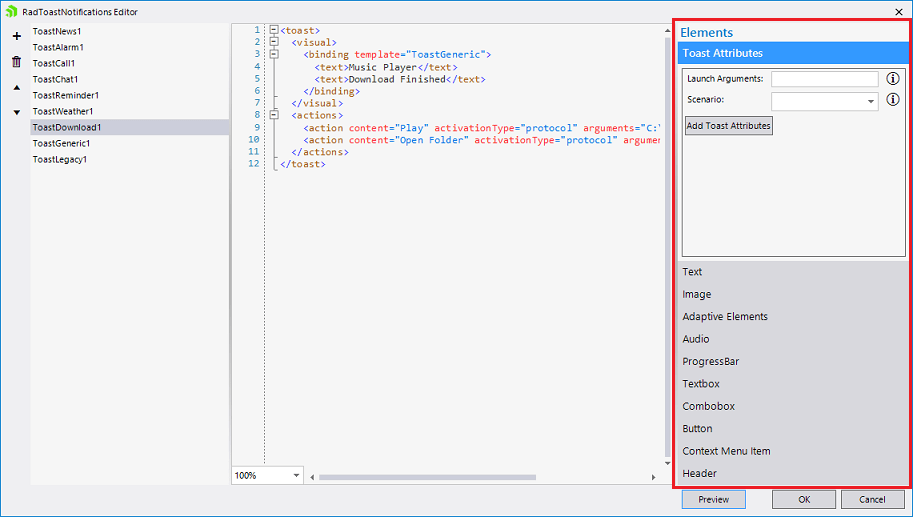
On the right side of the [RadToastNotifications Editor](https://www.telerik.com/products/winforms/documentation/controls/toast-notification/design-time), you have the possibilities to customize the loaded toast notification and add different [types of elements](https://docs.microsoft.com/en-us/windows/uwp/design/shell/tiles-and-notifications/adaptive-interactive-toasts?tabs=builder-syntax) and toast attributes to them. You can add additional [elements](https://docs.microsoft.com/en-us/windows/uwp/design/shell/tiles-and-notifications/adaptive-interactive-toasts?tabs=builder-syntax) to the toast or remove any of the existing ones by managing the syntax editor in the center.
![WinForms RadToastNotifications Editor](https://www.telerik.com/products/winforms/documentation/assets/66050f25aa71ea444f986f57dcdb8af5/toast-notification-templates010.png)

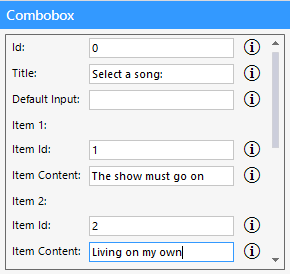
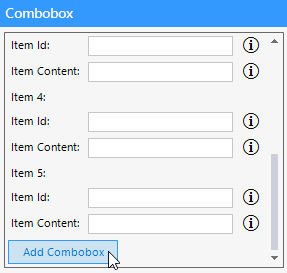
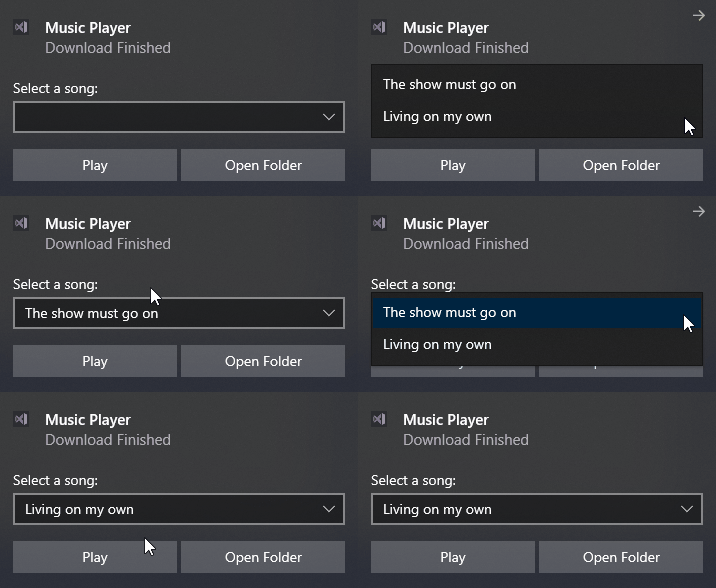
Let's try to extend the **ToastDownload** and add a combo with two items to it. Select the **Combobox** element and fill the data for two items:
![WinForms ToastNotification Extend ToastDownload](https://www.telerik.com/products/winforms/documentation/assets/c0e0461395932169977cdd0eb351c9d7/toast-notification-templates011.png)

![WinForms ToastNotification Add Combobox](https://www.telerik.com/products/winforms/documentation/assets/7943af1b0feedc61c0e44112cc7f6304/toast-notification-templates012.png)

Once you confirm the changes, the syntax code gets updated:

```XML
<toast>
  <visual>
    <binding template="ToastGeneric">
      <text>Music Player</text>
      <text>Download Finished</text>
    </binding>
  </visual>
  <actions>
    <input id="0" title="Select a song:" type="selection">
      <selection id="1" content="The show must go on" />
      <selection id="2" content="Living on my own" />
    </input>
    <action content="Play" activationType="protocol" arguments="C:\Windows\Media\Alarm01.wav" />
    <action content="Open Folder" activationType="protocol" arguments="file:///C:/Windows/Media" />
  </actions>
</toast>
```

Then, the **Preview** button at the bottom right corner of the [RadToastNotifications Editor](https://www.telerik.com/products/winforms/documentation/controls/toast-notification/design-time) allows you to see the changes that you just made:
![WinForms RadSplashScreen winforms/toast-notification-templates013](https://www.telerik.com/products/winforms/documentation/assets/85c377ca375131d9afeac2a1155af7df/toast-notification-templates013.gif)

Thus, you can use the Generic template and construct the desired toast from scratch.

## See Also

* [Getting Started](https://www.telerik.com/products/winforms/documentation/controls/toast-notification/getting-started)

* [Design Time](https://www.telerik.com/products/winforms/documentation/controls/toast-notification/design-time)