# WinForms PdfViewer Overview
| RELATED VIDEOS | |
| ----------------------------------------------------------------------------------------------------------------------------------------------------------------------------------------------------------------------------------------------------------------------------------------------------------------------------------------------------------------------------------------------------------------------------------------------------------------------------------------------------------------------------------- | --------------------------------------------------------------------------------------------------------------------------------------------------------------------- |
| [Getting Started with the WinForms RadPdfViewer](https://www.telerik.com/videos/winforms/getting-started-with-the-winforms-radpdfviewer)
**RadPdfViewer** enables you to easily load and display PDF documents natively in your application without using any third-party tools except Telerik’s WinForms toolbox. Thanks to the built-in UI virtualization, RadPdfViewer delivers an efficient solution for every scenario. This component comes as a nice addition to your Content Management System or Reporting application. |  |
**RadPdfViewer** is a control that:
* can natively visualize PDF documents straight in your application.
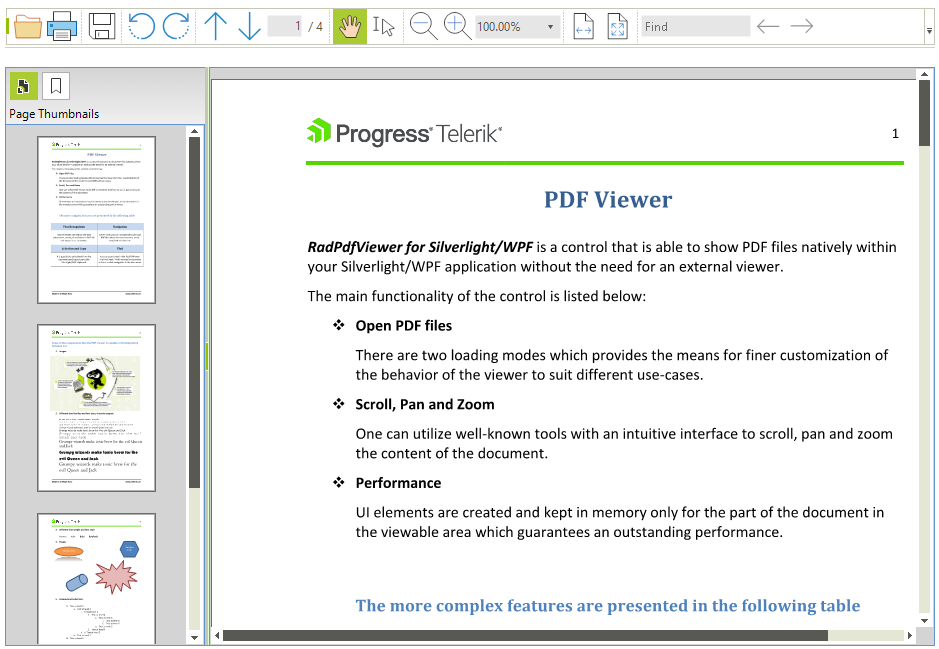
* comes with a predefined UI that is intuitive and provides the means for utilizing the features of the control.
* utilizes virtualization and supports load-on-demand mode to guarantee optimal performance with large documents.
> caption Figure 1: RadPdfViewer
Here is a list of the supported features
* [Interactive Forms](https://www.telerik.com/products/winforms/documentation/controls/pdfviewer/features/interactive-forms): The control supports different types of interactive forms and enables the end user to modify their values.
* [Digital Signatures](https://www.telerik.com/products/winforms/documentation/controls/pdfviewer/features/digital-signature): The user can show digitally signed documents and validate the signatures inside. Signing a document is supported as well.
* [Saving a Document](https://www.telerik.com/products/winforms/documentation/controls/pdfviewer/features/save-as): When the user modifies the forms in a document or signs it, or just want to create another file from the document, they can use the Save As functionality of the viewer.
* [Annotations](https://www.telerik.com/products/winforms/documentation/controls/pdfviewer/features/annotations): Full support for Widget and Link annotations. RadPdfViewer provides a read-only support for all other types of annotations.
* Fonts: Built-in support for TrueType, Type1 and CID fonts.
* [Create an Image from a PDF Page](https://www.telerik.com/products/winforms/documentation/controls/pdfviewer/export-to-image): An API for exporting a PDF document page to an image.
* Working with [positions](https://www.telerik.com/products/winforms/documentation/controls/pdfviewer/features/text/text-position) and modifying the [selection](https://www.telerik.com/products/winforms/documentation/controls/pdfviewer/features/text/text-selection) in the document.
* The control comes with a predefined UI that is intuitive and provides the means for utilizing the features of the control. Different dialogs are available as well.
* Using the UI you can easily zoom in and out.
* Scroll the document in the viewer.
* You can also use pan and text selection by specifying a different [viewer mode](https://www.telerik.com/products/winforms/documentation/controls/pdfviewer/ui/viewer-modes).
* The control utilizes virtualization in order to guarantee good performance with larger documents as well.
* RadPdfViewer allows [printing](https://www.telerik.com/products/winforms/documentation/controls/pdfviewer/features/printing-support) of the document loaded in it.
* You can [rotate](https://www.telerik.com/products/winforms/documentation/controls/pdfviewer/ui/rotation) the document as well.
* [Context Menu](https://www.telerik.com/products/winforms/documentation/controls/pdfviewer/ui/context-menu) to provide easy access to several of the features of the control.
* Extensible support for different stream compression filters. [Read more](https://www.telerik.com/products/winforms/documentation/controls/pdfviewer/customize-and-extensibility/customize-pdf-rendering)
* Support for documents encrypted with Encryption Algorithm 4 (RC4/AES-128).
* The API provides different options for extending and customizing the control.
> note **RadPdfViewer** requires **.NET Framework 4.0** and cannot be used with an older version.
## Telerik UI for WinForms Learning Resources
* [Telerik UI for WinForms PdfViewer Homepage](https://www.telerik.com/products/winforms/pdf-viewer.aspx)
* [Get Started with the Telerik UI for WinForms PdfViewer](https://www.telerik.com/products/winforms/documentation/controls/pdfviewer/getting-started)
* [Telerik UI for WinForms API Reference](https://docs.telerik.com/devtools/winforms/api/)
* [Getting Started with Telerik UI for WinForms Components](https://www.telerik.com/products/winforms/documentation/getting-started/first-steps)
* [Telerik UI for WinForms Virtual Classroom (Training Courses for Registered Users)](https://learn.telerik.com/learn/course/external/view/elearning/17/TelerikUIforWinForms)
* [Telerik UI for WinForms Forum](https://www.telerik.com/forums/winforms)
* [Telerik UI for WinForms Knowledge Base](https://docs.telerik.com/devtools/winforms/knowledge-base)
## Telerik UI for WinForms Additional Resources
* [Telerik UI for WinForms Product Overview](https://www.telerik.com/products/winforms.aspx)
* [Telerik UI for WinForms Blog](https://www.telerik.com/blogs/desktop-winforms)
* [Telerik UI for WinForms Videos](https://www.telerik.com/videos/product/winforms)
* [Telerik UI for WinForms Roadmap](https://www.telerik.com/support/whats-new/winforms/roadmap)
* [Telerik UI for WinForms Pricing](https://www.telerik.com/purchase/individual/winforms.aspx)
* [Telerik UI for WinForms Code Library](https://www.telerik.com/support/code-library/winforms)
* [Telerik UI for WinForms Support](https://www.telerik.com/support/winforms)
* [What’s New in Telerik UI for WinForms](https://www.telerik.com/support/whats-new/winforms)
## See Also
* [Getting Started](https://www.telerik.com/products/winforms/documentation/controls/pdfviewer/getting-started)
* [Logical Structure](https://www.telerik.com/products/winforms/documentation/controls/pdfviewer/structure/logical-structure)
* [Visual Structure](https://www.telerik.com/products/winforms/documentation/controls/pdfviewer/structure/visual-structure)
* [Design Time](https://www.telerik.com/products/winforms/documentation/controls/pdfviewer/design-time)