# HTML-like Text Formatting
Html-like formatting is a feature of Telerik Presentation Framework and therefore it can be also used in RadGridView. The screenshot below demonstrates the color tag applied to RadGridView cells:
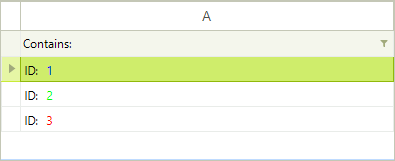
Tags are only parsed if **DisableHTMLRendering** is set to *false*. If you skip that, all tags will be shown as text. In the code snippet, HTML rendering is only enabled for the first column:
#### HTML-like text formatting
```C#
DataTable t = new DataTable();
t.Columns.Add("A");
t.Rows.Add(" ID: 1");
t.Rows.Add(" ID: 2");
t.Rows.Add(" ID: 3");
this.radGridView1.DataSource = t;
this.radGridView1.Columns[0].DisableHTMLRendering = false;
```
```VB.NET
Dim t As New DataTable()
t.Columns.Add("A")
t.Rows.Add(" ID: 1")
t.Rows.Add(" ID: 2")
t.Rows.Add(" ID: 3")
Me.RadGridView1.DataSource = t
Me.RadGridView1.Columns(0).DisableHTMLRendering = False
```
> note Please refer to *HTML-like Text formatting* topic in *Telerik Presentation Framework* section for the list of support tags.
## See Also
* [Alternating Row Color](https://www.telerik.com/products/winforms/documentation/controls/gridview/styling-and-appearance/alternating-row-color)
* [Four ways to customize RadGridView appearance](https://www.telerik.com/products/winforms/documentation/controls/gridview/styling-and-appearance/four-ways-to-customize-radgridview-appearance)
* [Row Header Images](https://www.telerik.com/products/winforms/documentation/controls/gridview/styling-and-appearance/images)
* [Themes](https://www.telerik.com/products/winforms/documentation/controls/gridview/styling-and-appearance/themes)