# Binding to Hierarchical Data Automatically
## Generating Two-Level Hierarchy
| RELATED VIDEOS | |
| ------------------------------------------------------------------------------------------------------------------------------------------------------------------------------------------------------------------------------------------------------------------- | -------------------------------------------------------------------------------------------------------------------------------------------------------------------------------------------------------------------- |
| [RadGridView for WinForms Hierarchy Overview](https://www.youtube.com/watch?v=t3cR7A5VjdY\&index=11\&list=PLvmaC-XMqeBaRgdM2nVNSM-0SSG_xbjSN)
In this video you will learn the various ways you can display hierarchical data in a RadGridView. (Runtime: 12:13) |  |
At runtime, if the data source for the grid is a **System.Data.DataSet** type and there are relations defined in it, the hierarchy can be created automatically. Set the **AutoGenerateHierarchy** property *true* to get this behavior. In the example below, the Northwind dataset has `Categories` and `Products` joined by `CategoryID`.
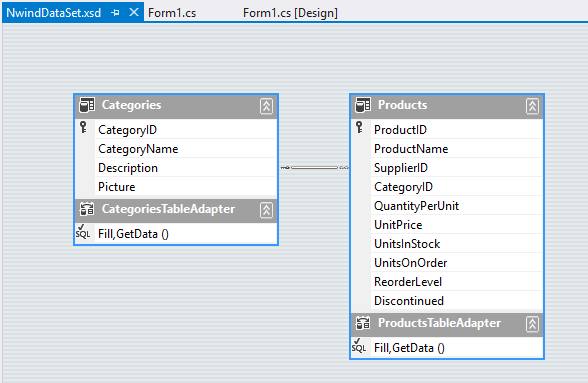
The run-time code fills the categories and products data tables, sets the **AutoGenerateHierarchy** to *true*, assigns the data set containing both tables to the grid **DataSource** and the **DataMember** is the name of the parent table. The last three lines of code below can be configured at design time.
```C#
private void BindingToHierarchicalGridAutomatically_Load(object sender, EventArgs e)
{
this.productsTableAdapter.Fill(this.nwindDataSet.Products);
this.categoriesTableAdapter.Fill(this.nwindDataSet.Categories);
radGridView1.AutoGenerateHierarchy = true;
radGridView1.DataSource = this.nwindDataSet;
radGridView1.DataMember = "Categories";
}
```
```VB.NET
Private Sub BindingToHierarchicalGridAutomatically_Load(ByVal sender As System.Object, ByVal e As System.EventArgs) Handles MyBase.Load
'TODO: This line of code loads data into the 'NwindDataSet.Order_Details' table. You can move, or remove it, as needed.
Me.Order_DetailsTableAdapter.Fill(Me.NwindDataSet.Order_Details)
'TODO: This line of code loads data into the 'NwindDataSet.Order_Details' table. You can move, or remove it, as needed.
Me.ProductsTableAdapter.Fill(Me.NwindDataSet.Products)
Me.CategoriesTableAdapter.Fill(Me.NwindDataSet.Categories)
RadGridView1.AutoGenerateHierarchy = True
RadGridView1.DataSource = Me.NwindDataSet
RadGridView1.DataMember = "Categories"
End Sub
```
## Generating Multi-Level Hierarchy
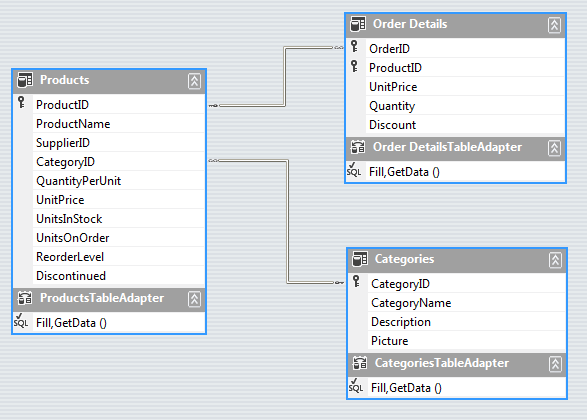
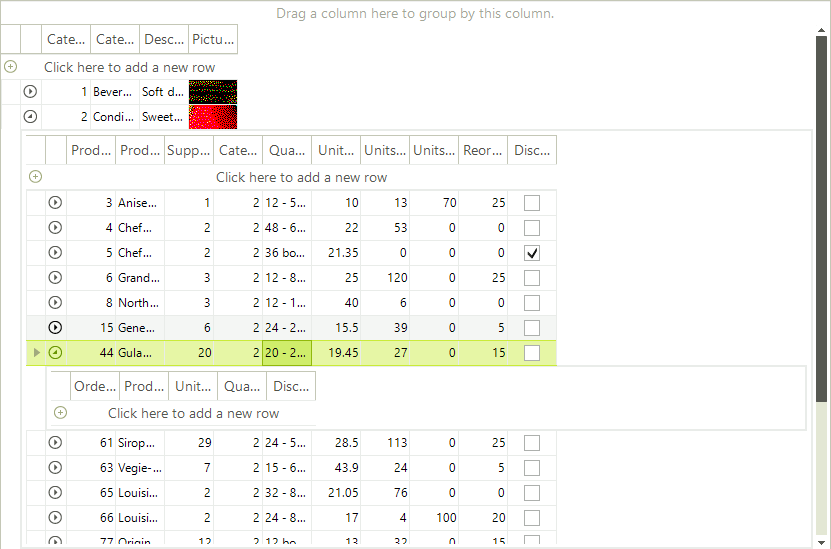
It is possible to auto generate Multi-level hierarchy as well. You should again set the **DataSource** and **AutoGenerateHierarachy** properties. Here are the three data tables from the Northwind database, used in the code snippet to generate the three-level hierarchy:
```C#
public void Dummy()
{
this.productsTableAdapter.Fill(this.nwindDataSet.Products);
this.categoriesTableAdapter.Fill(this.nwindDataSet.Categories);
this.order_DetailsTableAdapter.Fill(this.nwindDataSet.Order_Details);
radGridView1.DataSource = nwindDataSet;
radGridView1.DataMember = "Categories";
radGridView1.AutoGenerateHierarchy = true;
}
```
```VB.NET
Public Sub Dummy()
Me.ProductsTableAdapter.Fill(Me.NwindDataSet.Products)
Me.CategoriesTableAdapter.Fill(Me.NwindDataSet.Categories)
RadGridView1.DataSource = NwindDataSet
RadGridView1.DataMember = "Categories"
RadGridView1.AutoGenerateHierarchy = True
End Sub
```
## See Also
* [Binding to Hierarchical Data Programmatically](https://www.telerik.com/products/winforms/documentation/controls/gridview/hierarchical-grid/binding-to-hierarchical-data-programmatically)
* [Binding to Hierarchical Data](https://www.telerik.com/products/winforms/documentation/controls/gridview/hierarchical-grid/binding-to-hierarchical-data)
* [Creating hierarchy using an XML data source](https://www.telerik.com/products/winforms/documentation/controls/gridview/hierarchical-grid/creating-hierarchy-using-an-xml-data-source)
* [Hierarchy of one to many relations](https://www.telerik.com/products/winforms/documentation/controls/gridview/hierarchical-grid/hierarchy-of-one-to-many-relations)
* [Load-On-Demand Hierarchy](https://www.telerik.com/products/winforms/documentation/controls/gridview/hierarchical-grid/load-on-demand-hierarchy)
* [Object Relational Hierarchy Mode](https://www.telerik.com/products/winforms/documentation/controls/gridview/hierarchical-grid/object-relational-hierarchy-mode)
* [Self-Referencing Hierarchy](https://www.telerik.com/products/winforms/documentation/controls/gridview/hierarchical-grid/self-referencing-hierarchy)
* [Tutorial Binding to Hierarchical Data](https://www.telerik.com/products/winforms/documentation/controls/gridview/hierarchical-grid/tutorial-binding-to-hierarchical-data)