# HtmlTextBox Overview
The HtmlTextBox report item enables you to insert HTML-formatted text into a report.
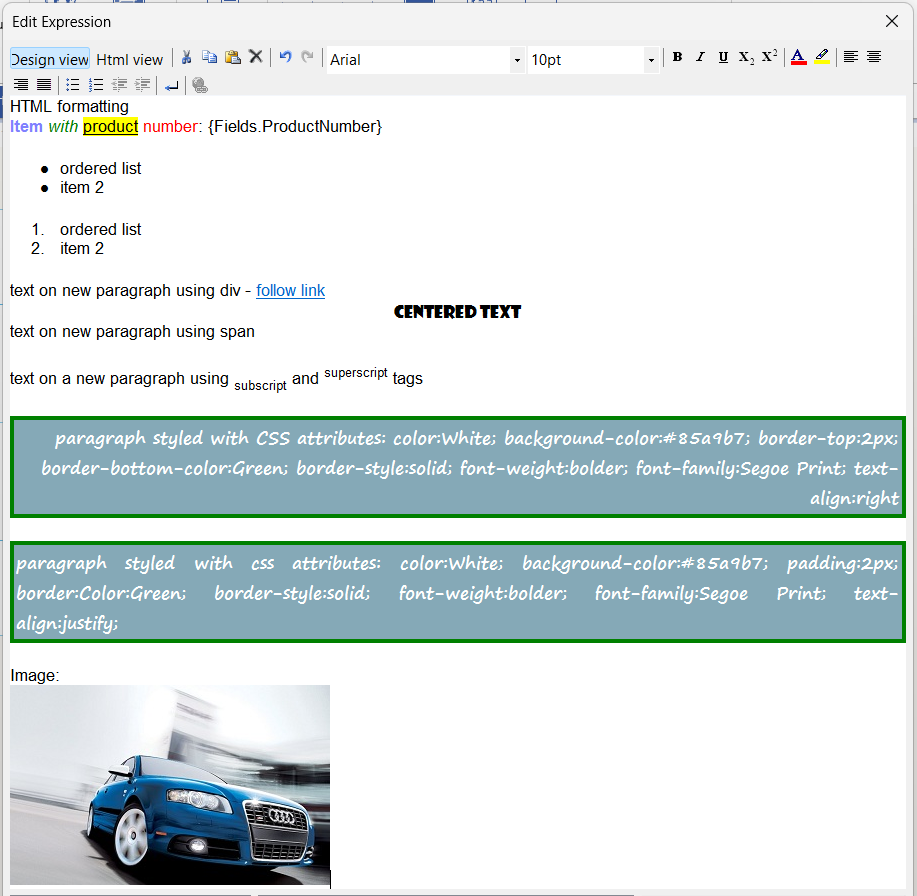
You can specify the HTML value at design time either through a WYSIWYG editor or through an expression editor, or retrieve it from a data source by using any simple or complex expression that evaluates to correctly formatted HTML.
| Design View of the HtmlTextBox Editor |
| :-------------------------------------------------------------------------------------------------------------------------------------------------------------------: |
|  |
## Key Features
* [XHTML validation](https://www.telerik.com/products/reporting/documentation/report-items/htmltextbox/xhtml-validation)—The HtmlTextBox allows you to validate its defined content as valid XHTML.
* [Formatting with the Telerik AJAX Editor](https://www.telerik.com/products/reporting/documentation/report-items/htmltextbox/using-html-from-telerik-radeditor)—You can filter the HTML tags or CSS attributes that are not supported by the HtmlTextBox by using the Telerik UI for ASP.NET AJAX Editor.
* [Edit HtmlTextBox content](https://www.telerik.com/products/reporting/documentation/report-items/htmltextbox/editing)—The HtmlTextBox supports data-driven inline fields which you can edit in place or through a design-time editor.
* [Styling and formatting](https://www.telerik.com/products/reporting/documentation/report-items/htmltextbox/formatting)—The HtmlTextBox enables you to control the presentation style of its text through the supported CSS attributes and HTML tags, including inline images with the `![]() ` tag (introduced in version `20.0.26.211`).
* [Growing and shrinking](https://www.telerik.com/products/reporting/documentation/report-items/htmltextbox/grow-and-shrink)—You can accommodate the content of the HtmlTextBox by allowing it to grow or shrink correspondingly.
* [Embedded expressions](https://www.telerik.com/products/reporting/documentation/report-items/htmltextbox/embedded-expressions)—With the HtmlTextBox, you can create a mail-merge functionality or a template for the text in your report.
## Next Steps
* [Getting Started with the HtmlTextBox Report Item](https://www.telerik.com/products/reporting/documentation/report-items/htmltextbox/get-started)
* [(KB) Anchor Tags vs. Hyperlink Actions in the HtmlTextBox](https://www.telerik.com/products/reporting/documentation/knowledge-base/htmltextbox-with-anchor-tag-vs-hyperlink-action)
* [(KB) Error while Parsing EntityName](https://www.telerik.com/products/reporting/documentation/knowledge-base/htmltextbox-an-error-occurred-while-parsing-entityname)
* [(w3.org) Full List of Special Entities](https://www.w3.org/TR/xhtml1/DTD/xhtml-special.ent)
* [Demo Page for Telerik Reporting](https://demos.telerik.com/reporting)
* [Telerik Reporting Knowledge Base](https://www.telerik.com/products/reporting/documentation/knowledge-base)
## See Also
* [Telerik Reporting Homepage](https://www.telerik.com/products/reporting)
* [Reporting Forums](https://www.telerik.com/forums/reporting)
* [Reporting Blog](https://www.telerik.com/blogs/tag/reporting)
* [Reporting Videos](https://www.telerik.com/videos/reporting)
* [Reporting Roadmap](https://www.telerik.com/support/whats-new/reporting/roadmap)
* [Reporting Pricing](https://www.telerik.com/purchase/individual/reporting)
* [Reporting Training](https://learn.telerik.com/learn/course/external/view/elearning/19/reporting-report-server-training)