# Controlling Absolute Positioning with z-index
Many Telerik controls render with absolute positioning and have their default z-indexes as shown below:
* **RadAjaxLoadingPanel** - 90000
* **RadAutoCompleteBox dropdown** - 7000
* **RadButton's SplitButton dropdown** - 7000
* **RadColorPicker popup** - 4001
* **RadComboBox dropdown** - 6000
* **RadDatePicker popup** - 5000
* **RadDropDownList dropdown** - 7000
* **RadDropDownTree dropdown** - 7000
* **RadFilter "add group/expression" dropdown** - 3500
* **RadFormDecorator - decorated dropdown** - 4007
* **RadGrid's PopUp edit form** - 2500
* **RadHtmlChart's tooltips** - 1000
* **RadLightBox** - 3006
* **RadListBox dragged item** - 6500
* **RadListView dragged item** - 99999
* **RadMenu** - 8000. Before expanding an item RadMenu has z-index 7000
* **RadNotification** - 10000
* **RadRibbonBar's Application Menu** - 9000
* **RadRibbonBar's RibbonBarGroup dropdown** - 9000
* **RadScheduler's PopUp edit form** - 2500
* **RadSearchBox dropdown** - 7000
* **RadSplitter's RadSlidingPane** - 2000
* **RadTile's PeekTemplate** - 1
* **RadTile while being dragged** - 99999
* **RadToolBar** - 9000
* **RadToolTip** - 8000
* **RadWindow** - 3000. If **ShowOnTopWhenMaximized** is **true** (its default value), a **maximized RadWindow** will have 100 000 for its z-index.
In different scenarios, you may need to change these values to ensure that one specific control will be shown above the other—for example **RadWindow** over **RadMenu**. To do this, you can set the value of the z-index property of every control by using the common style property, e.g.:
```ASP.NET
```
## Sample scenarios when overriding z-index is necessary
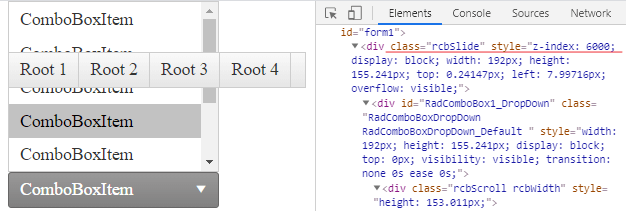
### RadMenu overlapping RadComboBox DropDown (Slide)
**Default appearance**
**Desired appearance**
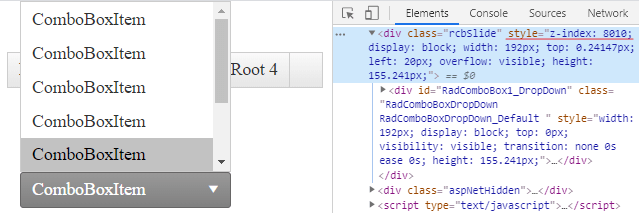
To achieve the appearance above, apply the following CSS style to override the default z-index of the RadComboBox Slide
```CSS
.rcbSlide{
z-index:8010 !important;
}
```
Another approach is to set the z-index inline in the RadComboBox declaration
```ASP.NET
```
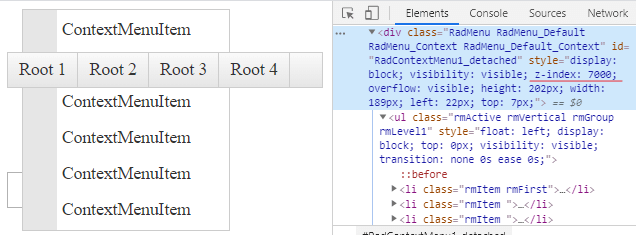
### RadMenu overlapping RadContextMenu
**Default appearance**
**Desired appearance**
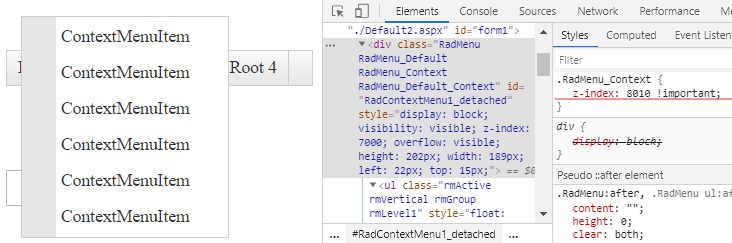
The applied CSS style to override the default z-index of the RadContextMenu:
```CSS
.RadMenu_Context{
z-index:8010 !important;
}
```
### RadMenu overlapping modal RadWindow
**Default appearance**
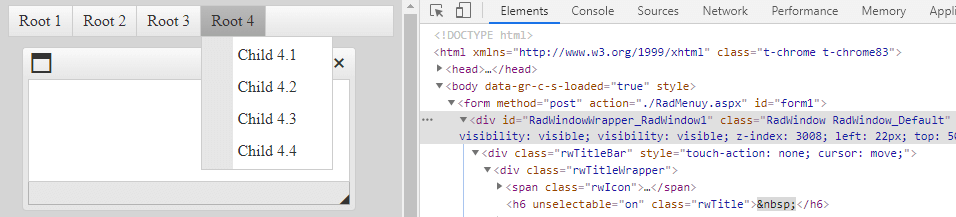
**Desired appearance**

Override the default z-index of the modal RadWindow with the following style:
```CSS
.RadWindow {
z-index: 8010 !important;
}
```
Another approach is to apply inline styles in the markup declaration
```ASP.NET
```
*Related resources*
* [RadMenu Overlaps RadWindow](https://docs.telerik.com/devtools/aspnet-ajax/controls/window/troubleshooting/common-issues#radmenu-overlaps-radwindow)
* [Show RadWindow above RadMenu](https://www.telerik.com/support/kb/aspnet-ajax/details/show-radwindow-above-radmenu)