# Positioning the RequiredMark of RadLabel
### HOW TO
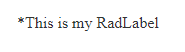
How can I move the `RequiredMark` from the right side of the RadLabel to before the text?
### DESCRIPTION
The RadLabel can easily be customized to allow different styles using CSS. By default, the `RequiredMark` is positioned to the right of the RadLabel's text.
### SOLUTION
In order to move the RequiredMark from the right to left side of the RadLabel, use the following CSS:
```CSS
```
```ASP.NET
```
## See Also
* [RadLabel - Overview Demo](https://demos.telerik.com/aspnet-ajax/label/overview/defaultcs.aspx)
* [RadLabel - Documentation and API Reference](https://www.telerik.com/products/aspnet-ajax/documentation/controls/label/overview)