# How to show thumbnail previews in RadGrid embedded in RadFileExplorer
## HOW TO
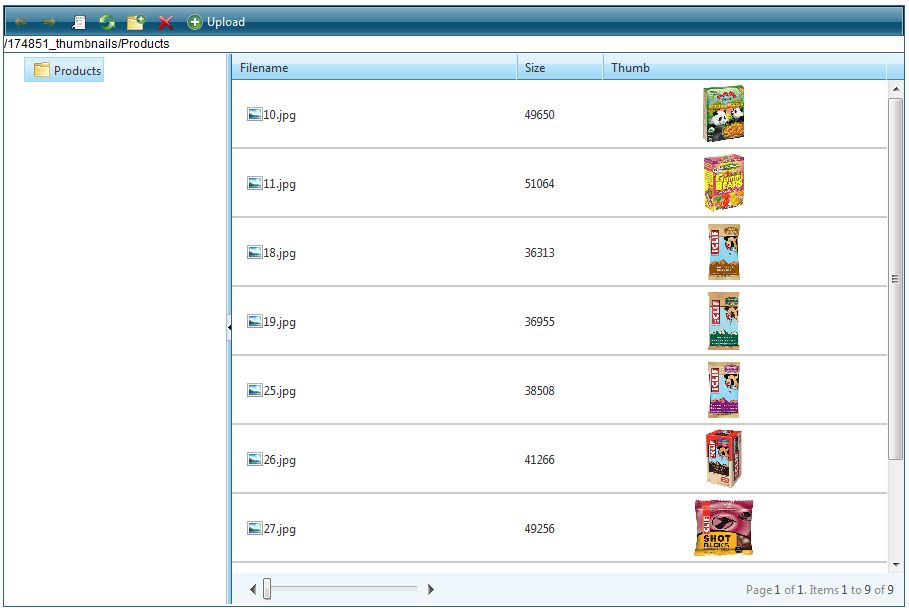
This article describes the steps in order to show thumbnail previews inside the RadGrid embedded in RadFileExplorer control.
## DESCRIPTION
The thumbnail images are shown in a custom column added to the Grid, embedded in RadFileExplorer. More detailed description about adding a custom columns can be found in [this online demo](http://demos.telerik.com/aspnet-ajax/fileexplorer/examples/applicationscenarios/customgridcolumns/defaultcs.aspx).
## SOLUTION
A custom FileBrowserContentProvider needs to be implemented in order to achieve the desired result. Only the behavior of the *ResolveDirectory* method needs to be changed and the easiest way to do this is to subclass the default provider ([Telerik.Web.UI.Widgets.FileSystemContentProvider](https://www.telerik.com/products/aspnet-ajax/documentation/controls/fileexplorer/server-side-programming/use-custom-filebrowsercontentprovider) and override that method only. In the overridden method, a HTML content (a \![]() tag) needs to be added to the *Attributes* collection of the image files only:
```C#
using System;
using System.Collections.Generic;
using System.Linq;
using System.Web;
using System.Web.UI;
using System.Web.UI.WebControls;
using Telerik.Web.UI.Widgets;
using Telerik.Web.UI;
using System.IO;
namespace Telerik.Web.Examples.FileExplorer.CustomGridColumns
{
public partial class Default : System.Web.UI.Page
{
protected void Page_Load(object sender, EventArgs e)
{
if (!IsPostBack)
{
RadFileExplorer1.Configuration.ContentProviderTypeName = typeof(CustomColumnsContentProvider).AssemblyQualifiedName;
string[] paths = new string[] { "~/Products" };
RadFileExplorer1.Configuration.ViewPaths = paths;
RadFileExplorer1.Configuration.UploadPaths = paths;
RadFileExplorer1.Configuration.DeletePaths = paths;
}
AddThumbnailColumn();
}
private void AddGridColumn(string name, string uniqueName, bool sortable)
{
RemoveGridColumn(uniqueName);
GridTemplateColumn gridTemplateColumn1 = new GridTemplateColumn();
gridTemplateColumn1.HeaderText = name;
if (sortable)
{
gridTemplateColumn1.SortExpression = uniqueName;
}
gridTemplateColumn1.UniqueName = uniqueName;
gridTemplateColumn1.DataField = uniqueName;
RadFileExplorer1.Grid.Columns.Add(gridTemplateColumn1);
}
private void RemoveGridColumn(string uniqueName)
{
if (!Object.Equals(RadFileExplorer1.Grid.Columns.FindByUniqueNameSafe(uniqueName), null))
{
RadFileExplorer1.Grid.Columns.Remove(RadFileExplorer1.Grid.Columns.FindByUniqueNameSafe(uniqueName));
}
}
private void AddThumbnailColumn()
{
AddGridColumn("Thumb", "Thumb", false);
}
public class CustomColumnsContentProvider : Telerik.Web.UI.Widgets.FileSystemContentProvider
{
public CustomColumnsContentProvider(HttpContext context, string[] searchPatterns, string[] viewPaths, string[] uploadPaths, string[] deletePaths, string selectedUrl, string selectedItemTag)
: base(context, searchPatterns, viewPaths, uploadPaths, deletePaths, selectedUrl, selectedItemTag)
{
}
public override DirectoryItem ResolveDirectory(string path)
{
DirectoryItem oldItem = base.ResolveDirectory(path);
foreach (FileItem fileItem in oldItem.Files)
{
string[] imageExtensios = new string[] { ".jpg", ".gif", ".png" };// Images extensios
if (imageExtensios.Contains(fileItem.Extension))
{//Show thumbnails for images only
string pathToFile = fileItem.Location;
string htmlText = "
 ";
fileItem.Attributes.Add("Thumb", htmlText);
}
}
return oldItem;
}
}
}
}
```
Please note that the attribute name (*Thumb* in the demo) should mach the *UniqueName* set to the added custom column.
The *scr* attribute of the image should be set to the FileItem's Location property. A CSS class named *thumbImages*is applied to the added *img* element in order to control the appearance of the images. The CSS class needs to be placed on the page where the **RadFileExplorer** control is declared
## RESULT
***Note:***\
The designed behavior of **RadGrid** is to suppress the standard RadGrid events for the following HTML elements: **input**, **textarea**, **label**, **img**, **select**, **option**, **button**. This is to avoid interfering with the functionality of the standard elements. This implies that double-clicking on the thumbnail will not open the preview dialog. To enable this functionality you need to override the following RadGrid functions:
```ASP.NET
```