# Move Shapes with Arrow Keys

## Environment

<table>
	<tbody>
		<tr>
			<td>Product</td>
			<td>RadDiagram for ASP.NET AJAX</td>
		</tr>
	</tbody>
</table>

## Description

If project requires to move the shapes of the Diagram by pressing the arrow keys, you can achieve it by following the steps below:

1. Handle the client-side `Load` event of the Diagram and check whether the selected item is a shape.
2. If the clicked object is a shape, assign a handler to the standard `keyDown` event of the `window` object.
3. Use the \`bounds()\`\` method of the Shape to move the shape depending on the pressed key,.

## Solution
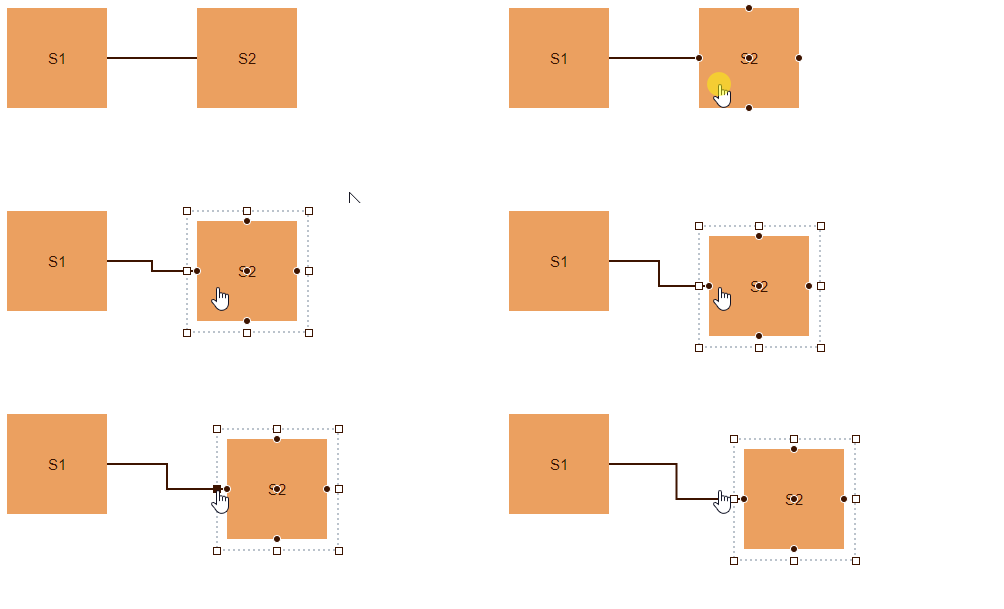
![](https://www.telerik.com/products/aspnet-ajax/documentation/assets/fa9814962d33779e30ba45778e88267f/diagram-move-shapes.gif)

```JavaScript
function attachHandlers(args) {
    var shape = args.item;

    if (shape instanceof $telerik._kendo.dataviz.diagram.Shape) {
        if (!shape.from) {
            $(window).keydown(moveShape)
        }
    }
}

function moveShape(event) {
    if (event.keyCode > 40 || event.keyCode < 37) return;

    var diagram = $find("<%=RadDiagram1.ClientID%>").get_kendoWidget();
    var shapes = diagram.select();

    if (event.keyCode && shapes) {
        for (var i = 0; i < shapes.length; i++) {
            var bounds = shapes[i].bounds();
            var x = bounds.x;
            var y = bounds.y;

            switch (event.keyCode) {
                case 37:
                    bounds.x = bounds.x - 5;
                    break;
                case 39:
                    bounds.x = bounds.x + 5;
                    break;
                case 38:
                    bounds.y = bounds.y - 5;
                    break;
                case 40:
                    bounds.y = bounds.y + 5;
                    break;
            }

            shapes[i].bounds(bounds);
        }
    }
}
```

```ASP.NET
<telerik:RadDiagram ID="RadDiagram1" runat="server">
    <ClientEvents OnClick="attachHandlers" />
    <LayoutSettings Enabled="true" Type="Tree" Subtype="Right">
    </LayoutSettings>
    <ShapesCollection>
        <telerik:DiagramShape Id="s1">
            <ContentSettings Text="S1" />
        </telerik:DiagramShape>
        <telerik:DiagramShape Id="s2">
            <ContentSettings Text="S2" />
        </telerik:DiagramShape>
    </ShapesCollection>
    <ConnectionsCollection>
        <telerik:DiagramConnection>
            <FromSettings ShapeId="s1" />
            <ToSettings ShapeId="s2" />
        </telerik:DiagramConnection>
    </ConnectionsCollection>
</telerik:RadDiagram>
```
