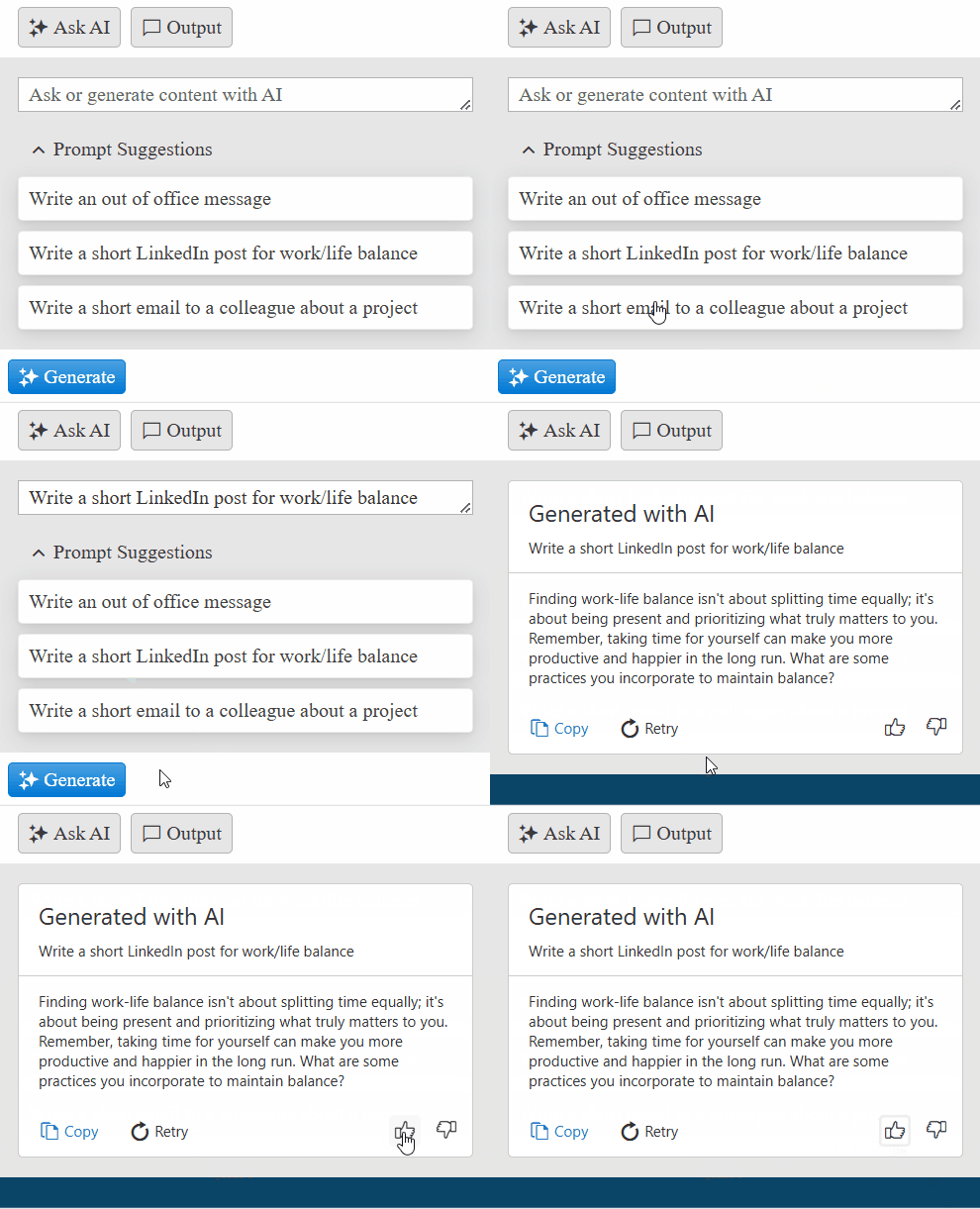
# Integration with OpenAI
## Description
I would like to integrate the AIPrompt with an AI service/model, such as OpenAI.
## Solution
The WebForms AIPrompt allows you to easily integrate it with a Chat API service such as ChatGPT using its [OnPromptRequest](https://www.telerik.com/products/aspnet-ajax/documentation/controls/aiprompt/client-side-programming/events#prompt-request) event.
### Configure OpenAI
If you have an OpenAI subscription, you can directly use it with the AIPrompt component. We need to install the **OpenAI** Nuget package, in order to use their services. Go to the Nuget Package Manager, search for OpenAI and install the package.
> note For more information on the OpenAI library, you can check [The official .NET library for the OpenAI API](https://github.com/openai/openai-dotnet).
#### Install OpenAI Package
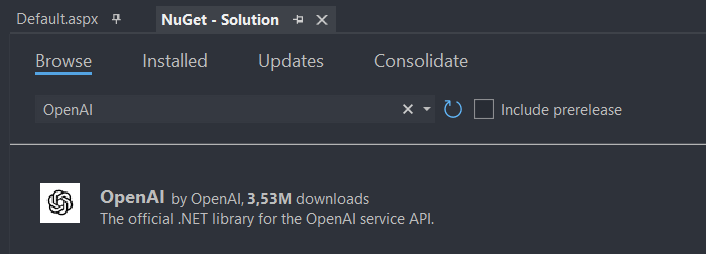
> note At the time of updating this article (November 2025), we used the OpenAI package version `2.7.0`, which installed the following packages.
```XML
```
#### Configure the Web App
If your NuGet packages do not add the Assembly Binding Redirects automatcailly, make sure you have them in the `web.config`.
```XML
```
Add reference to the `netstandard2.0` assembly.
```XML
```
Add API key and AI Model to the `appSettings`.
```XML
```
> warning Never share your API key with anyone or push it to GitHub/GitLab! The key will automatically be disabled by OpenAI and you will need to create a new one.
### AI Integration
First, use the AIPrompt's [`OnPromptRequest`](https://www.telerik.com/products/aspnet-ajax/documentation/controls/aiprompt/client-side-programming/events#prompt-request) event and chose/write a prompt.
```ASP.NET
```
```JavaScript
function onPromptRequest(sender, args) {
let prompt = args.get_prompt();
if (!prompt) return;
$.ajax({
url: 'Default.aspx/AskChatGPT',
type: 'POST',
contentType: 'application/json; charset=utf-8',
dataType: 'json',
data: JSON.stringify({ request: prompt }),
success: function (response) {
let promptOutput = {
prompt: prompt,
output: response.d
}
let outputView = Telerik.Web.UI.RadAIPromptViewType.Output;
sender.set_activeView(outputView);
sender.set_promptOutput(promptOutput);
},
error: function (error) {
console.error('Error in AJAX call:', error);
}
});
}
```
Add prompt suggestion to the AIPrompt.
```C#
protected void Page_Load(object sender, EventArgs e)
{
if (!IsPostBack)
{
string[] promptSuggestions = new string[]
{
"Write an out of office message",
"Write a short LinkedIn post for work/life balance.",
"Write a short email to a colleague about a project",
};
AIPrompt1.PromptSuggestions = promptSuggestions;
}
}
```
```VB
Protected Sub Page_Load(sender As Object, e As EventArgs) Handles Me.Load
If Not IsPostBack Then
Dim promptSuggestions As String() = {
"Write an out of office message",
"Write a short LinkedIn post for work/life balance.",
"Write a short email to a colleague about a project"
}
AIPrompt1.PromptSuggestions = promptSuggestions
End If
End Sub
```
On the server, get a reference to your **API key** and **Model** you wish to use. You can also give some additional information to the LLM (text formatting, giving it addtional instructions, etc.).
Create the following Page Method or a Web Service Method, which will recieve the request from the AIPrompt.
> note For more information about Page Methods and Web Services, refer to the [ASP.NET Web Services - Quick Walkthrough](https://www.telerik.com/products/aspnet-ajax/documentation/knowledge-base/common-quick-walkthrough-asp-net-web-services) article.
```C#
using OpenAI.Chat;
[WebMethod]
public static string AskChatGPT(string request)
{
string apiKey = System.Configuration.ConfigurationManager.AppSettings["OPENAI_API_KEY"];
string model = System.Configuration.ConfigurationManager.AppSettings["OPENAI_MODEL"];
string textFormat = "Respond in short, plain text (maximum of 3-4 sentences), without any formatting, such as bold text, dashes, slashes, numbering, ordered/unordered list, or special characters.";
string prompt = string.Join("", request, textFormat);
ChatClient chatClient = new ChatClient(model, apiKey);
ClientResult completion = chatClient.CompleteChat(prompt);
string response = completion.Value.Content[0].Text;
return response;
}
```
```VB
Imports OpenAI.Chat
Public Shared Function AskChatGPT(request As String) As String
Dim apiKey As String = System.Configuration.ConfigurationManager.AppSettings("OPENAI_API_KEY")
Dim model As String = System.Configuration.ConfigurationManager.AppSettings("OPENAI_MODEL")
Dim textFormat As String = "Respond in short, plain text (maximum of 3-4 sentences), without any formatting, such as bold text, dashes, slashes, numbering, ordered/unordered list, or special characters."
Dim prompt As String = String.Join(vbLf, request, textFormat)
Dim chatClient As New ChatClient(model, apiKey)
Dim completion As ClientResult(Of ChatCompletion) = chatClient.CompleteChat(prompt)
Dim response As String = completion.Value.Content(0).Text
Return response
End Function
```
Now the integration is complete. Below you can see the result.