# WebForms Upload Overview
> caution **RadUpload** has been replaced by [RadAsyncUpload](https://demos.telerik.com/aspnet-ajax/asyncupload/examples/overview/defaultcs.aspx), Telerik’s next-generation ASP.NET upload component. If you are considering Telerik’s Upload control for new development, check out the [documentation of RadAsyncUpload ](https://www.telerik.com/products/aspnet-ajax/documentation/controls/asyncupload/overview) or the [control’s product page](https://www.telerik.com/products/aspnet-ajax/asyncupload.aspx). If you are already using **RadUpload** in your projects, you may be interested in reading how easy the transition to RadAsyncUpload is and how you can benefit from it [in this article](https://www.telerik.com/products/aspnet-ajax/documentation/controls/asyncupload/migrating-from-radupload-for-asp.net-ajax-to-radasyncupload). The official support for **RadUpload** has been discontinued in June 2013 (Q2’13), although it is still be available in the suite. We deeply believe that **RadAsyncUpload** can better serve your upload needs and we kindly ask you to transition to it to make sure you take advantage of its support and the new features we constantly add to it.
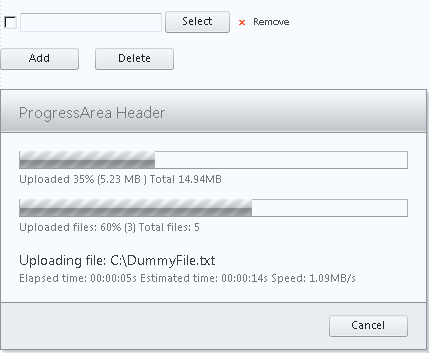
**Telerik RadUpload** is a set of three controls for uploading files and monitoring the progress of uploads (or other long processes). These controls provide tight integration with ASP.NET AJAX. **RadUpload for ASP.NET AJAX** contains:
* **RadProgressManager** - a non-visual element to manage the process of file uploads and progress monitoring.
* **RadUpload** - a control for single- and multi-file uploads, integrated file validation and more.
* **RadProgressArea -** a control for displaying progress dialogs: automatically monitoring file uploads and optionally monitoring any other measurable process on the server.
## RadProgressManager
**RadProgressManager** enables the following features:
* Management of [file uploads](https://www.telerik.com/products/aspnet-ajax/documentation/controls/upload/uploading-files/about-uploading-files) and **progress monitoring**.
* Works with [standard files inputs](https://www.telerik.com/products/aspnet-ajax/documentation/controls/upload/uploading-files/using-standard-file-input-controls) (`` elements) as well as the **RadUpload** control.
* [Client-side API](https://www.telerik.com/products/aspnet-ajax/documentation/controls/progressarea/client-side-programming/radprogressmanager-client-object) lets you manipulate the progress monitoring feature client-side and respond to [client-side events](https://www.telerik.com/products/aspnet-ajax/documentation/controls/upload/client-side-programming/events).
## RadUpload
**RadUpload** is a single- and multi-file upload control that provides the following features:
* [Automatic file saving](https://www.telerik.com/products/aspnet-ajax/documentation/controls/upload/how-to/auto-saving-to-a-target-folder) - **RadUpload** can automatically save its uploaded files to a selected folder.
* [Integrated validation](https://www.telerik.com/products/aspnet-ajax/documentation/controls/upload/validation/integrated-validation) - **RadUpload** can automatically validate uploaded files for file extension, MIME type, and file size.
* **Custom validation** - RadUpload makes it easy to provide your own custom validation, both [server-side](https://www.telerik.com/products/aspnet-ajax/documentation/controls/upload/validation/custom-validation), or [client-side using ASP.NET validators](https://www.telerik.com/products/aspnet-ajax/documentation/controls/upload/validation/client-side-validation).
* [Server-side API for manipulating files](https://www.telerik.com/products/aspnet-ajax/documentation/controls/asyncupload/how-to/how-to-manipulate-the-uploaded-files) - in more complex scenarios you can save the uploaded files with server-side code and still benefit from the integrated file validation.
* [Custom Fields](https://www.telerik.com/products/aspnet-ajax/documentation/controls/upload/how-to/adding-information-to-uploaded-files) - **RadUpload** lets you add custom fields to each file input. Using this functionality you can add fields like Title, Description, etc. to each file it uploads.
* [Configurable User Interface](https://www.telerik.com/products/aspnet-ajax/documentation/controls/upload/how-to/configure-the-ui-of-radupload) - you can fully customize the controls that are integrated into **RadUpload**.
* [Skins](https://www.telerik.com/products/aspnet-ajax/documentation/controls/upload/appearance-and-styling/skins) provide an easy way to make the look-and-feel harmonize with the rest of your Web site.
* A rich [client-side API](https://www.telerik.com/products/aspnet-ajax/documentation/controls/upload/client-side-programming/radupload-object) for manipulating the control and responding to [client-side events](https://www.telerik.com/products/aspnet-ajax/documentation/controls/upload/client-side-programming/events).
## RadProgressArea
**RadProgressArea** is a progress-monitoring control that displays a progress dialog to display the current progress of a file upload or other lengthy process.**RadProgressArea** provides the following features:
* [Automatic file upload monitoring](https://www.telerik.com/products/aspnet-ajax/documentation/controls/progressarea/getting-started) - you can monitor the progress of any file upload
* [Custom progress monitoring](https://www.telerik.com/products/aspnet-ajax/documentation/controls/progressarea/custom-progress) - with minimal server-side code you can monitor the progress of any measurable server-side process, such as mathematical calculations or database queries.
* [Configurable user interface](https://www.telerik.com/products/aspnet-ajax/documentation/controls/progressarea/configuraton) - you have full control over what indicators and controls appear in the progress dialog.
* [Progress templates](https://www.telerik.com/products/aspnet-ajax/documentation/controls/progressarea/progress-template) - you can further customize the progress dialog by creating a progress template that includes your own controls and elements. In most of the cases you don't need to write any javascript to ensure the proper operation of the control.
* [Skins](https://www.telerik.com/products/aspnet-ajax/documentation/controls/upload/appearance-and-styling/skins) provide an easy way to make the look-and-feel harmonize with the rest of your Web site.
* [Client-side API](https://www.telerik.com/products/aspnet-ajax/documentation/controls/progressarea/client-side-programming/radprogressarea-client-object) - you can manipulate the progress dialog from client-side code and respond to [client-side events](https://www.telerik.com/products/aspnet-ajax/documentation/controls/upload/client-side-programming/events).
## Browser Support
Telerik RadUpload supports all major browsers and platforms (both on PC and Mac, where applicable):
* Internet Explorer 5.5+;
* all Gecko-based browsers - Mozilla 1.0+, FireFox 0.8+, Netscape 7+;
* Opera 8.0+ (Possible problems with **RadProgressArea** on some platforms)
* Safari 2.0.4+
## See Also
* [Online Demos](https://demos.telerik.com/aspnet-ajax/asyncupload/examples/overview/defaultcs.aspx)
* [ASP.NET AJAX Upload (Async)](https://www.telerik.com/products/aspnet-ajax/asyncupload.aspx)