# Validation
You can use the built in ASP.NET validation with **RadTreeView**.
## Validating the TreeView with RequiredFieldValidator
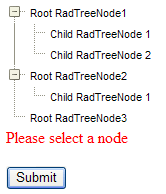
To validate for selected node of a TreeView, just specify the ID of the tree in the **ControlToValidate** property of the **RequiredFieldValidator**. Validation checks to see if there is at least one selected node.
```ASPNET
...
```
If no node is selected, the validator detects an error and displays the error message:
## Validating the TreeView using the CompareValidator
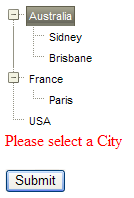
You can validate the TreeView using **CompareValidator** control. You need to specify the ID of the tree in the **ControlToValidate** property, the **Operator** and **ValueToCompare** properties. The validation will be made against the **Value** property of the nodes if they have values and if not - against their **Text** property.
```ASPNET
```
If a root nodes is selected, the validator detects an error and displays the error message:
## Causing Validation
The TreeView can trigger validation of other controls on the form when it performs a post-back to the server. Simply set the **CausesValidation** property to **True**.
By default, all validators on the Web page must be successful before the postback can occur. You can limit the controls that must be validated when the TreeView performs a post-back, while still allowing other controls on the Web page to be validated, by using validation groups. The validator controls have **ValidationGroup** property as does **RadTreeView**. Validation will be triggered only for the Validator controls where the **ValidationGroup** property matches the **RadTreeView** **ValidationGroup**. (If no **ValidationGroup** is set for the controls all Validators will be triggered.)
For a live example, see [Validation Groups](https://demos.telerik.com/aspnet-ajax/treeview/examples/functionality/validating/defaultcs.aspx)
## See Also
* [Validating RadTreeView Online Example](https://demos.telerik.com/aspnet-ajax/treeview/examples/functionality/validating/defaultcs.aspx)
* [Validate Treeview by Checked Nodes](https://www.telerik.com/products/aspnet-ajax/documentation/controls/treeview/application-scenarios/checkboxes/validate-treeview-by-checked-nodes)