# Positioning
To precisely position the tooltip, use the following **RadToolTip** and **RadToolTipManager** properties:
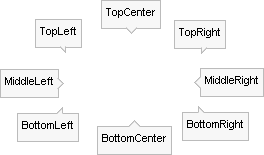
* **Position:** defines the relative location where the ToolTip will appear and can be one of the following values: BottomCenter, BottomLeft, BottomRight, Center, MiddleLeft, MiddleRight, TopCenter, TopLeft, TopRight. Notice in the screenshot below that the [callout](https://www.telerik.com/products/aspnet-ajax/documentation/controls/tooltip/getting-started/radtooltip-structure) points in relation to the tooltip position.
* **RelativeTo**: defines which element the ToolTip will appear in relation to. The possible values are **Mouse** (the default), **Element** and **BrowserWindow**.
* **OffsetX, OffsetY:** sets the X and Y offsets from the **Position** property of the ToolTip. These properties can be used for a more precise positioning of the ToolTip. The default values are zero.
## Example
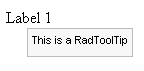
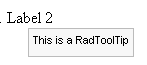
The wide range of properties used to configure where the ToolTip will appear on the page, lead to a wide range of possible configurations. The following example demonstrates one possible configuration of RadToolTip and the identical settings with RadToolTipManager:
```ASP.NET
```
The resulting display of the ASP.NET above:
## See Also
* [Important Settings](https://www.telerik.com/products/aspnet-ajax/documentation/controls/tooltip/getting-started/important-settings)
* [RadToolTip Structure](https://www.telerik.com/products/aspnet-ajax/documentation/controls/tooltip/getting-started/radtooltip-structure)