# First Steps with RadToolTip
The following tutorial demonstrates how **RadToolTip** is used to provide a custom tooltip for a single element.
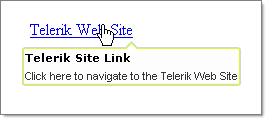
1. In a new AJAX-Enabled Web Application, add a **HyperLink** control from the Standard tab to the default web page.
2. Set the **Text** property to "Telerik Web Site" and the **NavigateUrl** to "[https://www.telerik.com](https://www.telerik.com/)".
3. Drop a **RadToolTip** control from the ToolBox to the default web page.
4. Set the RadToolTip **TargetControlID** property to the ID property of the HyperLink.
5. Set the **Position** property to be **BottomCenter**.
6. Set the **Title** property to "Telerik Site Link".
7. Set the **Text** property to "Click here to navigate to the Telerik Web Site".
8. Set the **Skin** property to **Telerik**.
9. Press **F5** to run the application. Run the mouse over the HyperLink to view the tooltip.
Example 1 - Creating RadTooltip in the aspx page
```ASPX
Click here to navigate to the Telerik Web Site
```
Example 2 - Dynamic creation
```C#
protected void Page_Load(object sender, EventArgs e)
{
Button button = new Button();
button.ID = "Button1";
button.Text = "Click me";
button.ToolTip = "This is a tooltip";
RadToolTip tooltip = new RadToolTip();
tooltip.TargetControlID = "Button1";
tooltip.Text = "This is a tooltip";
tooltip.BackColor = Color.Yellow;
tooltip.ForeColor = Color.Red;
this.Form.Controls.Add(button);
this.Form.Controls.Add(tooltip);
}
```
```VB.NET
Protected Sub Page_Load(ByVal sender As Object, ByVal e As EventArgs)
Dim button As Button = New Button()
button.ID = "Button1"
button.Text = "Click me"
button.ToolTip = "This is a tooltip"
Dim tooltip As RadToolTip = New RadToolTip()
tooltip.TargetControlID = "Button1"
tooltip.Text = "This is a tooltip"
tooltip.BackColor = Color.Yellow
tooltip.ForeColor = Color.Red
Me.Form.Controls.Add(button)
Me.Form.Controls.Add(tooltip)
End Sub
```
## See Also
* [FIrst Steps with RadToolTipManager](https://www.telerik.com/products/aspnet-ajax/documentation/controls/tooltip/getting-started/first-steps-with-radtooltipmanager)