# Data Binding Expressions

Often, when you use item templates, you want the controls in the template to display information associated with the tool button properties. For example, consider a simple toolbar with a text box in one item template and a check box in another:

```ASPNET
<telerik:RadToolBar RenderMode="Lightweight" ID="RadToolBar1" runat="server">
    <Items>
        <telerik:RadToolBarButton runat="server" Text="Button 1" Value="TextBox1">
            <ItemTemplate>
                <asp:TextBox ID="TextBox1" runat="server" />
            </ItemTemplate>
        </telerik:RadToolBarButton>
        <telerik:RadToolBarButton runat="server" Text="Button 2">
            <ItemTemplate>
                <asp:CheckBox ID="CheckBox1" runat="server" />
            </ItemTemplate>
        </telerik:RadToolBarButton>
    </Items>
</telerik:RadToolBar>
```

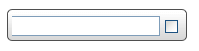
When you run the application, the button templates display as an empty text box and an unlabelled check box:
![ToolBar Unbound Template](https://www.telerik.com/products/aspnet-ajax/documentation/assets/efac7004cd01de5a34860590bcabc4c2/toolbar_unboundtemplate.png)

```ASPNET
<telerik:RadToolBar RenderMode="Lightweight" ID="RadToolBar1" runat="server">
    <Items>
        <telerik:RadToolBarButton runat="server" Text="Button 1" Value="TextBox1">
            <ItemTemplate>
                <asp:TextBox ID="TextBox1" Text='<%# DataBinder.Eval(Container, "Value") %>' runat="server" />
            </ItemTemplate>
        </telerik:RadToolBarButton>
        <telerik:RadToolBarButton runat="server" Text="Button 2">
            <ItemTemplate>
                <asp:CheckBox ID="CheckBox1" Text='<%# DataBinder.Eval(Container, "Text") %>' runat="server" />
            </ItemTemplate>
        </telerik:RadToolBarButton>
    </Items>
</telerik:RadToolBar>       
```

In the DataBinder. Eval statement, **Container** is the **RadToolBarButton** and **"Value"** or **"Text"** identifies the **Value** or **Text** property of that item.

> note In this example, the first parameter to the DataBinder.Eval statement is **Container** , because the items are statically bound. If the toolbar was bound to a data source, then you must use **Container.DataItem** instead. e.g.<%#DataBinder.Eval(Container.DataItem, "TextField") %>

In addition to adding a DataBinder.Eval statement, you must also explicitly call the DataBind method for the items so that the template has access to the properties of the button:

```C#
protected void Page_Load(object sender, EventArgs e)
{
    if (!IsPostBack)
    {
        for (int i = 0; i < RadToolBar1.Items.Count; i++) 
        { 
            RadToolBar1.Items[i].DataBind(); 
        }
    }
}	
```

```VB.NET
Protected Sub Page_Load(ByVal sender As Object, ByVal e As EventArgs) Handles Me.Load
    If Not IsPostBack Then

        Dim i As Integer = 0
        While i < RadToolBar1.Items.Count
            RadToolBar1.Items(i).DataBind()
            i = i + 1
        End While

    End If
End Sub	
```

Now the template controls reflect the properties of the underlying toolbar buttons:

![ToolBar Bound Template](https://www.telerik.com/products/aspnet-ajax/documentation/assets/aa1583d8eef25b2cd60fc6aa1210cd29/toolbar_boundtemplates.png)

## See Also

* [Overview](https://www.telerik.com/products/aspnet-ajax/documentation/controls/toolbar/data-binding/overview)
