# Fine-tune Icons
This help article shows how to modify the position, size and color of icons in **RadToggleButton**.
* [Fine-tune Position](https://www.telerik.com/products/aspnet-ajax/documentation/controls/togglebutton/functionality/icons/fine-tune#fine-tune-position)
* [Configure Font-size and Color](https://www.telerik.com/products/aspnet-ajax/documentation/controls/togglebutton/functionality/icons/fine-tune#configure-font-size-and-color)
## Fine-tune Position
You can change the position of font or image icons to match your concrete requirements. To do this, use the `Icon.Top` and `Icon.Left` properties to directly offset the icon in the particular toggle state (**Example 1**).
> caption Figure 1: The icon in RadToggleButton can be offset from its original top and left position. See Example 1.
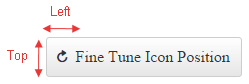
> caption Example 1: Offset RadToggleButton icon from the top and left. You can see the result in Figure 1.
```ASP.NET
```
## Configure Font-size and Color
The embedded **RadToggleButton** icons are font icons. Using a font facilitates the customization of the icons. For example, you can change the icon's color and font size with a single line of CSS (see **Figure 2** and **Example 2**).
> caption Figure 2: Customize the font size and color of the embedded icons of RadToggleButton with CSS.

> caption Example 2: Use CSS to modify the font size and color of the embedded icons in RadToggleButton.
```CSS
```
```ASP.NET
```
> tip This also applies for [custom font icons](https://www.telerik.com/products/aspnet-ajax/documentation/controls/togglebutton/functionality/icons/custom-icons#font-icons).
## See Also
* [Icons Overview](https://www.telerik.com/products/aspnet-ajax/documentation/controls/togglebutton/functionality/icons/embedded-icons)
* [Custom Icons](https://www.telerik.com/products/aspnet-ajax/documentation/controls/togglebutton/functionality/icons/custom-icons)
* [RadToggleButton Overview Demo](https://demos.telerik.com/aspnet-ajax/togglebutton/overview/defaultcs.aspx)