# Data Binding
Binding a **RadTimePicker** control to a data source is easy provided you use the **DbSelectedDate** property. It works almost like the **SelectedDate** one, but does not throw an exception when given a null value.
When embedding **RadTimePicker** control inside a data-bound control, use a data-binding expression to bind the value of the input control to the data source of the parent control. Data-binding expressions are contained within *<%# and %>* delimiters and use the **Eval** and **Bind** functions. The **Eval** function is used to define one-way (read-only) binding. The **Bind** function is used for two-way (updatable) binding.
> note
> In addition to calling **Eval** and **Bind** methods to perform data binding in a data-binding expression, you can call any publicly scoped code within the *<%# and %>* delimiters to execute that code and return a value during page processing.
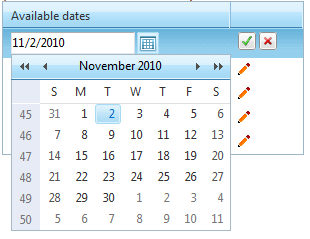
The following example demonstrates how to bind a **RadTimePicker** control inside a RadGrid.
```ASPNET
```
You can also bind **RadTimePicker** to a custom collection of time. Check out the following code snippet for illustration:
```ASPNET
Binding to generic list of DateTime
Binding to ArrayList of DateTime
Binding to DateTime array
Binding to object array with DateTime
```
```C#
protected void Page_Load(object sender, EventArgs e)
{
List list = new List();
list.Add(DateTime.Now);
list.Add(DateTime.Now.AddHours(1));
list.Add(DateTime.Now.AddHours(2));
list.Add(DateTime.Now.AddHours(3));
RadTimePicker1.TimeView.DataList.DataSource = list;
ArrayList arrayList = new ArrayList();
arrayList.Add(DateTime.Now);
arrayList.Add(DateTime.Now.AddHours(1));
arrayList.Add(DateTime.Now.AddHours(2));
arrayList.Add(DateTime.Now.AddHours(3));
RadTimePicker2.TimeView.DataList.DataSource = arrayList;
RadTimePicker3.TimeView.DataList.DataSource = new DateTime[] { DateTime.Now, DateTime.Now.AddHours(1) };
RadTimePicker4.TimeView.DataList.DataSource = new object[] { DateTime.Now, DateTime.Now.AddHours(1) };
}
```
```VB.NET
Protected Sub Page_Load(ByVal sender As Object, ByVal e As EventArgs) Handles MyBase.Load
Dim list As New List(Of DateTime)()
list.Add(DateTime.Now)
list.Add(DateTime.Now.AddHours(1))
list.Add(DateTime.Now.AddHours(2))
list.Add(DateTime.Now.AddHours(3))
RadTimePicker1.TimeView.DataList.DataSource = list
Dim arrayList As New ArrayList()
arrayList.Add(DateTime.Now)
arrayList.Add(DateTime.Now.AddHours(1))
arrayList.Add(DateTime.Now.AddHours(2))
arrayList.Add(DateTime.Now.AddHours(3))
RadTimePicker2.TimeView.DataList.DataSource = arrayList
RadTimePicker3.TimeView.DataList.DataSource = New DateTime() {DateTime.Now, DateTime.Now.AddHours(1)}
RadTimePicker4.TimeView.DataList.DataSource = New Object() {DateTime.Now, DateTime.Now.AddHours(1)}
End Sub
```
To see the live example of the above see [Binding to custom collections](https://demos.telerik.com/aspnet-ajax/Calendar/Examples/DateTimePicker/CustomCollection/DefaultCS.aspx).